Chord for web designers

The CRM for web designers who’d like to launch on time.

Chord gives your client one place to send their content, and tracks every stage of the build up to launch day.

First month of Pro for US$1 with the code TRIAL at checkout · cancel any time

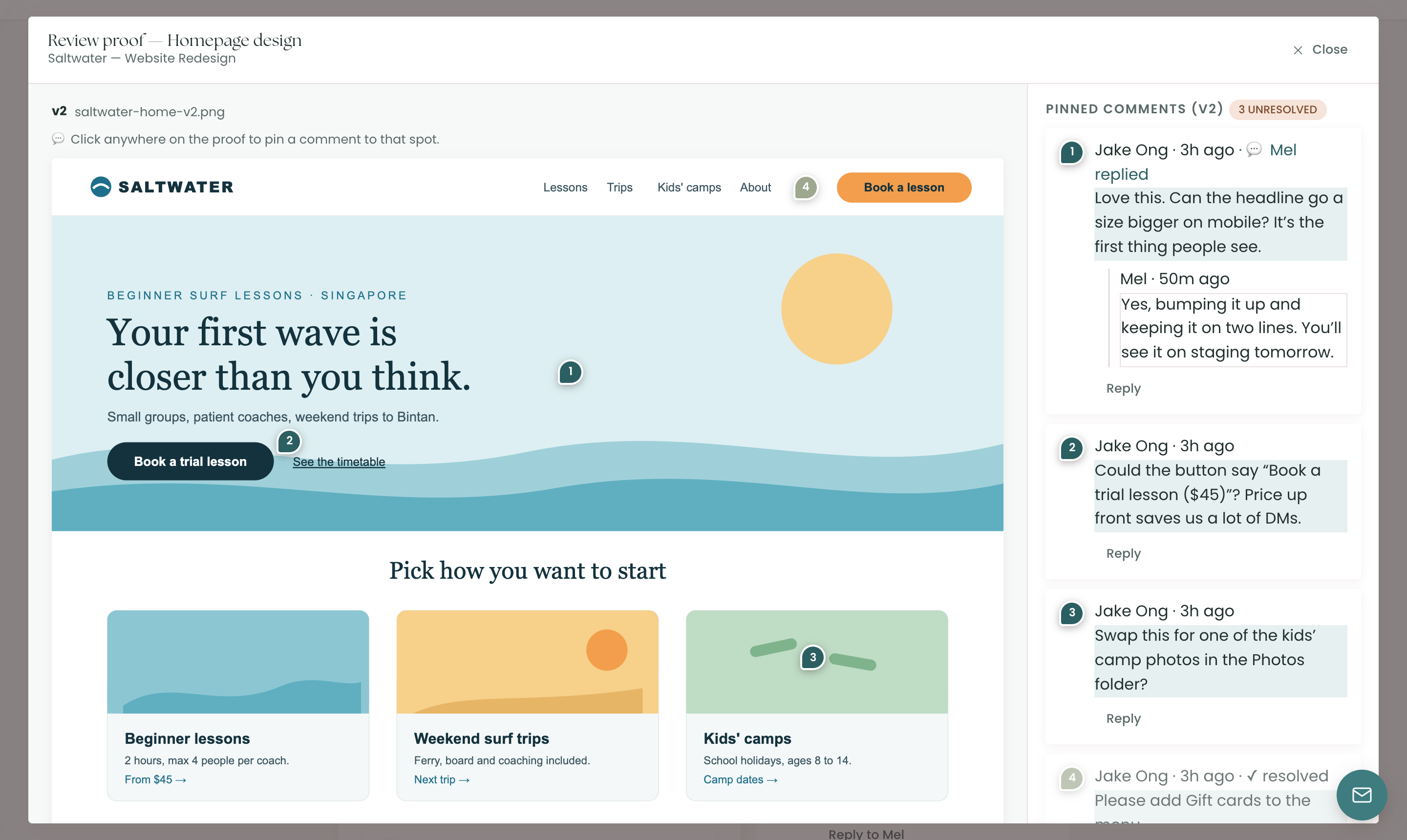
portal · review proof
A client’s comments pinned on a homepage design, with the reply thread alongside
Your brand, everywhere

Every screen wears your brand.

Choose your logo, colour palette and heading font once. Chord carries them through your studio, your client portal and every email.

A branded studio

Chord takes on your colours and heading font while you work, so your own workspace looks like your studio too.

A branded client portal

Your client sees your logo and colours. The portal is calm by design: they open it and see straight away what’s waiting on them, where the project is and which stage comes next.

Branded emails

Invitations, reminders and receipts go out with your logo and colours. On Pro, they can come from your own domain.

01 /

Get the content in, all in one place.

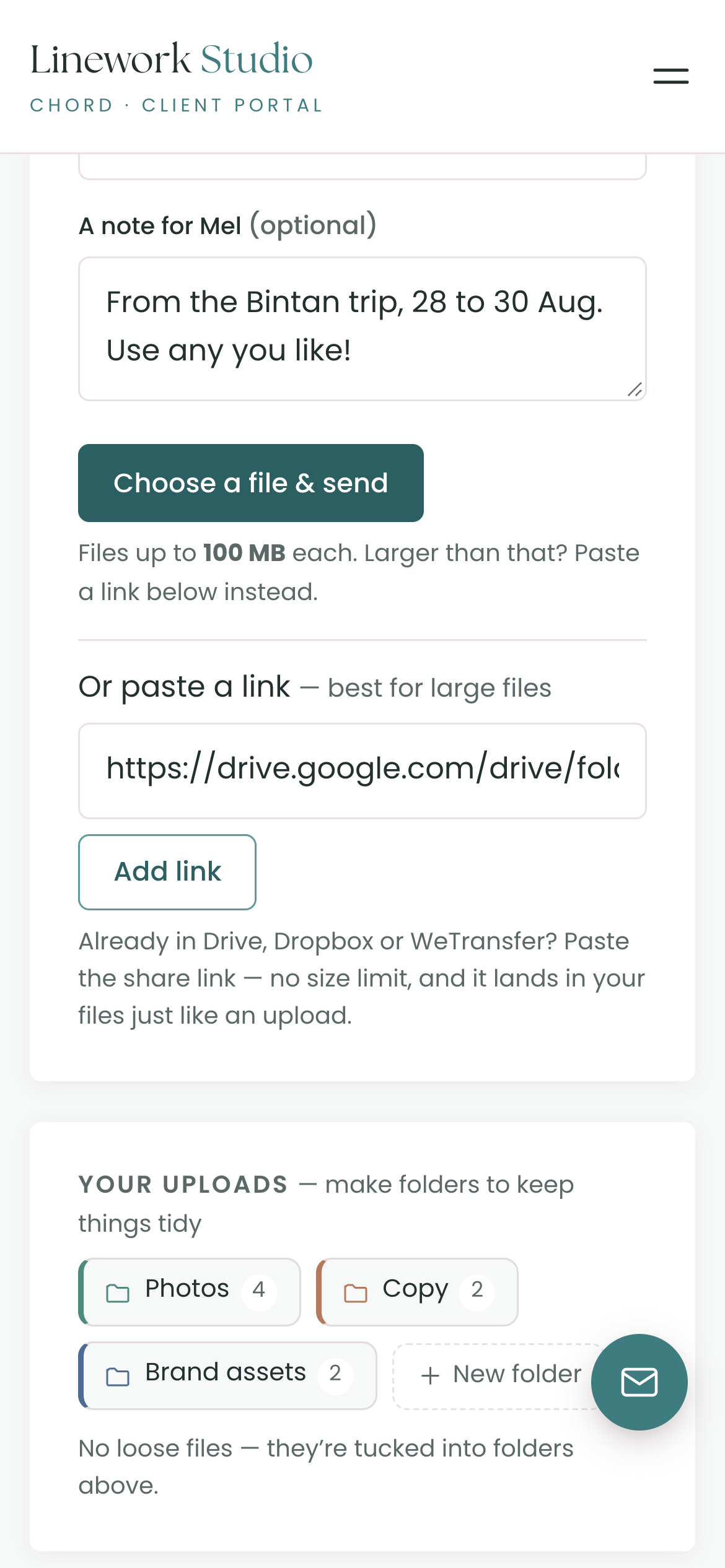
Website content arrives in pieces: a WeTransfer here, an email attachment there, a Google Drive folder that’s still empty. In Chord, your client sends everything to the Uploads area in their portal.

  • Uploads up to 100 MB each, or a Drive, Dropbox or WeTransfer link for anything bigger
  • Colour-coded folders like Photos, Copy and Brand assets, which you or your client can make
  • Files attached to tasks show up in the same place
portal · uploads
A client’s Uploads area with colour-coded folders for photos, copy and brand assets
02 /

Feedback on the page, with every round counted.

Website feedback usually arrives as a list, and you spend an hour matching each line to the right spot. In Chord, your client pins each comment on the page design, and Chord counts every round of changes.

  • Pinned comments on images and PDFs, with a reply thread on each one
  • Figma or staging links in the same review. Your client looks there, then approves or asks for changes in Chord
  • Revision rounds that count themselves. Once the included rounds are used, the portal tells your client more changes may be billable
portal · your decision
The client’s Approve and Request changes buttons, with a note that the included revision round is used and more changes may be billable
03 /

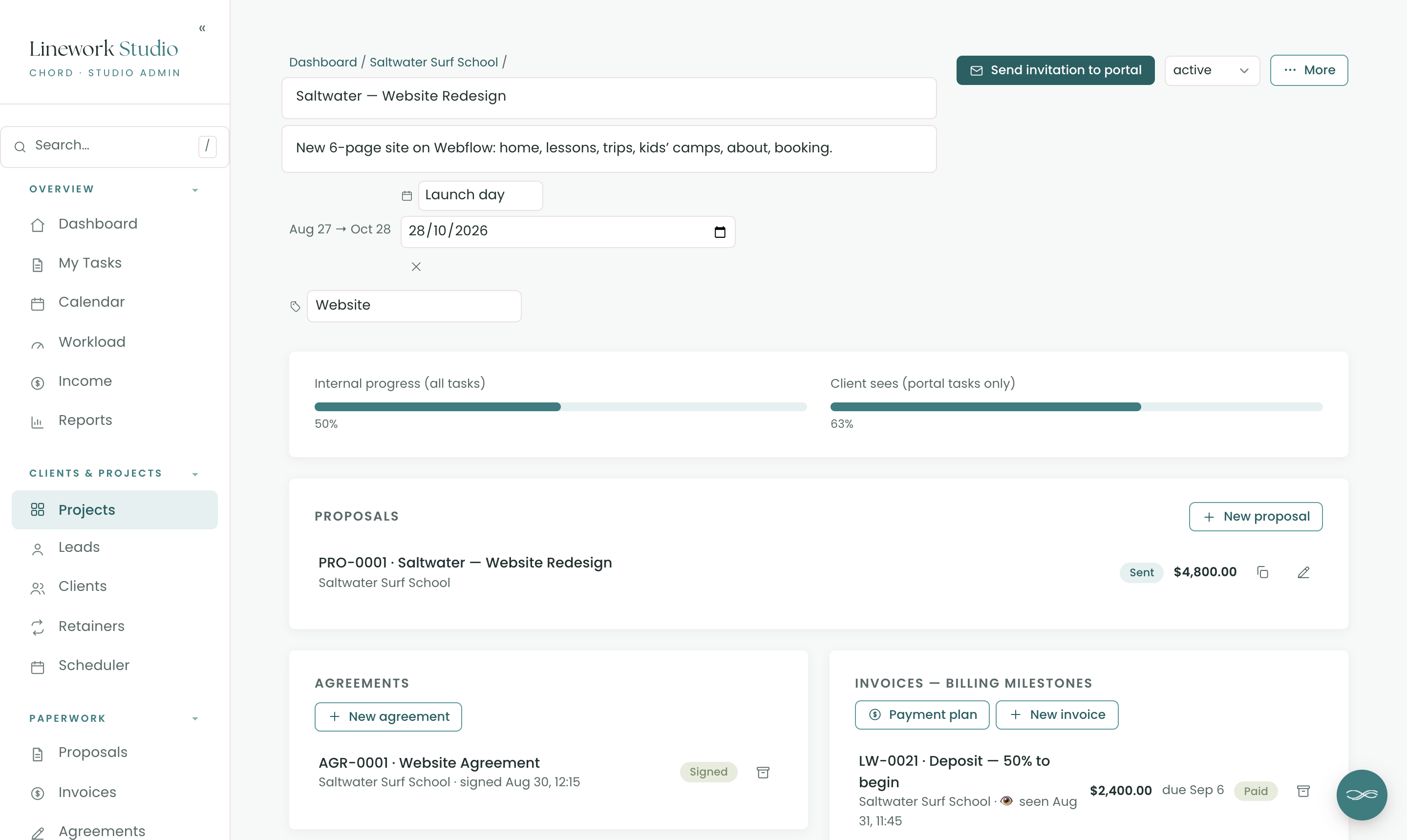
A build with a launch date everyone can see.

Every website goes through the same stages: discovery, wireframes, design, build and launch. Chord splits each project into those stages, and puts the launch day on your calendar, your dashboard and your client’s portal.

  • Named stages from a template you reuse for every site
  • Task dates in working days, worked out from the project start
  • A one-click day off moves your open deadlines one working day later
work.yourstudio.com · project
Project stages from discovery to launch, with the launch day as a key date
04 /

Hand over the site once the last invoice is paid.

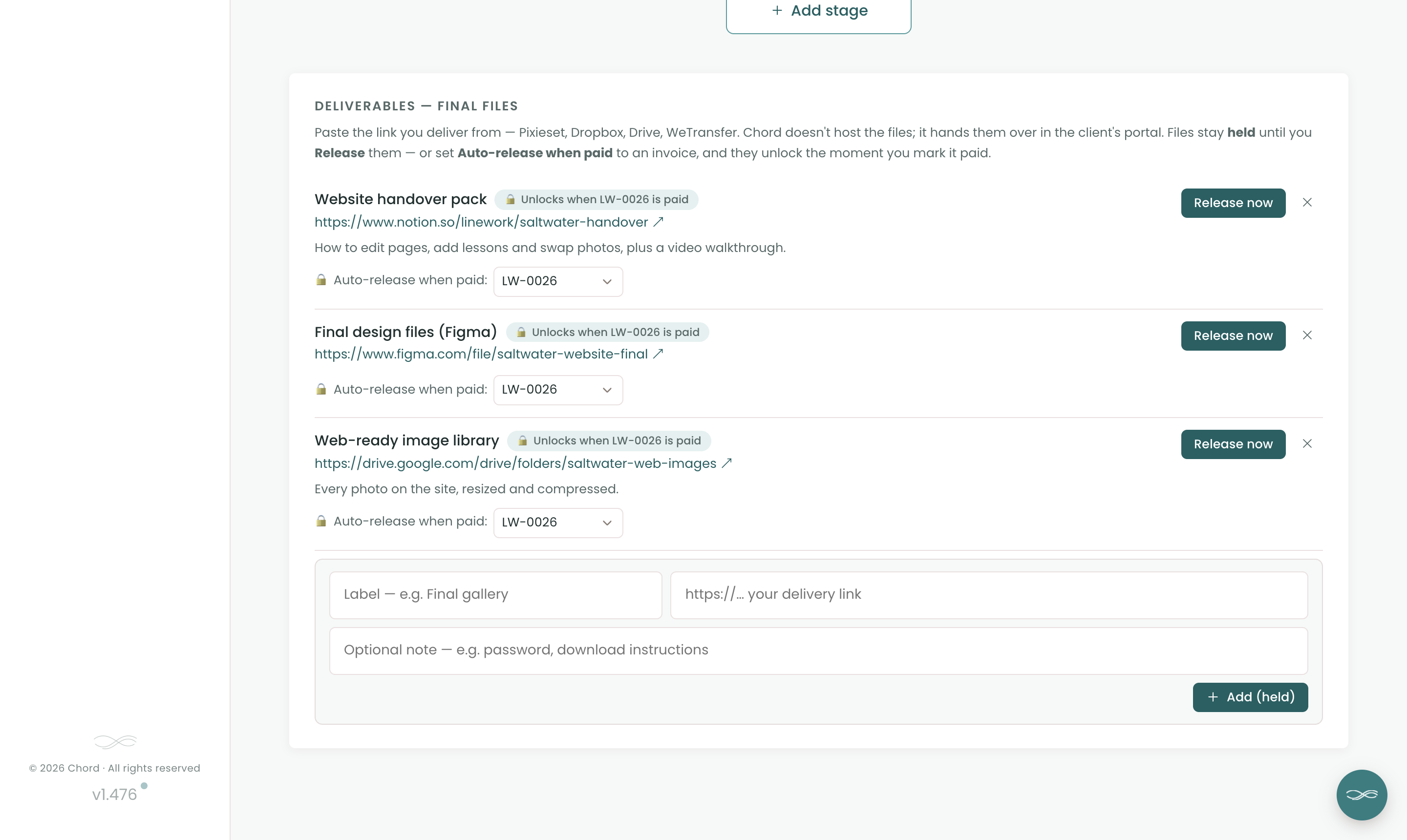
Handovers get messy. The instructions are spread across emails, the final files sit in a link that expires, and the last invoice is still unpaid a month later. In Chord, the handover pack waits in your client’s portal until you release it.

  • Links to your final files: the handover guide, the design files and the image library
  • Tied to the final invoice. Mark it paid and Chord releases the files and emails your client
  • No more “just following up on the invoice” emails
portal · handover
The handover pack held in the client portal until the final invoice is paid
05 /

Care plans that keep paying for themselves.

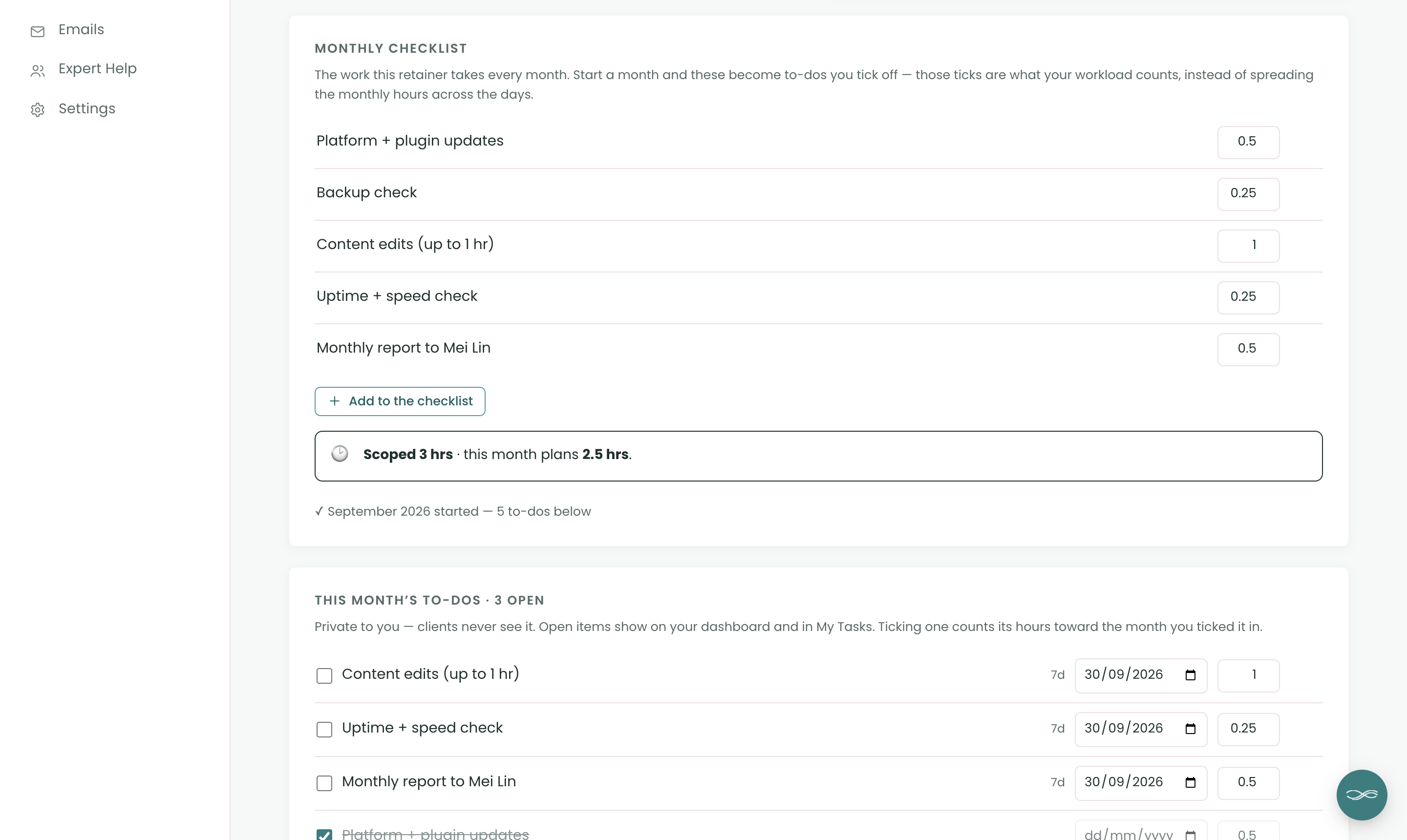
Care plans bring in steady income. But small edits add up, and soon the plan doesn’t cover the time it takes. In Chord, each care plan is a retainer with a monthly checklist, and every task on it has its hours.

  • A monthly checklist: plugin updates, a backup check, an hour of edits and a short report
  • Hours sold next to hours planned, so you can see when a plan stops paying
  • Bill each month in one click, or switch on auto-billing. Retainers come with Pro
work.yourstudio.com · care plan
A website care plan as a monthly checklist with hours for each task
06 /

Know if you have room for another site.

Every task has a rough time estimate. Chord adds them up across your projects and shows how full each month is, so you can say yes to a new site knowing you have the time for it.

  • A monthly workload forecast in hours, against the capacity you set
  • A traffic-light view that shows at a glance when a week is full
  • An income forecast built from your invoices
work.yourstudio.com · workload
On Pro · Chord + Claude

Get Claude to do the admin work for you.

Connect Chord to Claude and ask about your studio in plain words. Claude reads what’s in Chord and answers in seconds.

Ask what’s happening

  • Where each project is up to
  • Who owes you money, and how much
  • Which clients just commented
  • What a client said in their questionnaire, turned into a starting brief for the project

Let Claude do the first draft

  • Proposals from your own templates
  • Contracts from your contract template
  • Invoices at your package prices

Everything waits in Chord as a draft. You go in, check it and send it yourself.

Claude never emails your clients, and its drafting tools stay off until you switch them on. How to connect Claude

Claude · connected to Chord
Which sites are still waiting on content from the client?
Two of them. Harbour & Co still owes their About page copy, due on Thursday. Lumen hasn’t sent the product photos yet. Everything else is with you.
Everything in one place

And the rest of your studio, too.

Chord also runs the paperwork around each site, so you don’t need a second tool for it.

Pricing

Priced for every season of your business.

Starter fits one site at a time. Move to Pro when the projects stack up or you start selling care plans, and switch back whenever you like.

Starter

For one project at a time, or a quieter season.

US$9 / month
  • 1 active project
  • Branded client portal
  • Proposals, contracts & invoices
  • Workload & income view
  • 1 GB file storage for client uploads
Open your studio

First month of Pro for US$1 with the code TRIAL at checkout · Cancel anytime · Prices exclusive of applicable taxes.

Common questions

Questions web designers ask

Can my client review a Figma file or a staging site?

Yes. Add the Figma or staging link to the review. Your client looks at the design there, then approves it or asks for changes in Chord, so every round is still counted.

How do clients send me big files?

They upload files up to 100 MB each in their portal, or paste a Drive, Dropbox or WeTransfer link for anything bigger. They can sort everything into folders as they go.

Does Chord chase late content for me?

Not yet, so you’ll still send the nudge yourself. When the content arrives, you’ll know exactly where it is.

Can I run website care plans in Chord?

Yes, on Pro. A care plan is a retainer with a monthly checklist and the hours for each task. You can bill each month in one click or switch on auto-billing.

Will the portal look like my brand?

Yes, on both plans. Your logo and colours run across the portal, emails, proposals, contracts and invoices.

Do my clients need an account?

They get a branded sign-in link by email that takes them straight into their portal. There’s no password to remember.
Comparing tools?

The best CRM for website designers in 2026

Read the guide
Open now

Open your web design studio today.

Your first month of Pro is US$1 with the code TRIAL at checkout. Cancel any time.

Open your studio

Questions first? Write to hello@withchord.com. A real person reads it.

Open your studio