Chord for marketing consultants

The CRM for marketing consultants who run on retainers.

Chord shows you and your client what each retainer delivers, and raises and chases the monthly invoice for you.

First month of Pro for US$1 with the code TRIAL at checkout · cancel any time

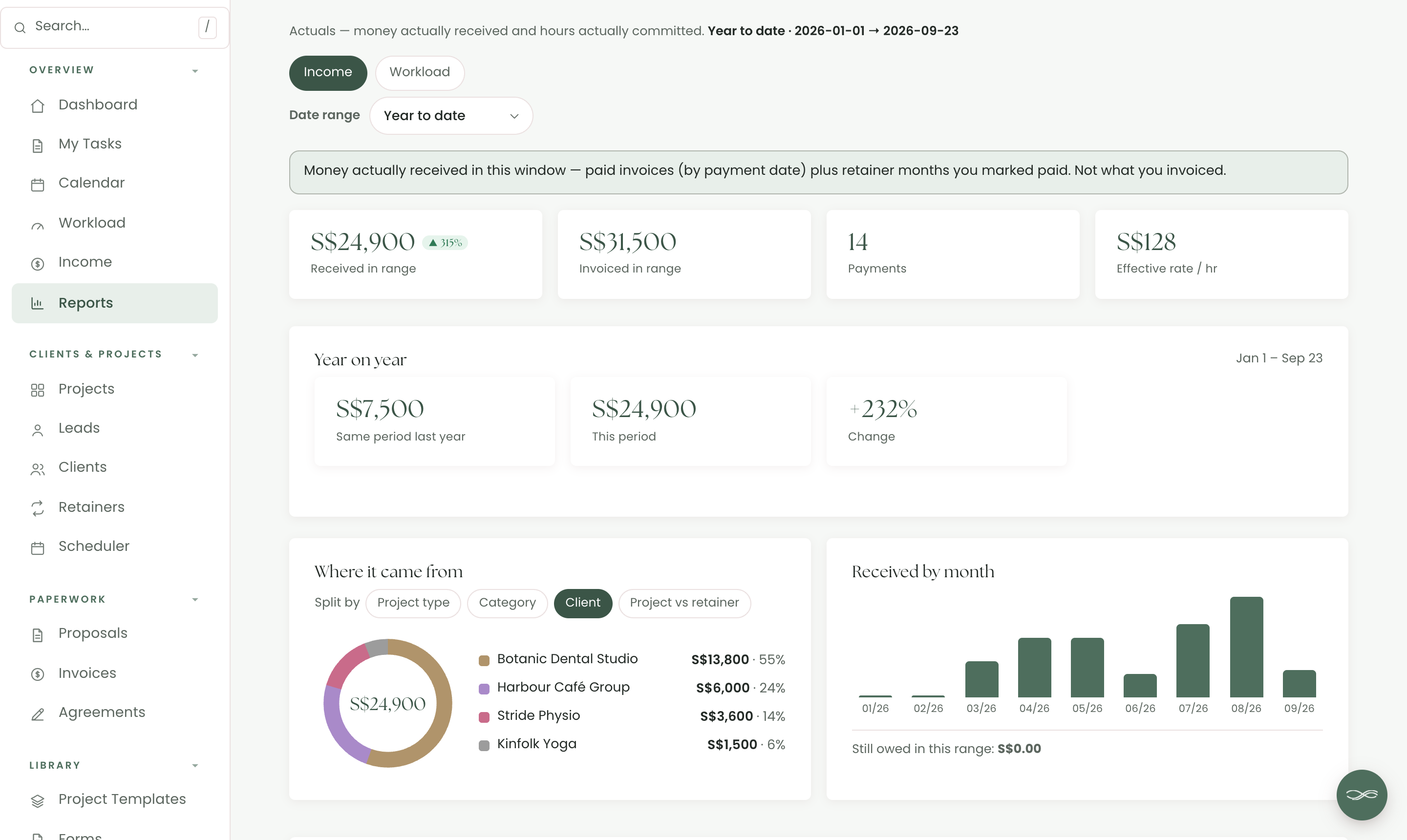
work.yourstudio.com · reports
Income by client, this year against last, and what the hours really earned
01 /

Retainers with the hours added up.

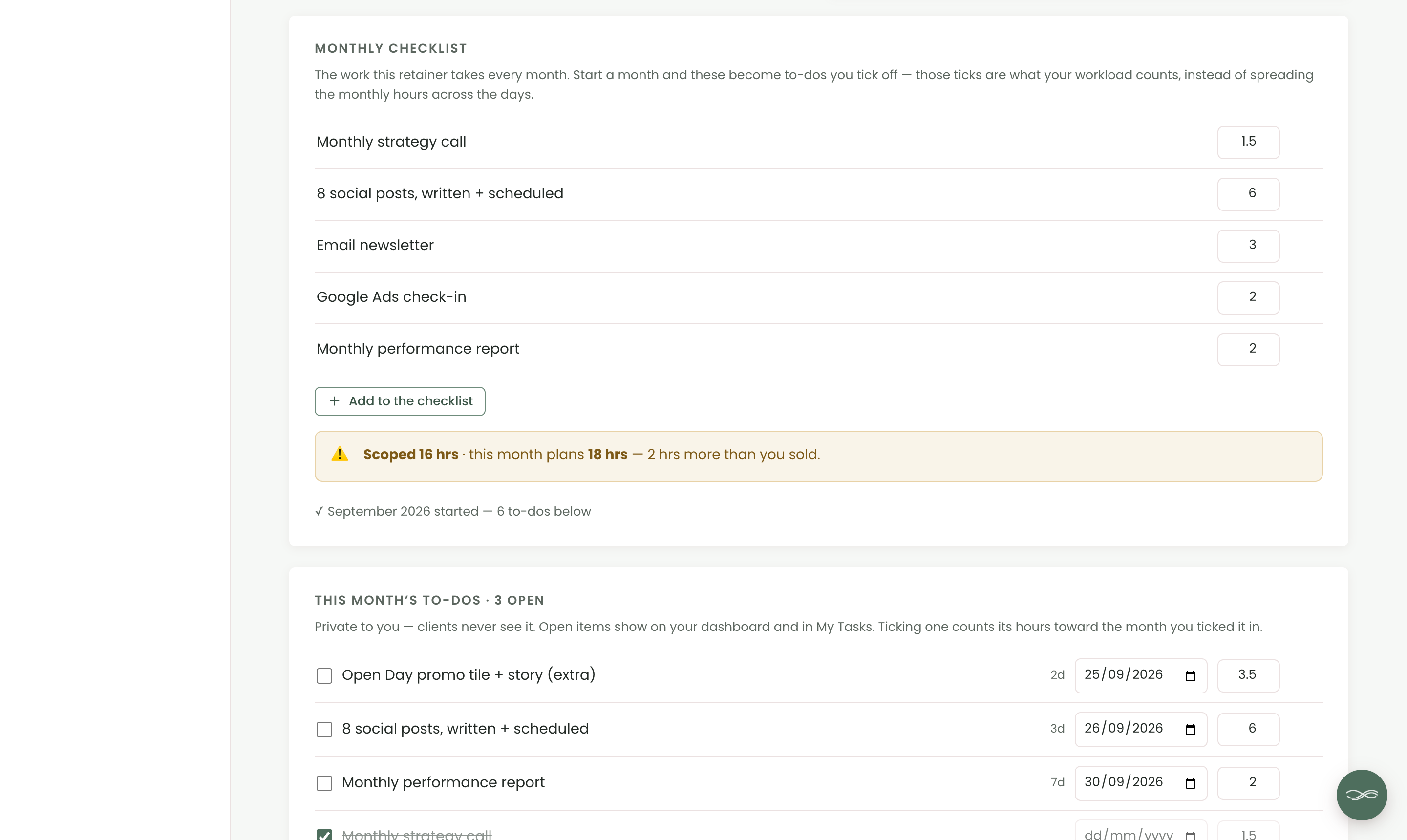
A client asks for “one quick extra” in week two, then another. In Chord, each retainer has a monthly checklist with the hours for each item, and Chord compares the hours you sold with the hours the month now plans.

  • “2 hrs more than you sold”, flagged before the month ends
  • Pause a month when a client needs a break. It drops out of your forecast and isn’t billed
  • Reports show your income by client and your effective hourly rate. Retainers and reports come with Pro
work.yourstudio.com · retainer
A retainer scoped at 16 hours with 18 planned, flagged before the month ends
02 /

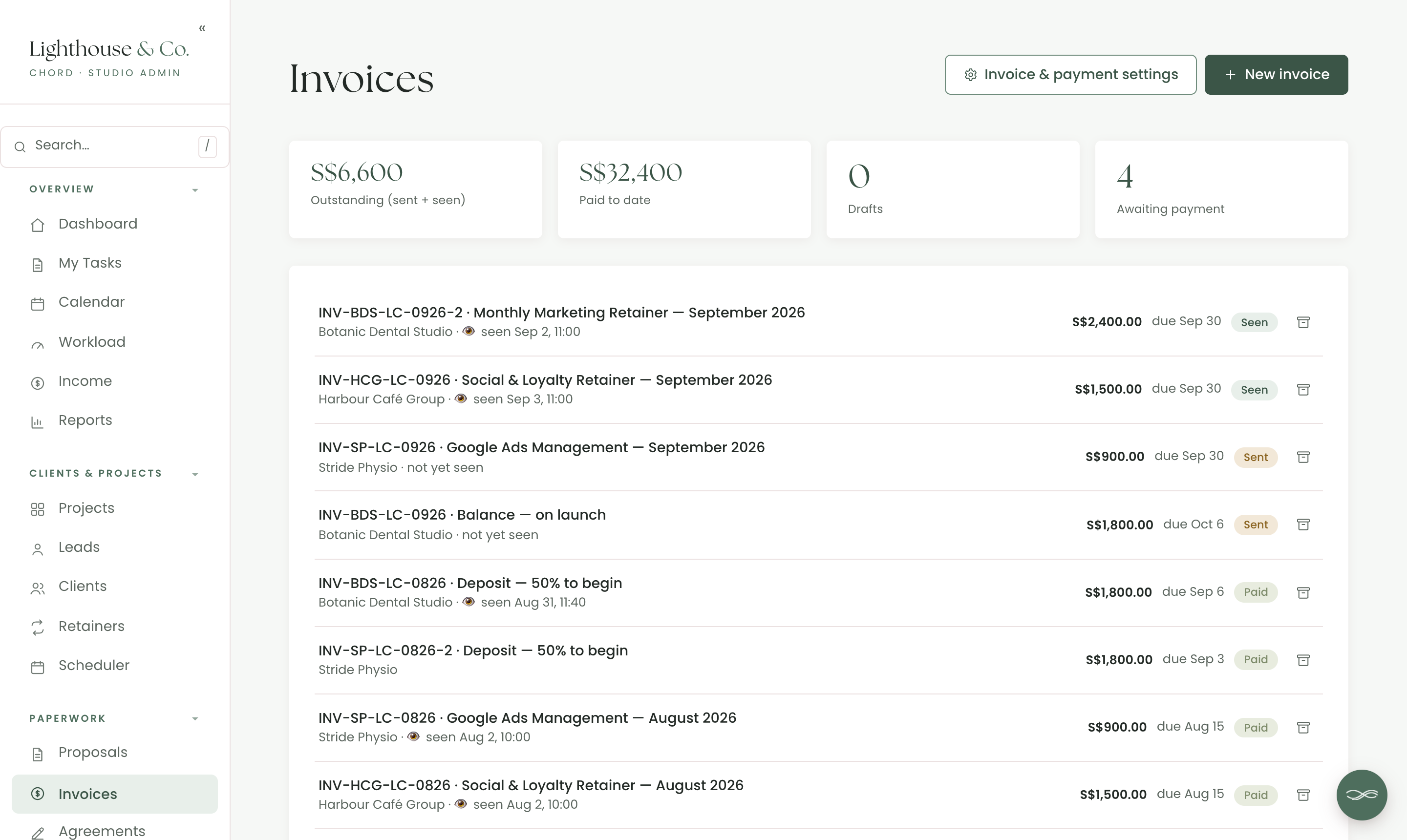
Recurring billing that chases itself.

Sending the same invoice every month is dull, and chasing it is worse. Tick “Auto-bill monthly” on a retainer, and Chord raises each month’s invoice the first time you open it that month.

  • A draft to check, or sent straight to your client
  • Reminders a few days before an invoice is due, then on set days after, in your own words
  • Receipts numbered and emailed when an invoice is paid
work.yourstudio.com · invoices
A month’s retainer invoices, raised and sent
03 /

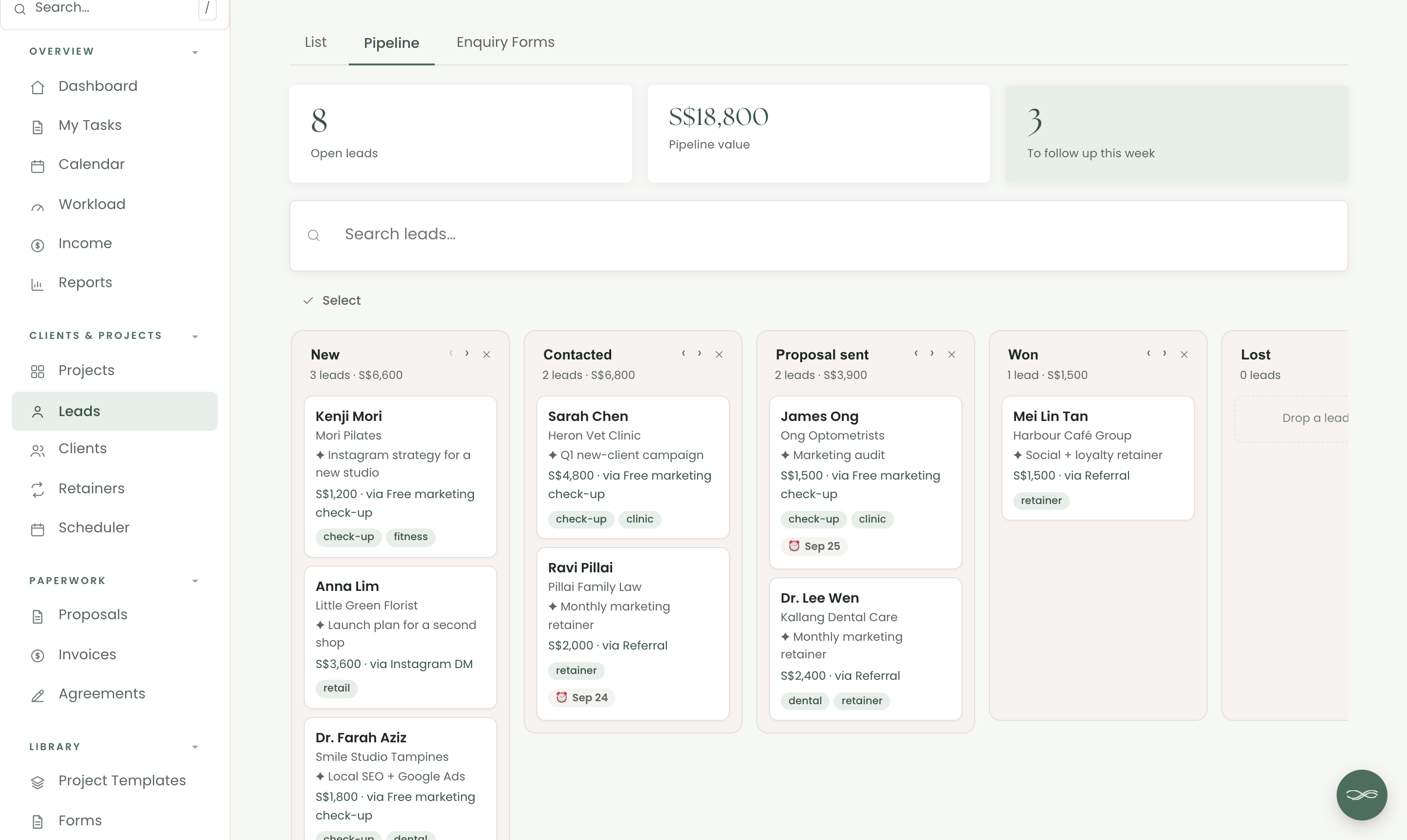
Fill next quarter while you serve this one.

When your retainers are full, marketing yourself is the first thing to go. In Chord, enquiry forms on your website send every lead to your pipeline, and a sequence can follow up for you.

  • Several enquiry forms, each with its own link or website embed
  • A pipeline with each lead’s value, source and follow-up date
  • A welcome email to every new enquiry within the hour, then a follow-up a few days later
work.yourstudio.com · leads
A lead pipeline, one column per stage
04 /

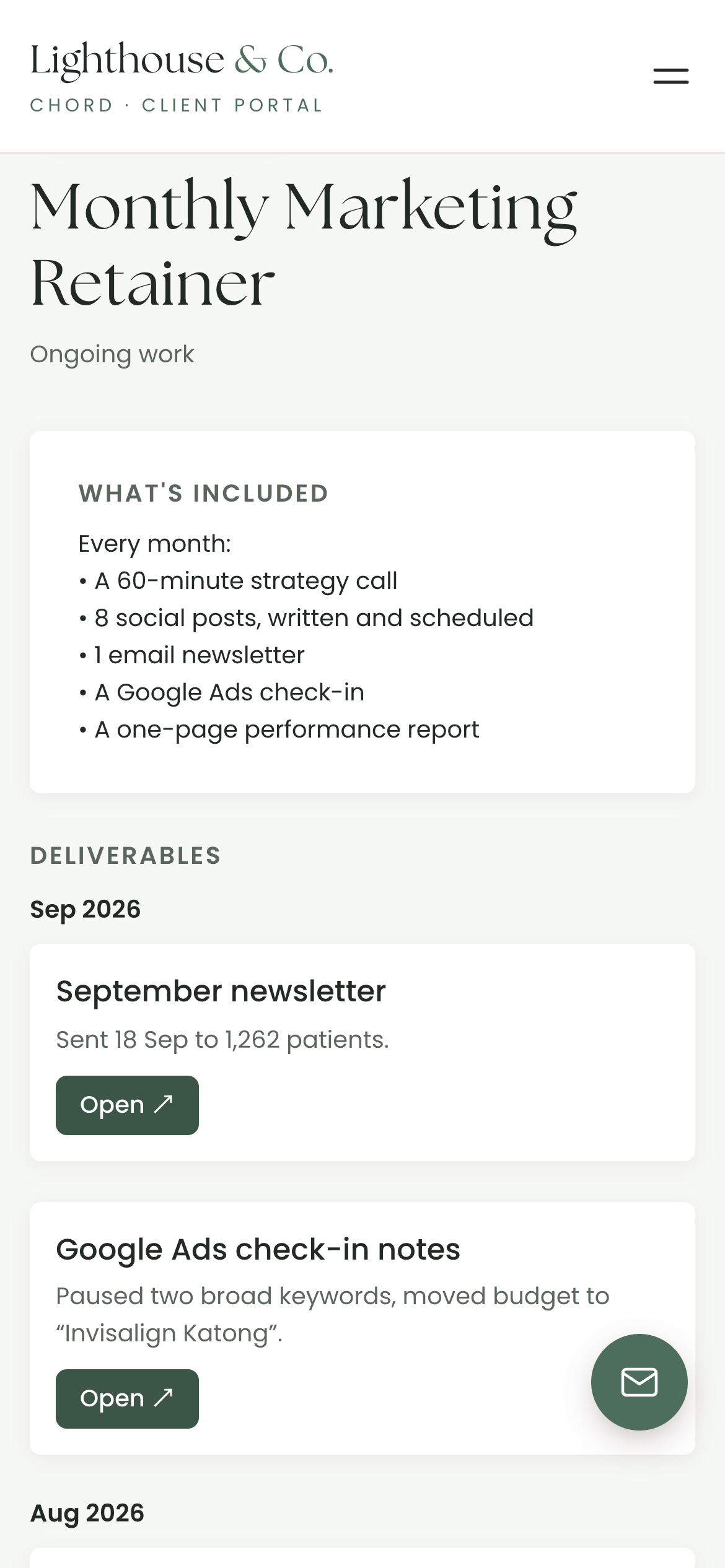
A portal that shows what you delivered.

Much of your work is invisible to your client, like the budget you moved or the newsletter you rewrote at the last minute. In Chord, you share each retainer to their portal, with what’s included and what you delivered each month.

  • A note and a link on each deliverable, like “Sent 18 Sep to 1,262 patients”
  • Their invoices in the same place
  • Your logo and colours on every page
What the client sees: what’s included, and what was delivered this month
Real screen · scroll it
05 /

Know if you have room for another retainer.

Every task has a rough time estimate. Chord adds them up across your work and shows how full each month is, so you can say yes to a new retainer knowing you have the time for it.

  • A monthly workload forecast in hours, against the capacity you set
  • A traffic-light view that shows at a glance when a week is full
  • An income forecast built from your invoices
work.yourstudio.com · workload
On Pro · Chord + Claude

Get Claude to do the admin work for you.

Connect Chord to Claude and ask about your studio in plain words. Claude reads what’s in Chord and answers in seconds.

Ask what’s happening

  • Where each project is up to
  • Who owes you money, and how much
  • Which clients just commented
  • What a client said in their questionnaire, turned into a starting brief for the project

Let Claude do the first draft

  • Proposals from your own templates
  • Contracts from your contract template
  • Invoices at your package prices

Everything waits in Chord as a draft. You go in, check it and send it yourself.

Claude never emails your clients, and its drafting tools stay off until you switch them on. How to connect Claude

Claude · connected to Chord
Draft a proposal for Kestrel from my retainer template.
Here’s the draft: your Growth retainer at US$2,500 a month, with your contract attached. Say yes and I’ll save it to Kestrel’s record, ready for you to check and send.
Everything in one place

And the rest of your studio, too.

Chord also runs the paperwork around each client, so you don’t need a second tool for it.

Pricing

Priced for every season of your business.

Retainers, reports and auto-billing come with Pro. Starter suits one project at a time, and you can switch whenever you like.

Starter

For one project at a time, or a quieter season.

US$9 / month
  • 1 active project
  • Branded client portal
  • Proposals, contracts & invoices
  • Workload & income view
  • 1 GB file storage for client uploads
Open your studio

First month of Pro for US$1 with the code TRIAL at checkout · Cancel anytime · Prices exclusive of applicable taxes.

Common questions

Questions marketing consultants ask

Can I pause a retainer for a month?

Yes. A paused month drops out of your income forecast and isn’t billed.

Does Chord send retainer invoices for me?

Yes, on Pro. Tick “Auto-bill monthly” and Chord raises each month’s invoice the first time you open it that month, as a draft or sent straight to your client.

Can I see which clients are worth the hours?

Yes. Reports show the money you received by client and your effective hourly rate, and you can export them as CSV or PDF. Reports come with Pro.

Can I put an enquiry form on my website?

Yes. Each form has its own link or embed, and every submission arrives on your pipeline as a new lead.

Will the portal look like my brand?

Yes, on both plans. Your logo and colours run across the portal, emails, proposals, contracts and invoices.

Do my clients need an account?

They get a branded sign-in link by email that takes them straight into their portal. There’s no password to remember.
Comparing tools?

The best CRM for marketing consultants in 2026

Read the guide
Open now

Open your consultancy today.

Your first month of Pro is US$1 with the code TRIAL at checkout. Cancel any time.

Open your studio

Questions first? Write to hello@withchord.com. A real person reads it.

Open your studio