
You pick up your coffee, sit down at your desk and open your laptop. Eight new emails are waiting. Three clients want an update, an invoice is overdue, and somewhere in your task list is a project that’s due today. Before you can start, you have to work out what’s what.
So you sort. You read, you check, you jump between tabs. By the time you know where everything stands, your coffee is cold and your best morning hours have gone on admin instead of the creative work you do best.
Now you can hand it to Claude. If you connect Claude to your CRM, it can read your studio and tell you what matters today in plain English. I build Chord, a client portal and studio CRM for solo creatives, and this week we made that possible. Here’s what it means for your day, what Claude can and can’t see, and how to set it up in about two minutes.
What it means for your day
Once you’ve connected Chord, you can talk to Claude about your studio the way you’d talk to a colleague who knows every project. Here are the routines I think you’ll use most. Copy any of these questions straight into Claude.
A morning brief, before you open your inbox
Start the day with one question instead of six tabs. Claude looks across your projects, tasks, invoices and bookings, and what’s happened since yesterday. It also reads your Needs your attention list, like a new enquiry or a payment to confirm. Then it tells you what’s due, what’s late and who you’re waiting on.
“Give me my morning brief: what needs my attention, what happened since yesterday, what’s due today and this week, and anything waiting on a client.”
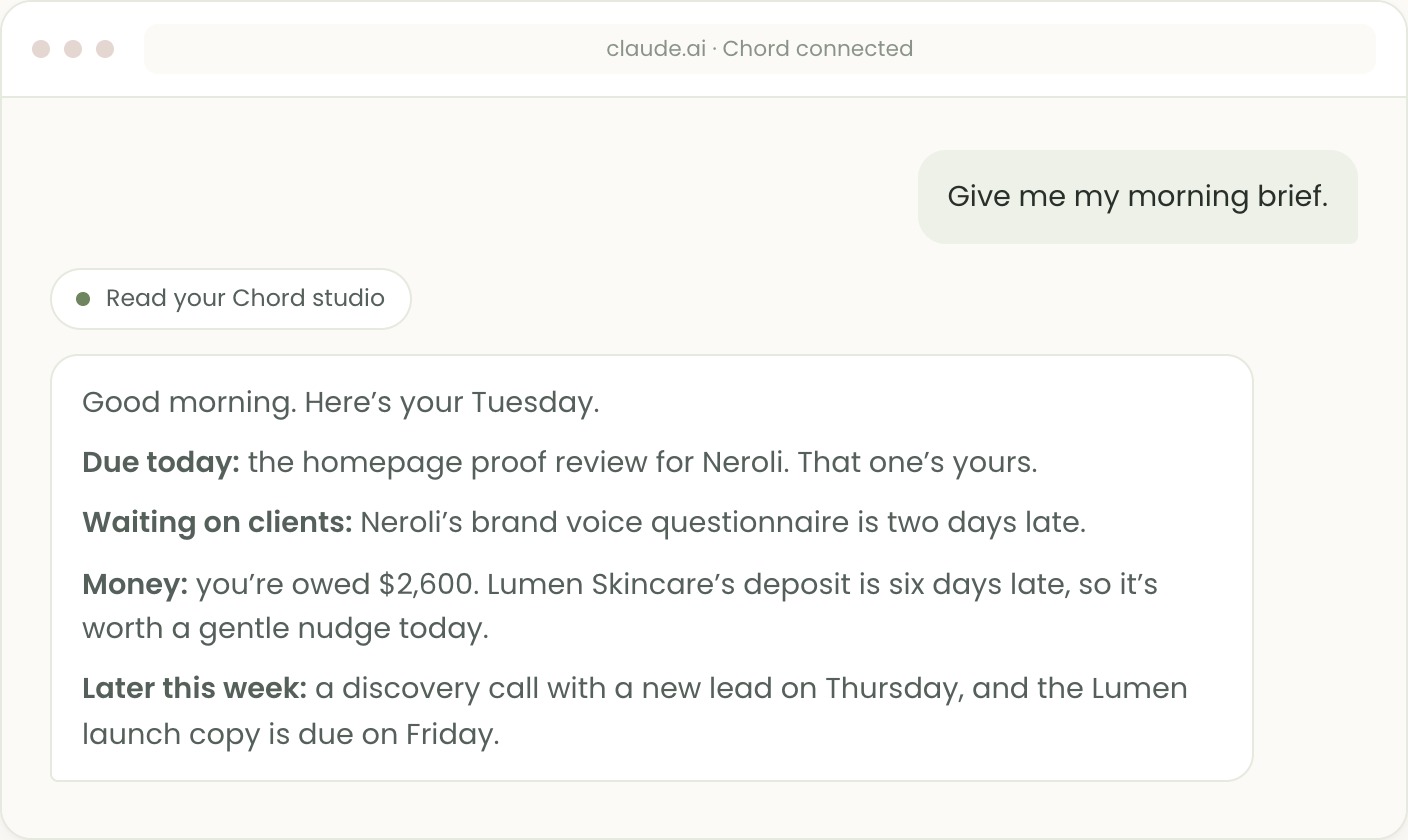
A tip: save your favourite question in a Claude Project, so your brief is one tap away each morning.
A client health check
Once a week, ask Claude to go through your clients one by one. You’ll see which projects are moving, which clients owe you a task or a payment, and where you’re the one holding things up.
“Go through my active clients. For each one, tell me where their projects are, anything overdue on their side or mine, any unsigned contracts, how many revision rounds they have left, and any unpaid invoices.”
A snapshot of your week ahead
On a Sunday evening or a Monday morning, get the whole week in one view: meetings, key dates like a wedding or a shoot, deadlines, and invoices falling due.
“What does my week ahead look like? Include meetings, key dates, deadlines and invoices that fall due.”
A Friday money check
Chasing payments feels awkward, so most of us put it off. Make it a five-minute Friday habit instead.
“Who owes me money right now, and how late is each invoice? And how much have I been paid this month?”
Prep before a client call
Two minutes before a call, ask for a quick catch-up on that client, so you walk in knowing exactly where things stand.
“I have a call with Neroli this afternoon. Brief me on their projects: what’s done, what’s next, what they said in their questionnaire, what they’ve commented on and anything they owe me.”
What your clients have said
Client feedback arrives in bits: a comment on Tuesday, a pinned note on page three of a proof on Thursday. Ask Claude to gather what’s still open, so nothing slips through.
“Has any client left comments I haven’t answered? Group them by project and tell me which page each pinned one is on.”
Leads you haven’t followed up
Enquiries go cold when life gets busy. Ask which leads are still open and whose follow-up date has come round.
“Which leads are still open, what are they worth, and whose follow-up is due?”
Turn an enquiry email into a lead
A new enquiry arrives in your inbox while you’re in the middle of something. Paste it into Claude and it adds the person to your pipeline for you, with their details and what they’re after. It checks they aren’t already a lead or a client first. This one is off until you switch it on.
“Here’s an enquiry I just got. Add her as a lead, and set a follow-up for Thursday.”
Draft a questionnaire
A blank form is hard to start. Tell Claude who the client is and what you need to know, and it writes the questions and saves the form in Chord. You read it through and change anything you like. No client sees it until you add it to a project. This one is off until you switch it on too.
“Write me a discovery questionnaire for a wedding photography client. Keep it under ten questions.”
It works for your public enquiry form too. Ask for one that asks wedding couples for their date and guest count, and Claude sets it up in Chord. It stays switched off until you’ve checked it and turned it on.
Turn questionnaire answers into a starting point
Once a client has filled in your questionnaire, Claude can read their answers for you. Ask it to pull out what matters, draft the agenda for your first meeting, or sketch where to begin. It’s a springboard for the project, so you never start from a blank page.
I use this a lot, because I don’t always remember every detail a client told me. If you’re a brand designer, it gives you a first read on the client’s taste and goals to draw ideas from. If you’re an interior designer, it shows you what the client wants and where to start.
“Read Neroli’s questionnaire answers and draft an agenda for our kick-off meeting.”
What Claude can see, and what it can’t
Claude reads your clients, projects, tasks, client comments, questionnaire answers, proposals, contracts, proofing rounds, invoices, retainers, leads, bookings, automations and recent activity, and only when you ask it something. It works from your live studio, so its answers match what’s in Chord right now.
Out of the box, it can only read. Claude can’t change a task, reply to a comment, send an email or delete anything, so you stay in charge of every action. When it suggests chasing an invoice, you’re the one who decides and sends the reminder.
There are two extras you can switch on in Settings, then Integrations: let Claude add leads, and let Claude create forms. Each has its own switch, and both are off until you tick them. Even then, Claude never emails anyone.
Some things stay private. Claude never sees passwords, payment links or your clients’ portal sign-ins. It can see the names of files your clients upload, but it can’t open them. It also can’t read your emails or your workload forecast.
When Claude reads your studio to answer you, that information goes to Anthropic, the company that makes Claude, under their privacy terms. You can disconnect it at any time.
How to connect Claude to your CRM in Chord
Connecting Claude is part of Chord Pro. You also need a Claude account that lets you add custom connectors. Then it takes four steps.
1. Add Chord as a connector. In Claude, open Settings, then Connectors, and click Add custom connector. Name it Chord and paste https://work.withchord.com/mcp as the address, then click Continue.
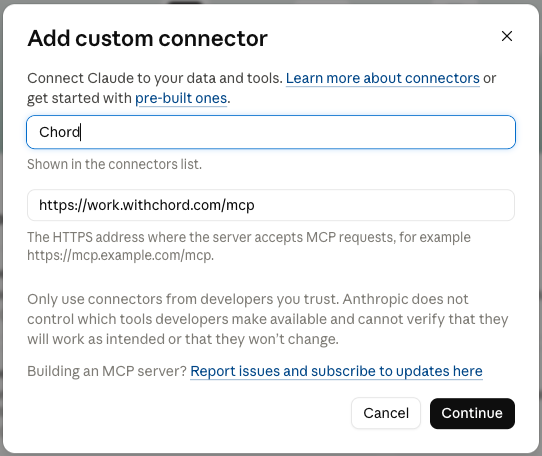
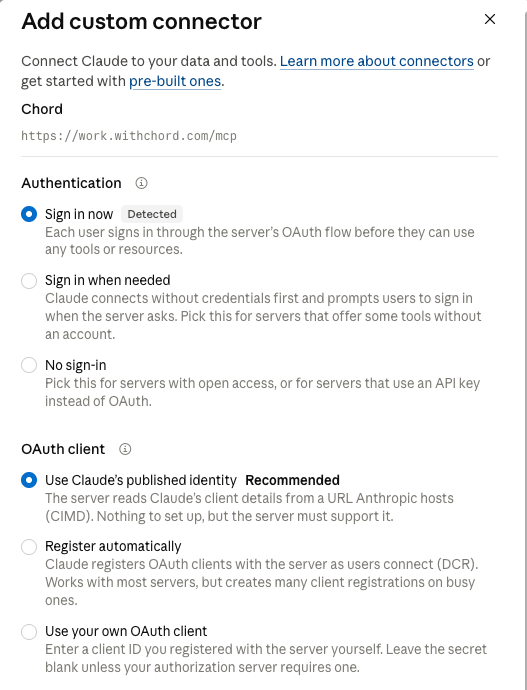
2. Keep the recommended sign-in. Claude spots that Chord has its own sign-in. Leave Sign in now and Use Claude’s published identity selected, finish adding the connector, then click Connect.
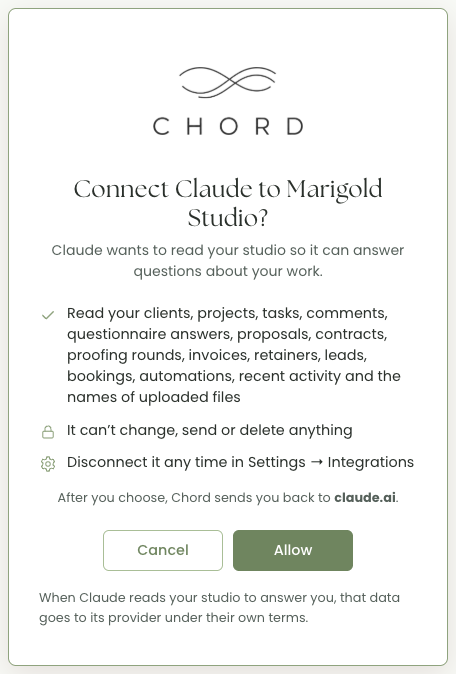
3. Click Allow on Chord’s screen. Claude opens Chord. Sign in if Chord asks, check it shows your studio’s name, and click Allow. Chord sends you straight back to Claude.
4. Ask your first question. Start a new chat and try your morning brief. The first time, Claude may ask your permission before it uses Chord.
To disconnect, open Settings, then Integrations in Chord, and click Disconnect next to Claude. It loses access straight away.
A few honest limits
Claude can occasionally get a detail wrong, like any assistant. Before you chase a client, check the figure in Chord.
Apart from adding leads and drafting forms, Claude only reads. If you want the reminder sent or the task ticked off, you still do that yourself in Chord. I kept it this way on purpose, because your client relationships are too important to hand to an assistant that could act on its own.
And it only knows what’s in Chord. If a project lives in your inbox and not in your studio, Claude won’t know about it.
Personally, I love asking for project updates.
Claude can see which tasks my client has ticked off, what they’ve commented on and what they answered in their questionnaire. So I get the real picture without opening the project and piecing it together myself.
It’s also good at turning those questionnaire answers into an agenda, or a first brief. That makes it a springboard rather than a status report - especially for a project I’m picking back up and have to re-contextualise.
None of it replaces knowing your own clients. It just means you walk into the morning already knowing where everything stands, instead of spending your best hours trying to work it out.
If you connect it, tell me which question you end up asking most.