The design is signed off. The launch date is on the calendar, and your client has already told their customers about it. The only thing missing is the content: the About page copy, the team photos and the logo in a file you can actually use.
You've asked three times. Each time, the answer is "this week, promise". You feel stuck, because you can't build the site without it, and the launch date isn't moving.
I run a creative studio and I build a client tool called Chord, so I'll be upfront: Chord is mine, and I'll talk about it later in this post. First, I want to share the six things that decide whether a CRM works for a website designer, whichever tool you choose.
I wrote this for freelance website designers and small web studios who design and build sites for small businesses. If you run a development agency with project managers, your list will look different.
1. Getting the client's content in on time
Every website project has the same bottleneck, and it's rarely the design. It's the content.
You need the page copy, the photos, the logo files and the team bios, and they arrive in pieces: a WeTransfer here, an email attachment there, a Google Drive folder that's still empty.
Look for one place where your client can send everything, big files included, and where it's easy to see what has arrived.
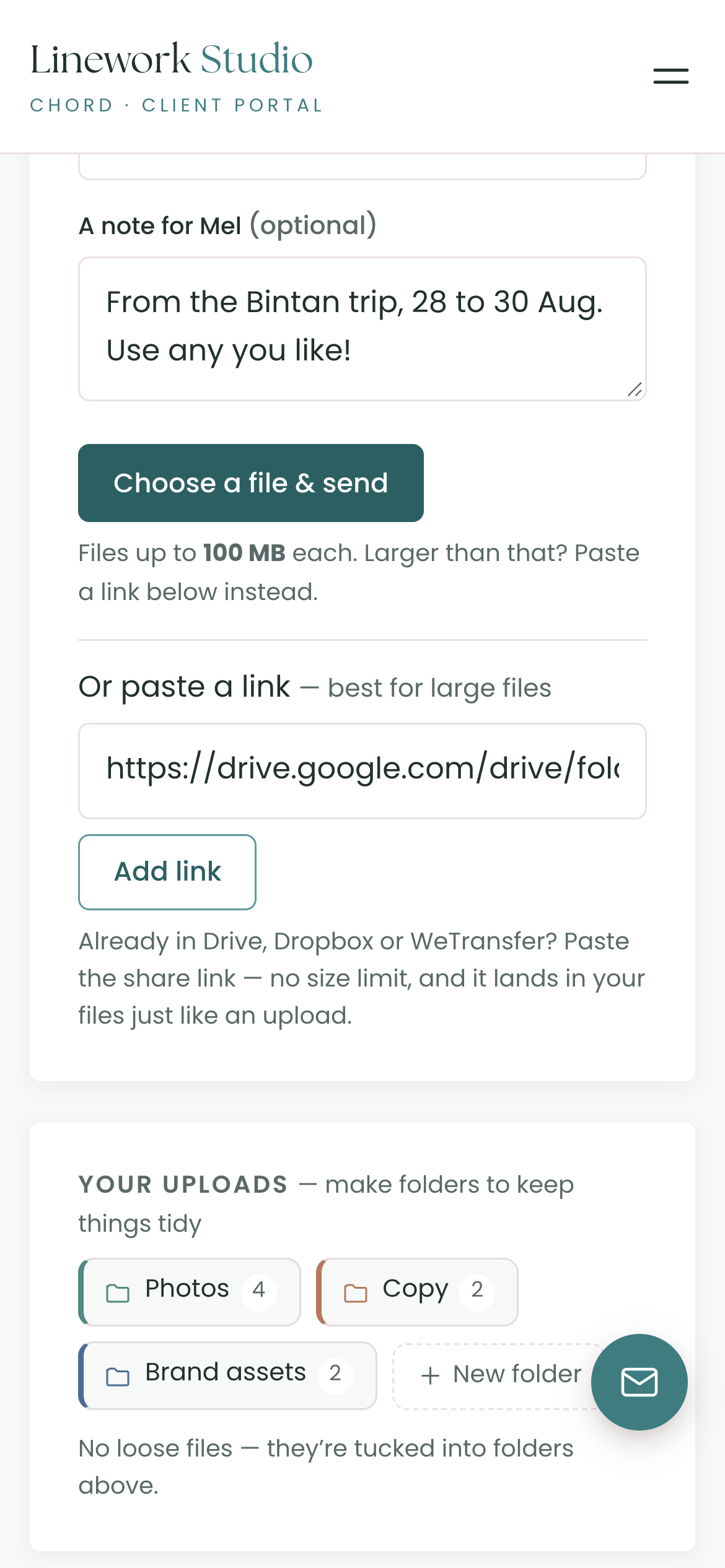
In Chord, your client has an Uploads area in their portal. They can upload files up to 100 MB each, or paste a Drive, Dropbox or WeTransfer link for anything bigger.
You and your client can both make colour-coded folders, like Photos, Copy and Brand assets, so everything is easy to find later. Files attached to their tasks show up in the same place.
Chord doesn't chase late content for you yet, so you'll still need to send the nudge. But when the content arrives, you know exactly where it is.
2. Feedback on page designs
Website feedback often comes as a list: "Make the header smaller, change the photo on the third card, and can the button be orange?"
Then you spend the next hour matching each line to the right spot on the right page.
What you need is a tool where your client can point at the exact spot on the design, and where rounds of changes are counted.
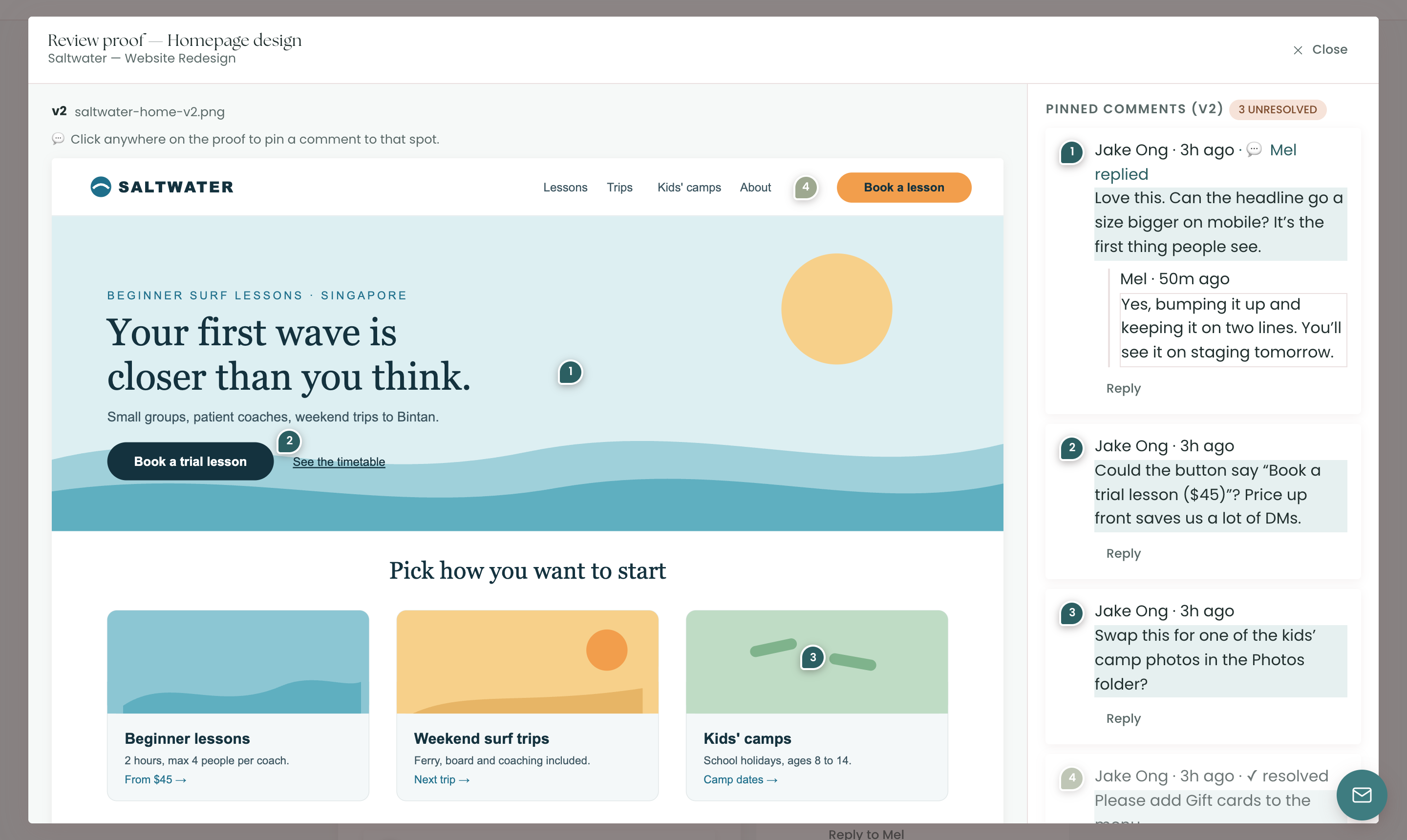
In Chord, you upload each page design as an image or PDF, and your client clicks anywhere to pin a comment. You reply in the thread and mark each comment done once it's fixed.
Working in Figma, or already on a staging site? Add that link to the same review. Your client looks at the design there, then approves or requests changes in Chord, so every round is counted.
Once your client has used the rounds you included, the portal tells them that more changes count as an extra round, which may be billable.
3. A build shaped like a website project
A website build has a shape: discovery, wireframes, design, build and launch. There's usually a launch date, too, and your client may have already told people about it.
When everything lives in one long to-do list, it's hard to see whether the launch is still on track.
Look for projects with named stages, a launch date everyone can see, and deadlines that move when your plans change.
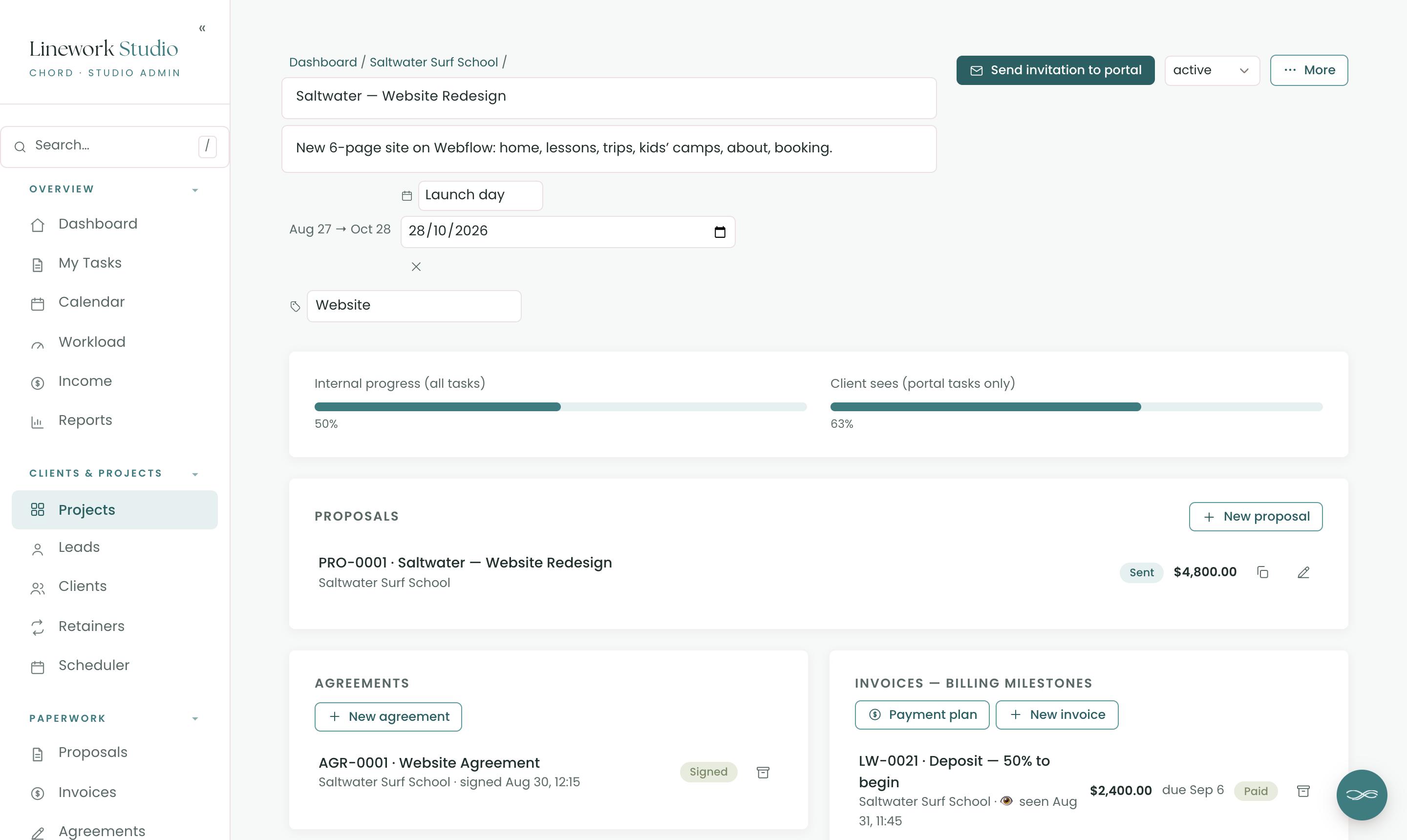
In Chord, you split each project into named stages and add a key date, such as "Launch day". It shows on your calendar, on your dashboard and in your client's portal.
Chord works out your task dates in working days from the project start. If you take a day off, your open deadlines move one working day later, and the launch day stays where it is. So keep an eye on the gap between the two.
4. A clean handover
Launch day is exciting. The handover afterwards is often messy: instructions scattered across emails, the final files in a link that expires, and the last invoice still unpaid a month later.
Look for a tool that gathers the handover in one place and holds it until the final invoice is paid.
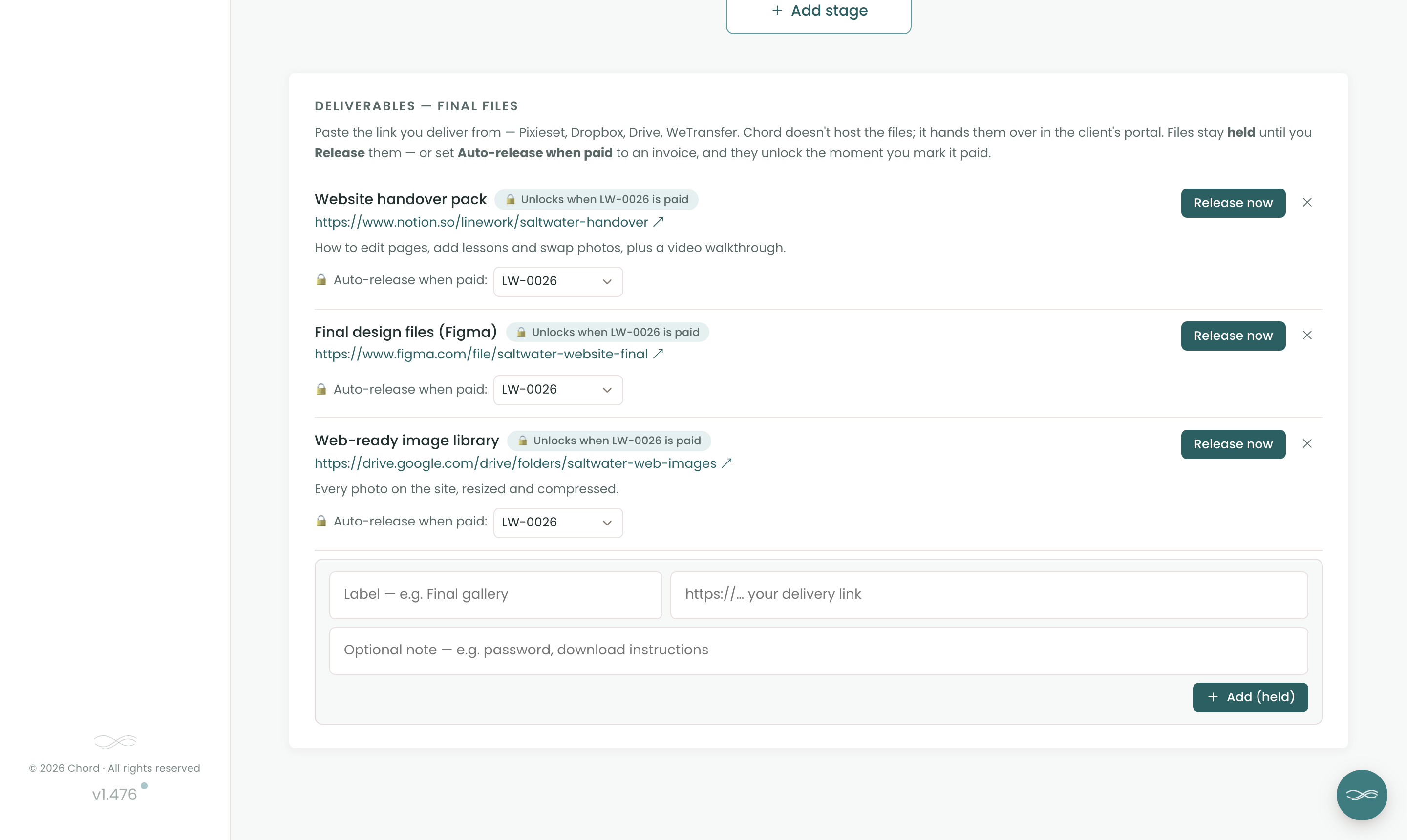
In Chord, you paste the links to your final files: the handover guide, the design files and the image library. They stay held until you release them.
You can link them to the final invoice instead. When you mark that invoice paid, Chord releases the files in your client's portal and emails them to say everything is ready.
5. Care plans after launch
Many web designers offer a care plan after launch: updates, backups, small content edits and a monthly check-in.
It's good recurring income. But if you don't track it, the small edits slowly grow, and the plan stops paying for itself.
Look for a tool that runs each care plan on a monthly checklist, with the hours and the invoice taken care of.
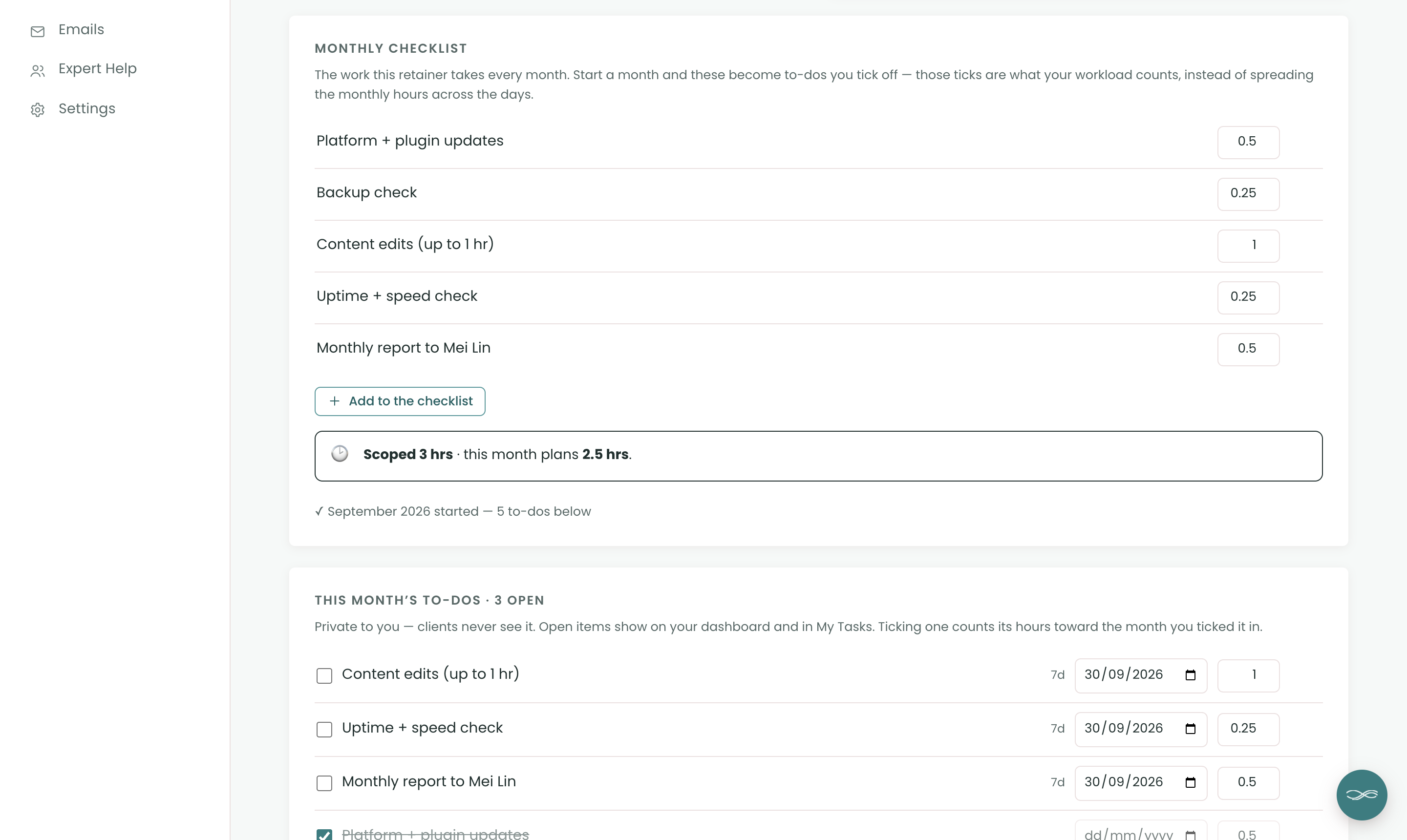
In Chord, a care plan is a retainer with a monthly checklist: plugin updates, a backup check, up to an hour of edits and a short report, each with its hours. When you start the month, the checklist becomes that month's to-dos.
Chord shows the hours you sold next to the hours the month plans. You can bill each month in one click, or switch on auto-billing so the invoice is raised the first time you open Chord in the new month. Retainers come with the Pro plan.
6. A plan that flexes with your seasons
One of my pet peeves: when you're at peak season, you pay for tools that expand your capacity. A lot of those tools lock you in, and then you find yourself in low season still paying for them, and now they're very expensive. Most software pricing assumes your business runs the same way every single month, but creative work doesn't.
That's why, when I built Chord, I wanted two plans you can switch between at any time. Starter at US$9 covers one active project at a time and 1 GB of storage. It doesn't include retainers, reports or sending email from your own domain, which makes it right for a one-project-at-a-time pace or a slower season.
When the work stacks up, move to Pro at US$29: unlimited projects and clients, retainers, reports, 10 GB of storage and sending email from your own domain. When things slow down again, drop back to Starter with no penalty. I made it this way deliberately, so Chord flexes with you through every season of your business.
The honest comparison
Most website designers choose between the freelancer all-in-one tools, and some add a separate tool just for collecting content. Here's how the prices compare as I write this, billed monthly:
| Tool | Starts at (US$/mo) | Pricing model | Worth knowing |
|---|---|---|---|
| Moxie | $12 | Flat plans | Client portal starts on Pro ($25) |
| Bonsai | $15 | Per user, tiered | Invoices and contracts start at $25 |
| HoneyBook | $36 | Flat plans | Payments in US, Canada, UK and Australia |
| Dubsado | $35 | Flat plans, 3 users included | Deepest automations, long setup |
| Content Snare | $42 | Flat plans, 2 users | Content collection only, 20 open requests |
| Chord | $9 Starter / $29 Pro | Flat plans | First month of Pro US$1 with code TRIAL |
Based on published pricing as of September 2026, in US dollars, billed monthly (most tools discount annual plans). Check each site for current plans.
Moxie is the best value, at US$12 a month for one person, and every plan includes time tracking. You need the Pro plan, at US$25, for the branded client portal.
Bonsai charges per user, starting at US$15 a month. That entry plan doesn't include invoices, contracts, proposals or the client portal; you get those on the Essentials plan at US$25. If you want expense and tax tracking in the same tool, Bonsai is strong there.
HoneyBook is the polished all-rounder, at US$36 a month or US$29 if you pay yearly. Its online payments only work in the US, Canada, the UK and Australia, so check your country first.
Dubsado is the automation powerhouse. It starts at US$35 a month, or about US$28 if you pay yearly, and it includes three users. Its forms and workflows go deep, but setting them up takes a lot of time.
Content Snare does one job very well: collecting content from clients, with automatic reminders until they send it. It starts at US$42 a month for two users and up to 20 open requests. It doesn't do proposals, contracts or invoices, so you'd still need a CRM beside it.
And then there's Chord, which I built as a working creative, for solo studios and small teams. I built it around the six things in this post.
I'll be honest about two gaps. Chord doesn't send reminders for late content yet, so Content Snare is stronger there. And it doesn't do your accounting or taxes, so Bonsai is better for that.
Setting Chord up takes a couple of hours.
How to choose
The table gives you a shortlist, but you still have to choose.
So take your last website project and walk it through each tool you're trying. Include the proposal, the content you waited for, the design feedback, the launch and the care plan after it.
Then pick the CRM that gets the content in and the site out on time.
If you'd like to try that in Chord, you can start in about ten minutes.