Chord for interior designers

The CRM for interior designers, with every project in one place.

Chord keeps the approvals, selections, files and staged invoices for each renovation together, from concept to handover day.

First month of Pro for US$1 with the code TRIAL at checkout · cancel any time

work.yourstudio.com · renovation
A renovation with handover day fixed, the deposit paid and the agreement signed
01 /

Approvals, room by room.

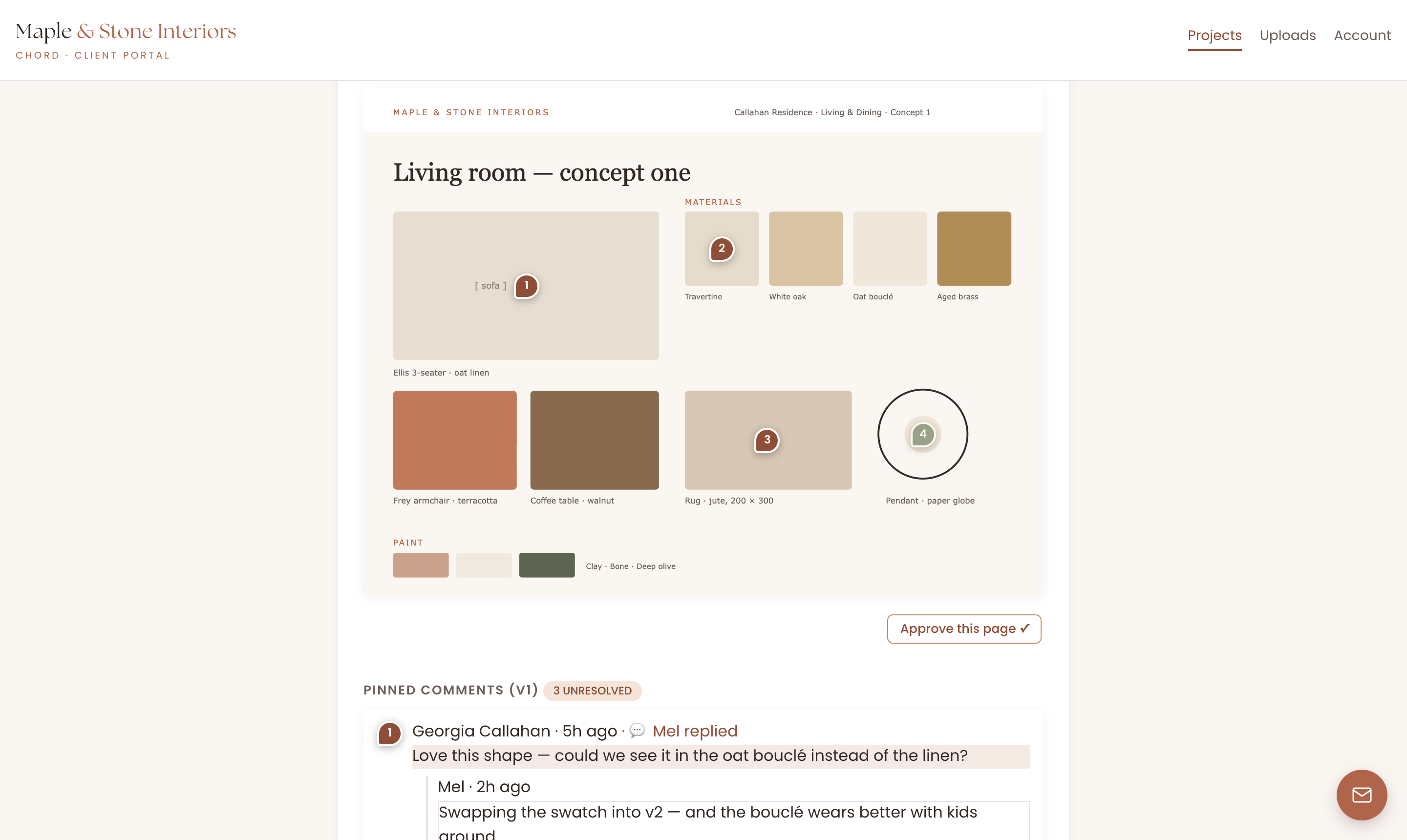
Approvals arrive in voice notes, on printed boards and in calls nobody wrote down. In Chord, your client pins comments straight onto the board or render, and each approval is recorded with its version.

  • A proofing cycle for each deliverable, so the dining room never waits on the living room
  • Rounds counted, with extra rounds flagged as possibly billable
  • Every approval on record, with the version it belongs to
portal · review board
Feedback pinned on a swatch board, with every round on record
02 /

A timeline built around handover day.

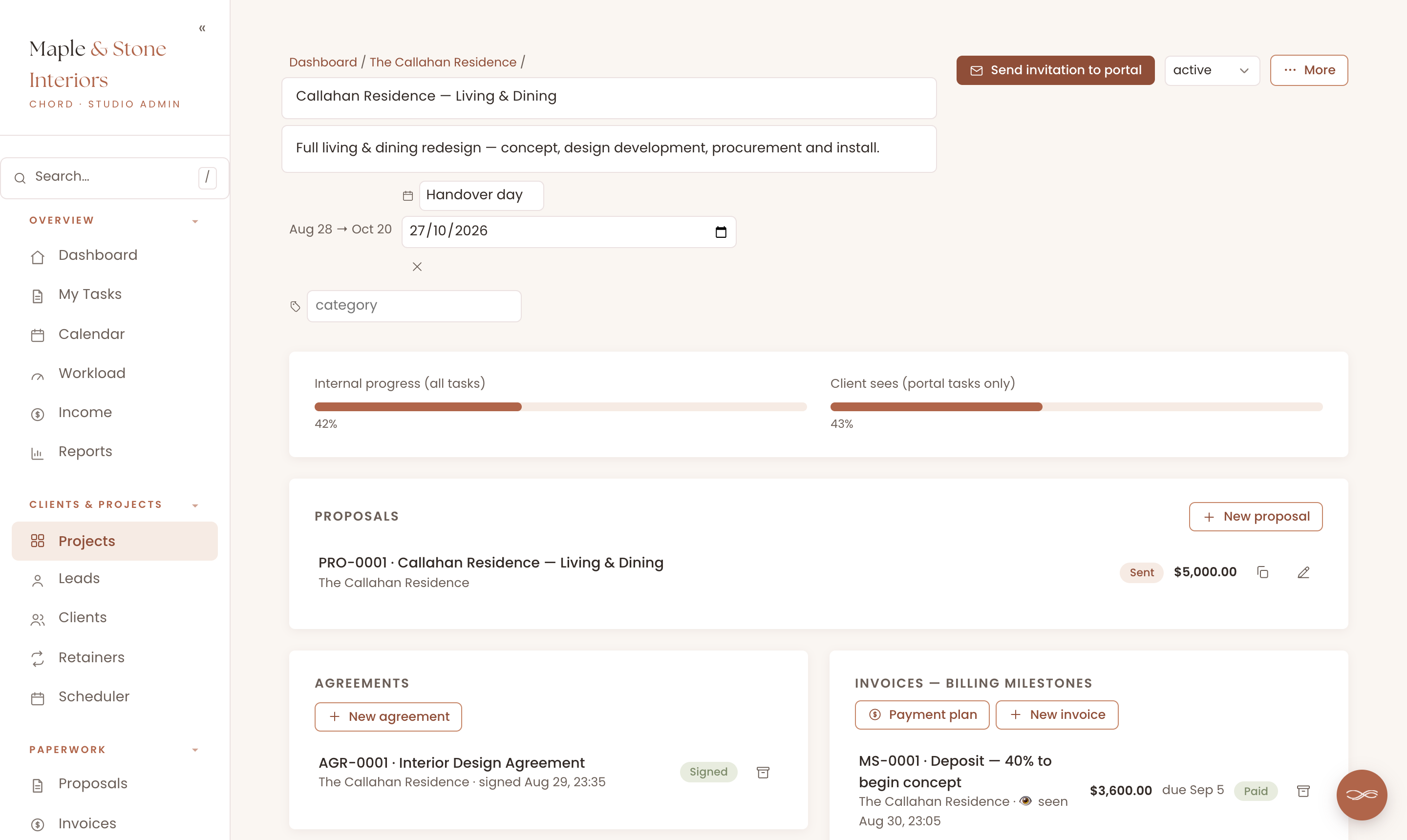
A renovation runs in phases: concept, design development, procurement and install. In Chord, you split each project into those stages and set a key date, such as “Handover day”.

  • Task dates in working days, worked out around the key date
  • Take a day off and your deadlines move, while handover day stays put
  • Two installs in one month? The workload view shows it months ahead
work.yourstudio.com · workload
03 /

A paper trail for every selection.

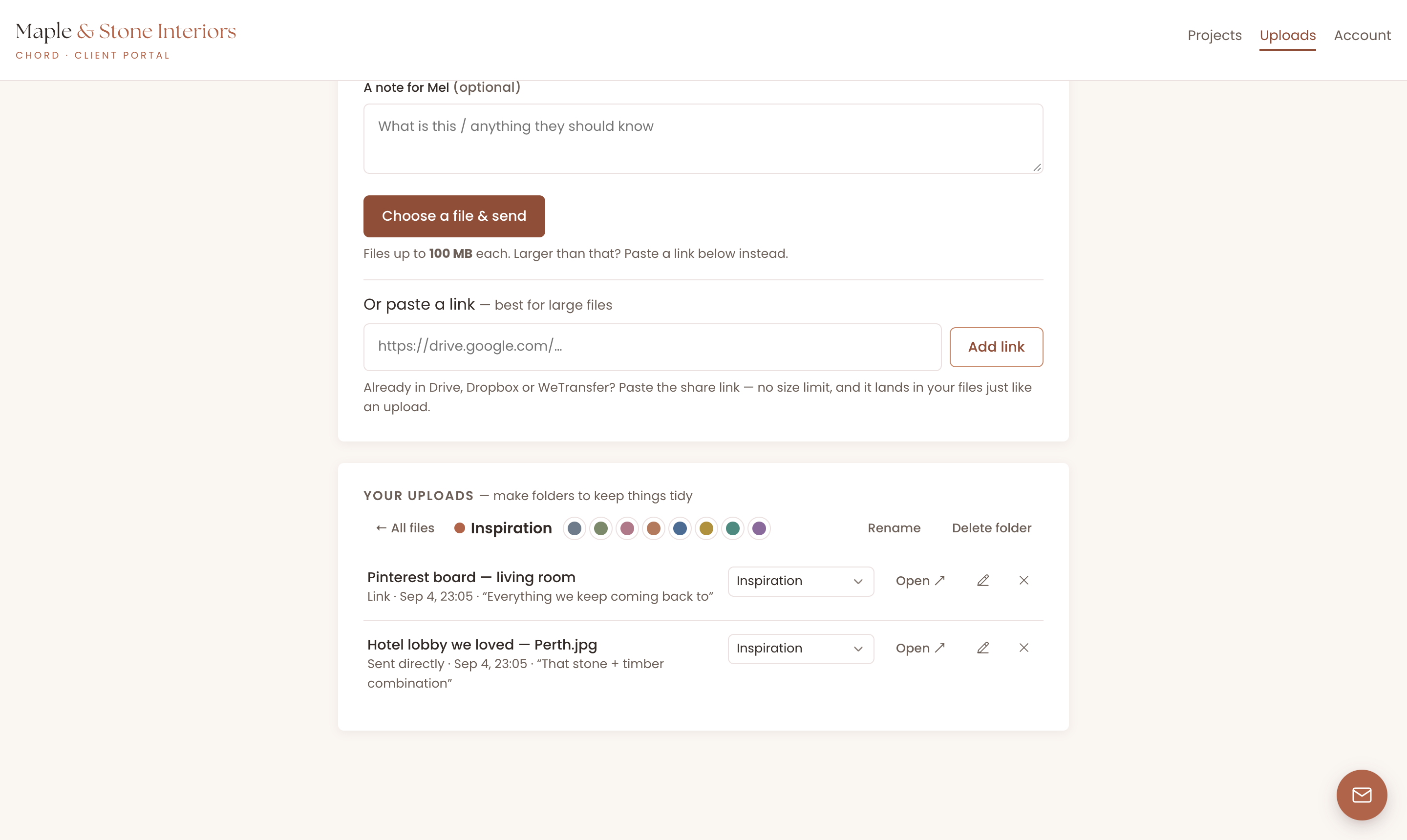
Every designer has had the “but I never chose that tile” conversation. In Chord, your approved boards sit on one side and your client’s uploads on the other, so the proof is easy to find.

  • Uploads up to 100 MB each, or a Drive, Dropbox or Pinterest link with no size limit
  • Colour-coded folders you can both browse months later
  • Approved boards kept version by version
portal · files
Pinterest boards, floor plans and site photos filed in colour-coded folders
04 /

Invoices in stages, with reminders.

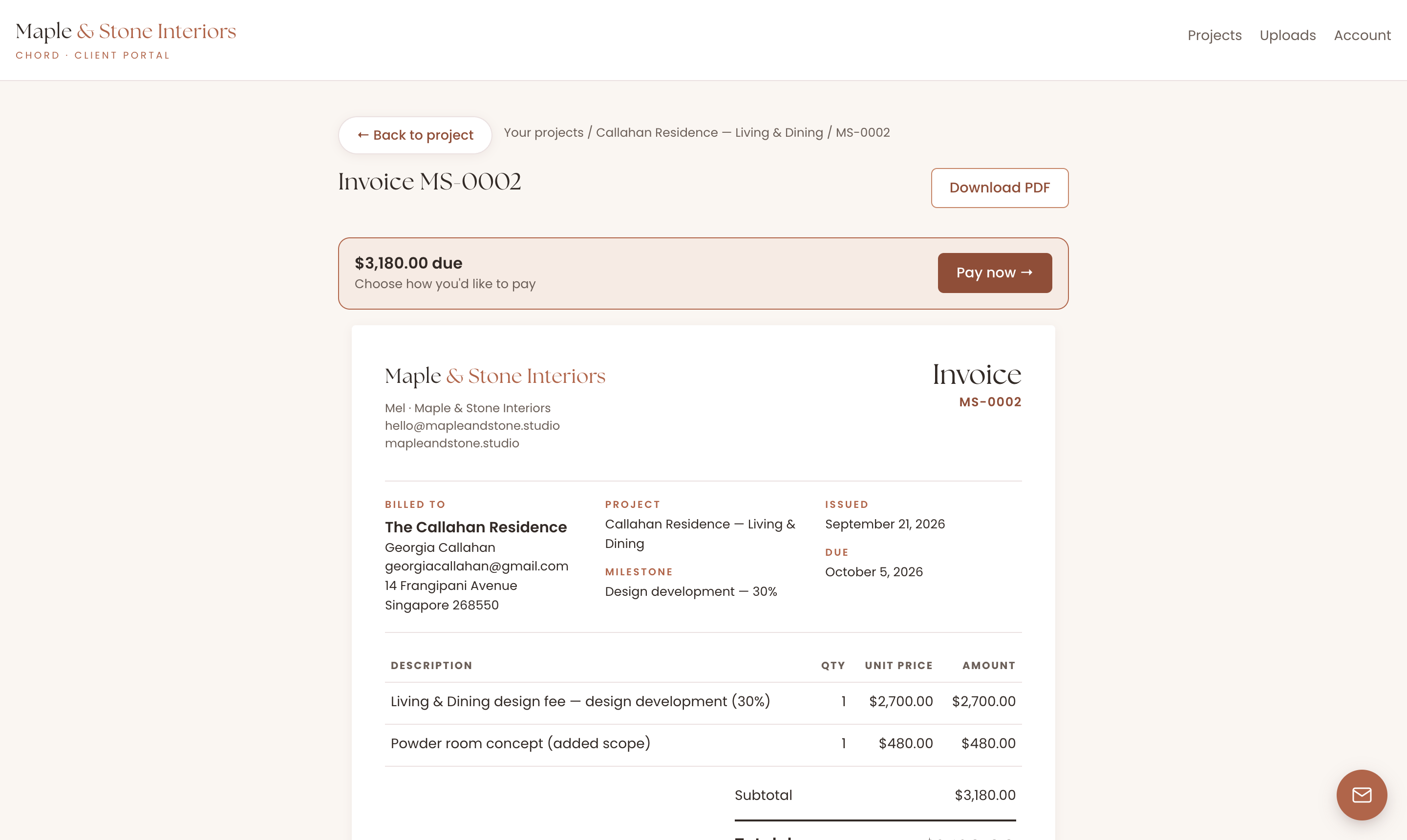
Interiors money arrives in phases, from the concept deposit to the balance at install. In Chord, you create a milestone invoice for each phase, and Chord can remind your client when one is due.

  • Payment plans with named milestones
  • Added scope goes on as its own named line
  • Card, bank transfer or QR code, with cards through your own Stripe account
work.yourstudio.com · invoices
A milestone invoice for each phase of a renovation
05 /

A portal for the long haul.

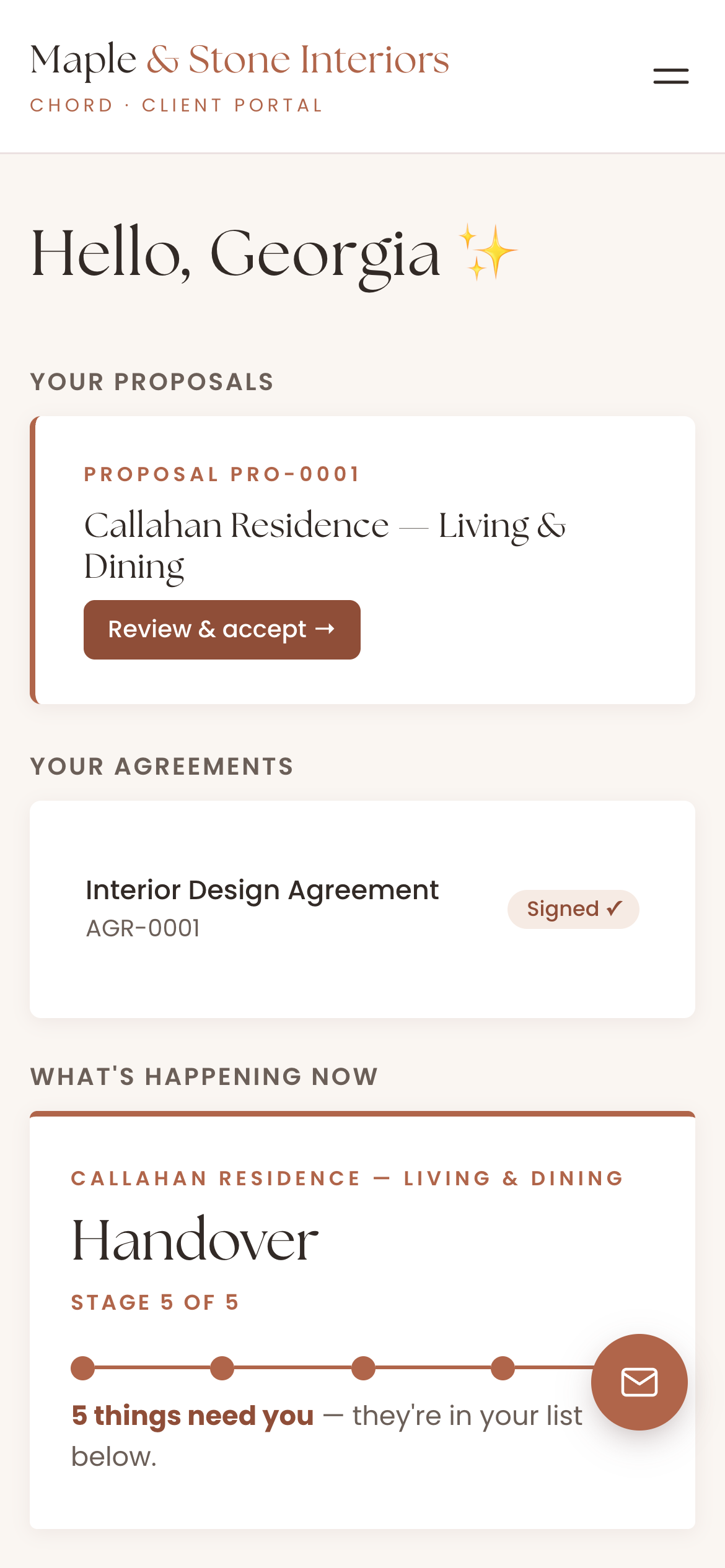
Procurement is the quiet stretch, when everything is ordered and nothing visible is happening. Your client’s portal shows where the project is and what comes next, so they don’t need to email to check in.

  • The current stage and what’s coming next
  • A “waiting on you” list for the decisions you need
  • Your logo and colours on every page
The client portal on a phone, showing the current stage of a renovation
Real screen · scroll it
On Pro · Chord + Claude

Get Claude to do the admin work for you.

Connect Chord to Claude and ask about your studio in plain words. Claude reads what’s in Chord and answers in seconds.

Ask what’s happening

  • Where each project is up to
  • Who owes you money, and how much
  • Which clients just commented
  • What a client said in their questionnaire, turned into a starting brief for the project

Let Claude do the first draft

  • Proposals from your own templates
  • Contracts from your contract template
  • Invoices at your package prices

Everything waits in Chord as a draft. You go in, check it and send it yourself.

Claude never emails your clients, and its drafting tools stay off until you switch them on. How to connect Claude

Claude · connected to Chord
Set up the Tan residence from my full-home template, with the deposit invoice.
Here’s the plan: a Tan Residence project from your Full home template starting Monday, your design contract, and a US$4,000 deposit invoice dated today. Nothing’s saved yet. Shall I go ahead?
Everything in one place

And the rest of your studio, too.

Chord also runs the paperwork around each client, so you don’t need a second tool for it.

Pricing

Priced for every season of your business.

Starter fits one project at a time. Move to Pro when several renovations overlap, and switch back whenever you like.

Starter

For one project at a time, or a quieter season.

US$9 / month
  • 1 active project
  • Branded client portal
  • Proposals, contracts & invoices
  • Workload & income view
  • 1 GB file storage for client uploads
Open your studio

First month of Pro for US$1 with the code TRIAL at checkout · Cancel anytime · Prices exclusive of applicable taxes.

Common questions

Questions interior designers ask

Can clients send me Pinterest boards?

Yes. They paste a Pinterest, Drive or Dropbox link into their portal, or upload files up to 100 MB each, and sort them into folders.

Can I invoice in stages?

Yes. Create a milestone invoice for each phase, or set up a payment plan. Chord can send reminders as each one falls due.

How are approvals recorded?

When your client approves a concept, Chord records the approval with the version it belongs to, so you can find it later.

Can I add scope halfway through?

Yes. New scope goes on the invoice as its own named line, so the invoice matches how the project really went.

Will the portal look like my brand?

Yes, on both plans. Your logo and colours run across the portal, emails, proposals, contracts and invoices.

Do my clients need an account?

They get a branded sign-in link by email that takes them straight into their portal. There’s no password to remember.
Comparing tools?

The best CRM for interior designers in 2026

Read the guide
Open now

Open your interiors studio today.

Your first month of Pro is US$1 with the code TRIAL at checkout. Cancel any time.

Open your studio

Questions first? Write to hello@withchord.com. A real person reads it.

Open your studio