It's the monthly check-in call, and your client asks the question you've been dreading: "So what did we actually get for this month?"
You know you worked hard. But the work is spread across a strategy doc, three platforms, a Slack channel and your own memory. You start listing things from your head, and you feel yourself getting defensive.
I run a creative studio and I build a client tool called Chord, so I'll be upfront: Chord is mine, and I'll talk about it later in this post. First, I want to share the six things that decide whether a CRM works for a marketing consultant, whichever tool you choose.
I wrote this for independent marketing consultants and small agencies who work with clients on monthly retainers. If you run a large agency with account managers, your list will look different.
1. Retainers as first-class citizens
Retainers are the backbone of a consulting business. They're also where the hours go missing.
A client asks for "one quick extra" in the second week, then another. Nobody writes it down, and by the end of the month you've worked two hours more than they pay for.
What you need is a tool that treats each retainer as its own thing, with the month's work listed out and the hours added up.
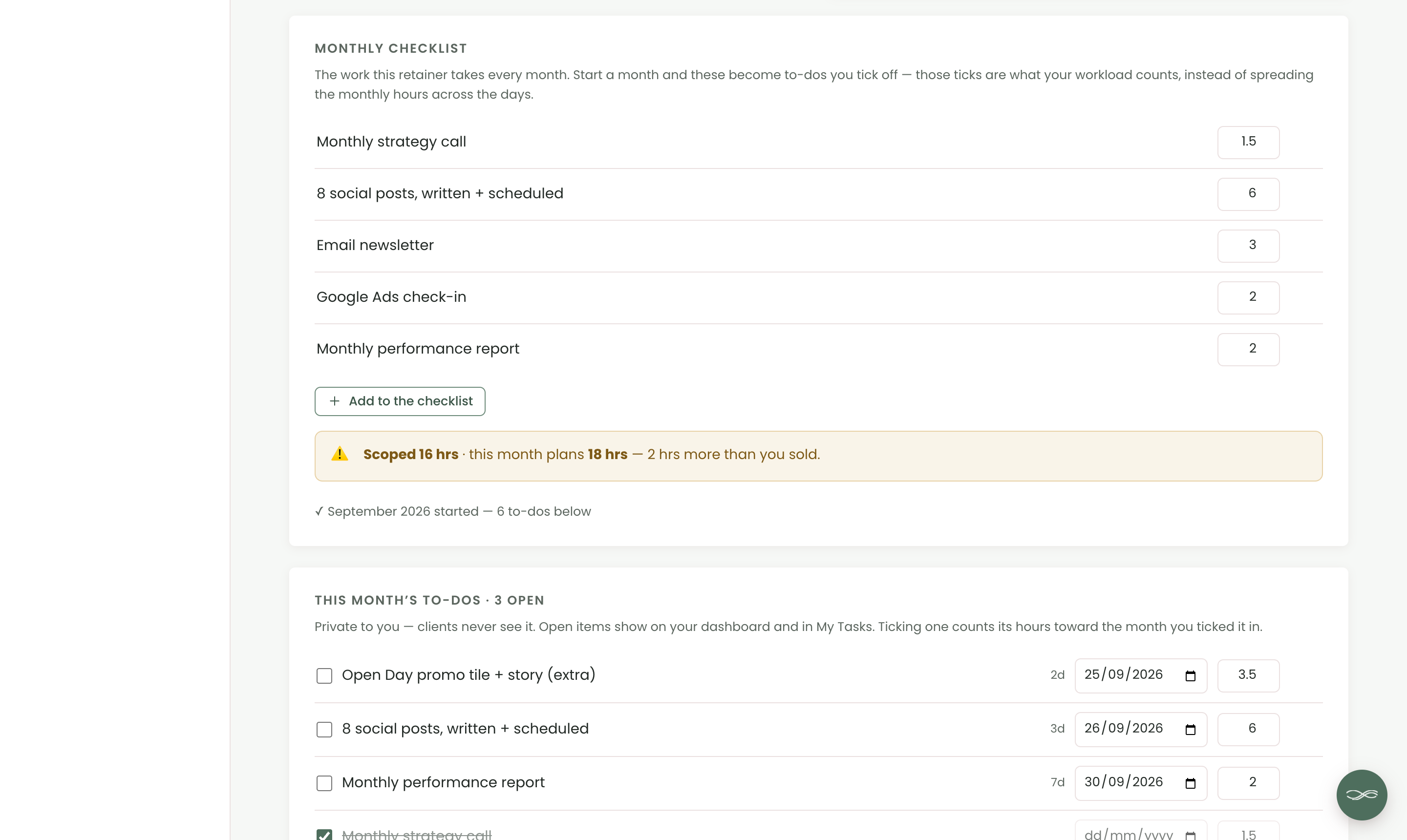
In Chord, each retainer can carry a monthly checklist: the strategy call, the social posts, the newsletter and the report, each with its hours. When you start a month, the checklist becomes that month's to-dos.
Chord compares the hours you sold with the hours the month now plans. If you add an extra, it tells you plainly: "2 hrs more than you sold". That's your cue to have the conversation early.
If a client needs a break, you can pause a month. A paused month drops out of your forecast and isn't billed. Retainers come with the Pro plan.
2. Proving the hours
Retainer clients pay the same every month, so it's easy to lose sight of what each one really earns you.
One client might pay the most but take twice the hours. You feel busy all the time, but you can't tell which work is worth it.
Look for reports that show your income by client, the hours you've committed, and what those hours really earned.
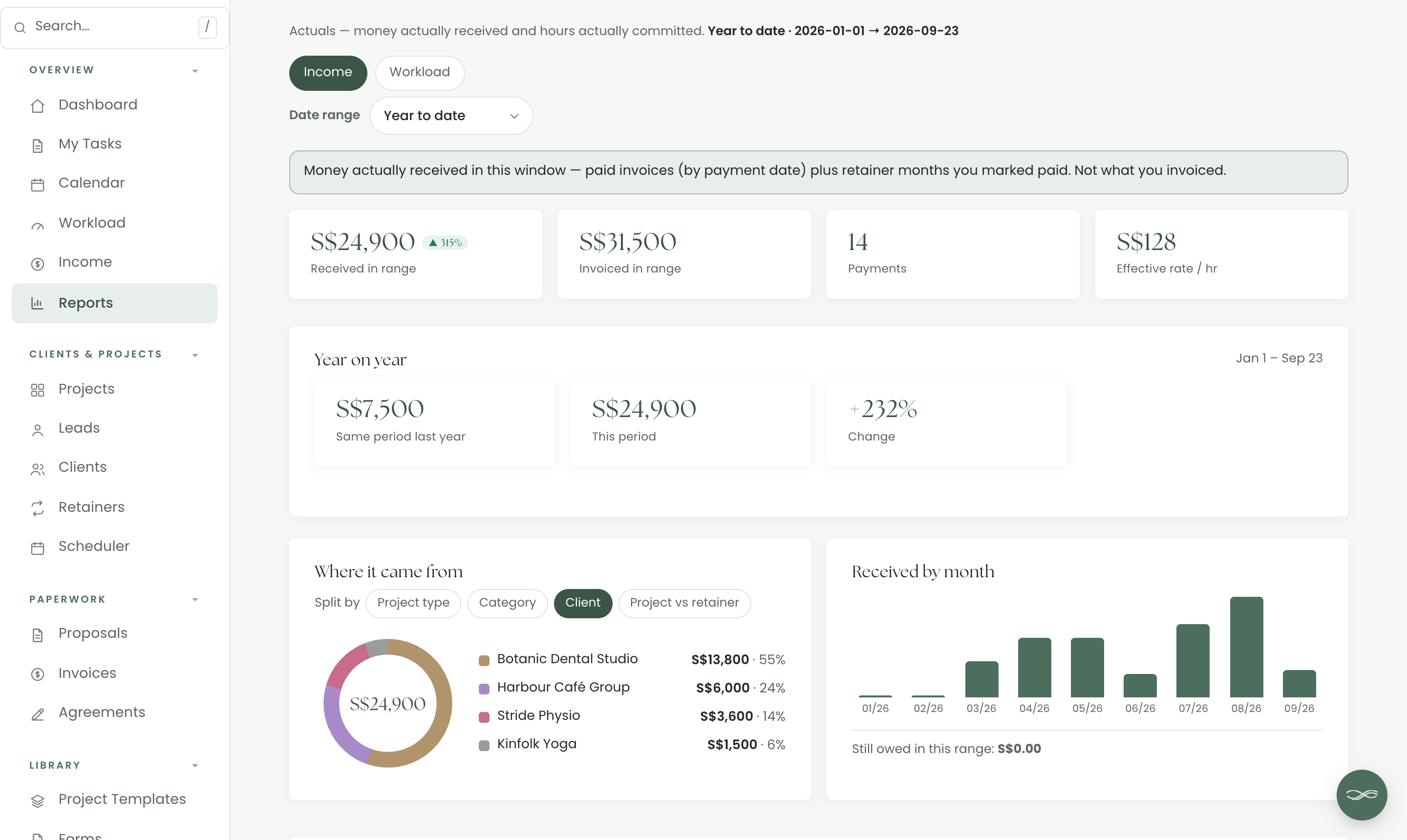
Chord's Reports show the money you actually received in any date range. You can split it by client, by category, or by projects and retainers, and compare it with the same period last year.
Reports also shows your effective hourly rate: the money you received divided by the hours you planned. The Workload tab breaks those hours down by client, and you can export both as CSV or PDF. Reports come with the Pro plan.
3. Recurring billing that chases itself
Sending the same invoice every month is dull, and it's easy to forget. Chasing it when it's late is worse.
Look for a tool that raises each month's retainer invoice for you, reminds clients before it's due, and follows up when it's late.
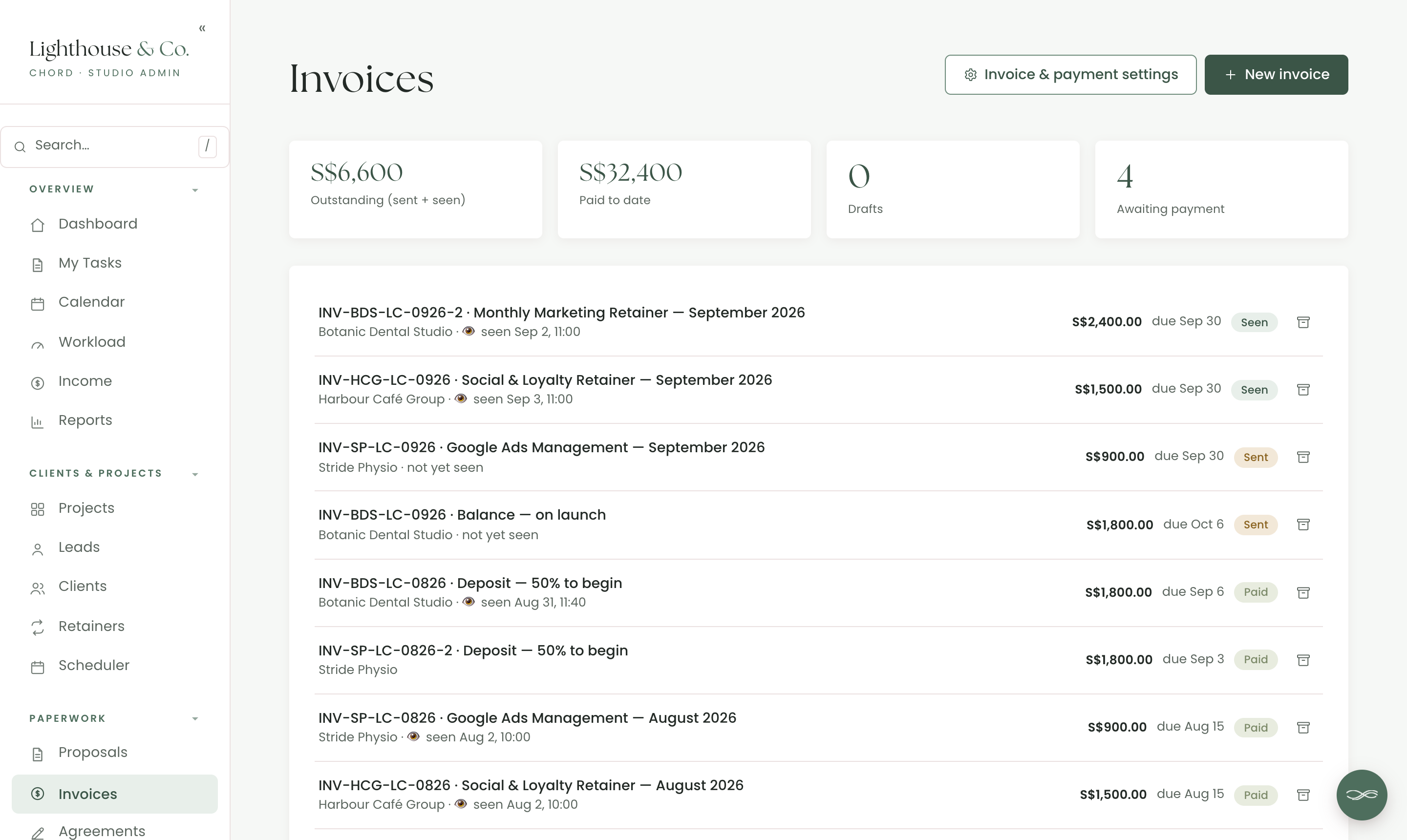
In Chord, you tick "Auto-bill monthly" on a retainer. When a new month starts, Chord raises that month's invoice the next time you open it. It can save it as a draft for you to check, or send it straight to your client.
Money autopilot handles the reminders, once you switch it on. It can remind clients a few days before an invoice is due, then chase it on set days after, in your own words. It runs every morning, whether or not you've opened Chord.
When an invoice is paid, Chord gives it a receipt number and emails your client a receipt.
4. Filling next quarter while serving this one
When your retainers are full, marketing yourself is the first thing to go. Then a retainer ends, and next quarter looks empty.
You need a way to keep enquiries coming in and moving forward, even in your busiest months.
Look for enquiry forms you can put on your website, a pipeline that shows every lead in one place, and automations that follow up for you.
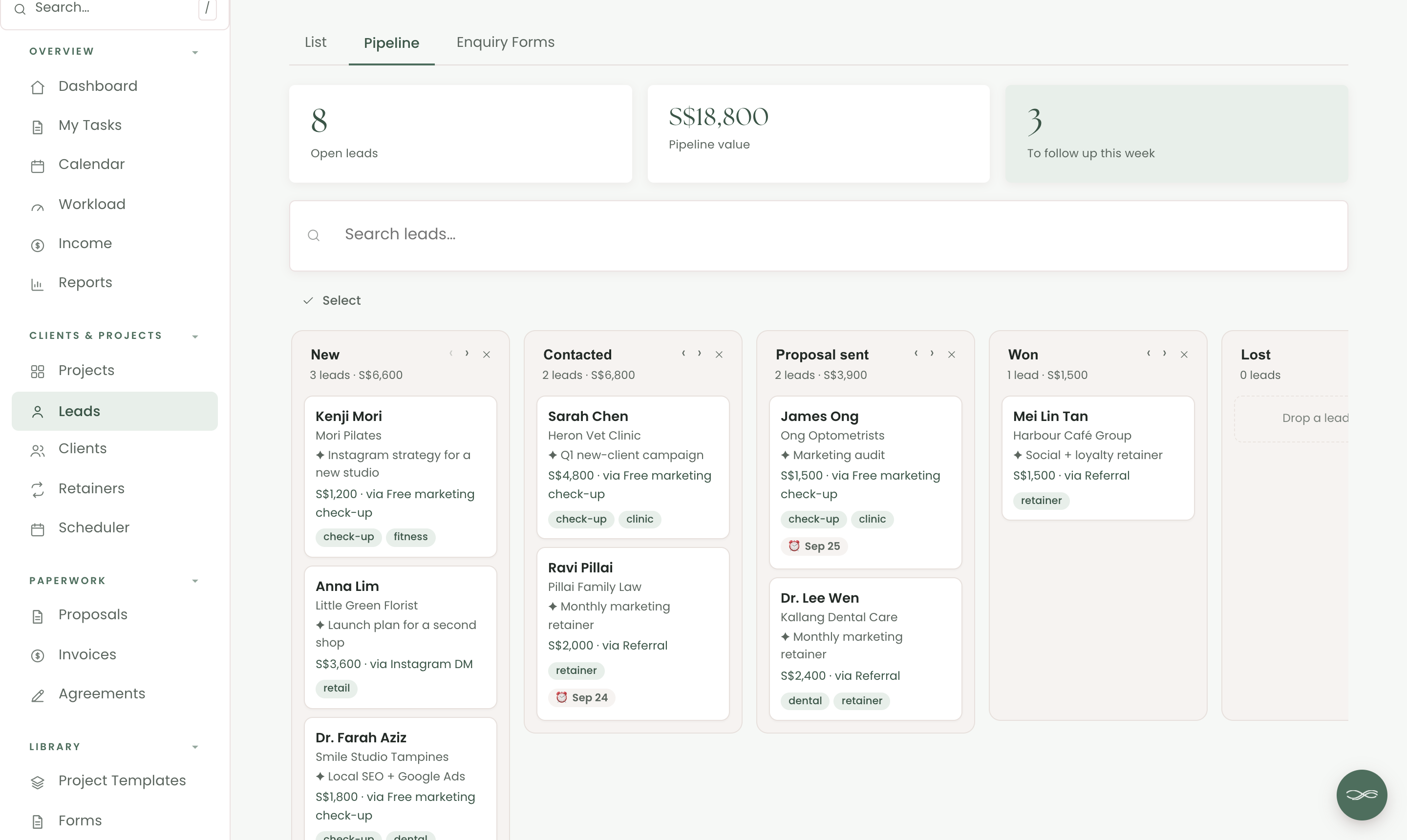
In Chord, you can create several enquiry forms, each with its own link or website embed. For example, you might offer a "Free marketing check-up". Every submission arrives on your pipeline as a new lead, tagged with the form it came from.
Your pipeline shows each lead's value, source and follow-up date. And a sequence can send a welcome email to every new enquiry within the hour, then follow up a few days later.
5. A portal that makes monthly value visible
Your client pays every month, but a lot of your work is invisible to them. They don't see the ad budget you moved, or the newsletter you rewrote at the last minute.
If they can't see the work, they start to wonder what they're paying for.
Look for a client portal that shows what's included in the retainer and what you delivered each month.
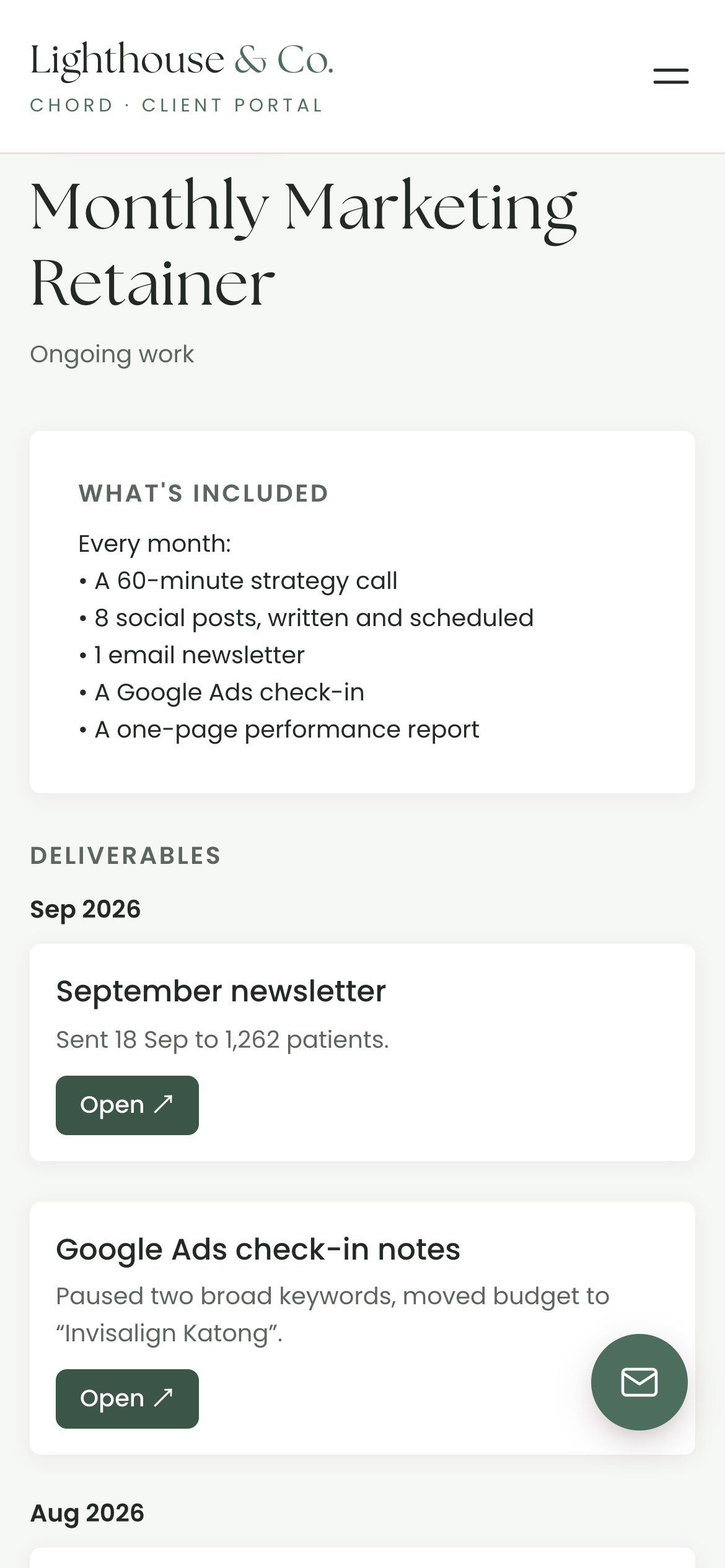
In Chord, you can share a retainer to your client's portal. They see what's included, the deliverables you release each month, and their invoices.
Each deliverable has a short note and a link, like "Sent 18 Sep to 1,262 patients". So when the check-in call comes around, the answer to "what did we get?" is already on their screen.
6. A plan that flexes with your seasons
One of my pet peeves: when you're at peak season, you pay for tools that expand your capacity. A lot of those tools lock you in, and then you find yourself in low season still paying for them, and now they're very expensive. Most software pricing assumes your business runs the same way every single month, but creative work doesn't.
That's why, when I built Chord, I wanted two plans you can switch between at any time. Starter at US$9 covers one active project at a time and 1 GB of storage. It doesn't include retainers, reports or sending email from your own domain, which makes it right for a one-project-at-a-time pace or a slower season.
When the work stacks up, move to Pro at US$29: unlimited projects and clients, retainers, reports, 10 GB of storage and sending email from your own domain. When things slow down again, drop back to Starter with no penalty. I made it this way deliberately, so Chord flexes with you through every season of your business.
The honest comparison
Most marketing consultants choose between the freelancer all-in-one tools and the client-portal platforms. Here's how the prices compare as I write this, billed monthly:
| Tool | Starts at (US$/mo) | Pricing model | Worth knowing |
|---|---|---|---|
| Bonsai | $15 | Per user, tiered | Invoices and contracts start at $25 |
| Moxie | $12 | Flat plans | Client portal starts on Pro ($25) |
| HoneyBook | $36 | Flat plans | Payments in US, Canada, UK and Australia |
| Dubsado | $35 | Flat plans, 3 users included | Deepest automations, long setup |
| SuiteDash | $19 | Flat plans, unlimited users | Recurring invoice generators start at $49 |
| Chord | $9 Starter / $29 Pro | Flat plans | First month of Pro US$1 with code TRIAL |
Based on published pricing as of September 2026, in US dollars, billed monthly (most tools discount annual plans). Check each site for current plans.
Bonsai charges per user, starting at US$15 a month. That entry plan doesn't include invoices, contracts, proposals or the client portal; you get those on the Essentials plan at US$25. If you want expense and tax tracking in the same tool, Bonsai is strong there.
Moxie is the best value, at US$12 a month for one person, and every plan includes time tracking. You need the Pro plan, at US$25, for the branded client portal.
HoneyBook is the polished all-rounder, at US$36 a month or US$29 if you pay yearly. Its online payments only work in the US, Canada, the UK and Australia, so check your country first.
Dubsado is the automation powerhouse. It starts at US$35 a month, or about US$28 if you pay yearly, and it includes three users. Its forms and workflows go deep, but setting them up takes a lot of time.
SuiteDash starts at US$19 a month, with unlimited staff and clients and a white-label portal. But proposals and recurring invoice generators need the Thrive plan, at US$49 a month.
And then there's Chord, which I built as a working creative, for solo studios and small teams. I built it around the six things in this post.
I'll be honest about two gaps. Chord plans your hours instead of timing them, so if you bill by tracked time, Moxie will suit you better. And it doesn't do your accounting or taxes, so Bonsai is better for that.
Setting Chord up takes a couple of hours.
How to choose
The table gives you a shortlist, but you still have to choose.
So take last month with your biggest retainer client and walk it through each tool you're trying. Include the checklist of work, the hours, the invoice, the new enquiry and the check-in call.
Then pick the CRM that helps you answer "what did we get this month?" in one screen.
If you'd like to try that in Chord, you can start in about ten minutes.