An interiors project scatters itself across more places than almost any other kind of creative work. The mood boards live in one app, the floor plans in a PDF from the architect, the procurement list in a spreadsheet, the budget in another one. Meanwhile the client keeps the ideas coming — a text about a pendant they saw at a friend's place, an email with four new Pinterest links, a voice note about the tile. Somewhere in all of it is the message where they approved the first concept. Finding it is your job now.
I run a creative studio and I build a client tool, so I'll say my bias upfront: Chord is mine, and it appears later in this post. But the first half is the part I wish someone had written for the solo designer — the five things that actually decide whether a CRM works for interiors, whether you buy ours or anyone else's.
This is written for the designer working solo or with one assistant, running a handful of residential and small commercial projects at a time. If you're a firm placing forty orders a month, your list looks different.
1. Concept approvals, room by room
Every interiors project lives or dies on approvals. The living room concept, the dining palette, the FF&E schedule — each needs a clear yes from the client, and each yes tends to arrive scattered: one in a WhatsApp voice note, one scribbled over a printed board, one implied in a phone call nobody wrote down.
So the first test of an interiors CRM is whether feedback happens on the boards. Look for a tool where the client clicks the actual swatch or render to leave a comment, where rounds are counted, and where an approval is a recorded event rather than a vibe. Room-by-room matters too: the dining room shouldn't stall because the living room is on revision three.
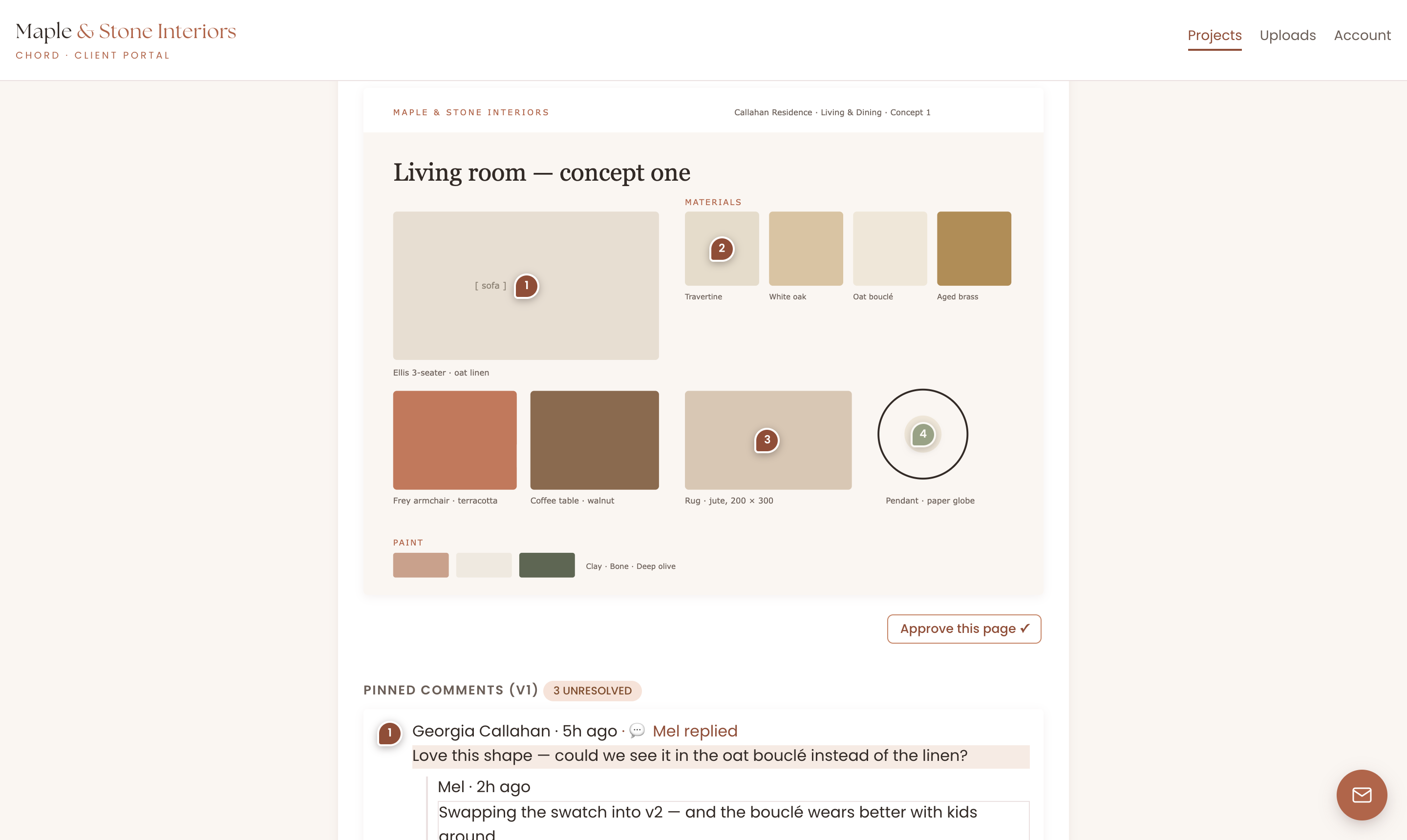
In Chord each deliverable gets its own proofing cycle with a set number of rounds. Clients pin numbered comments straight onto the board or render, you reply or push back in the thread, and extra rounds are named as billable before they happen. When a concept is approved, that approval sits on the record with the version it belongs to.
2. A project shaped like a renovation
A renovation is not a list of tasks. It's concept, then design development, then procurement, then install — and at the end of it, a handover day that someone has probably already scheduled movers around. Generic project tools flatten that into one undifferentiated to-do list, and things get messy.
Look for a tool that thinks in phases, anchors the whole timeline to the handover date, and reflows the working dates when life happens without ever moving the anchor. Lead times shift, a slab gets delayed, you take a week off; the plan should bend around the fixed point, not break.
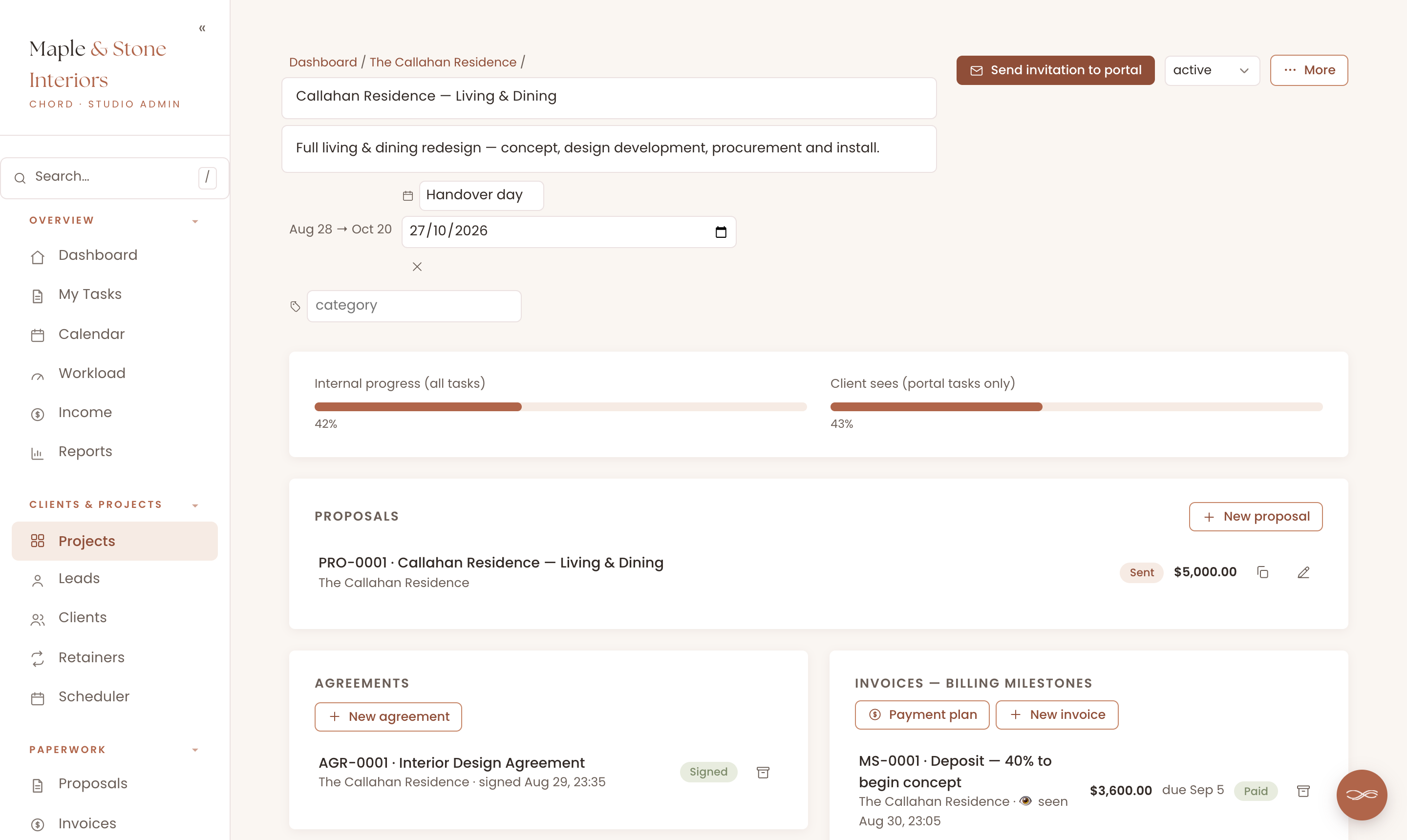
Chord projects run on named stages and take a key date — "Handover day", "Install week" — with task dates cascading in working days around it. Take a day off and the deadlines reflow while the handover stays put. The workload view shows how full your weeks are months ahead, so two installs colliding in November is something you see in August.
3. A paper trail for selections and choices
Every designer has lived the "but I never chose that tile" conversation. The selection was made — in a message, in a meeting, on a Pinterest board that has since been edited — and now, mid-install, nobody can point to where. The fix isn't better memory. It's a tool where selections, references and approvals accumulate in one place from day one.
The record has two sides. On yours: the concept boards, kept together with the client's approvals, version by version. On theirs: the floor plans, the inspiration photos, that picture of a hotel lobby they can't stop thinking about. In Chord, clients upload files up to 100 MB straight into the portal, or paste a Drive, Dropbox or Pinterest link with no size limit — from a task you've assigned them or from their own Uploads tab — and everything files into colour-coded folders you can both browse months later.
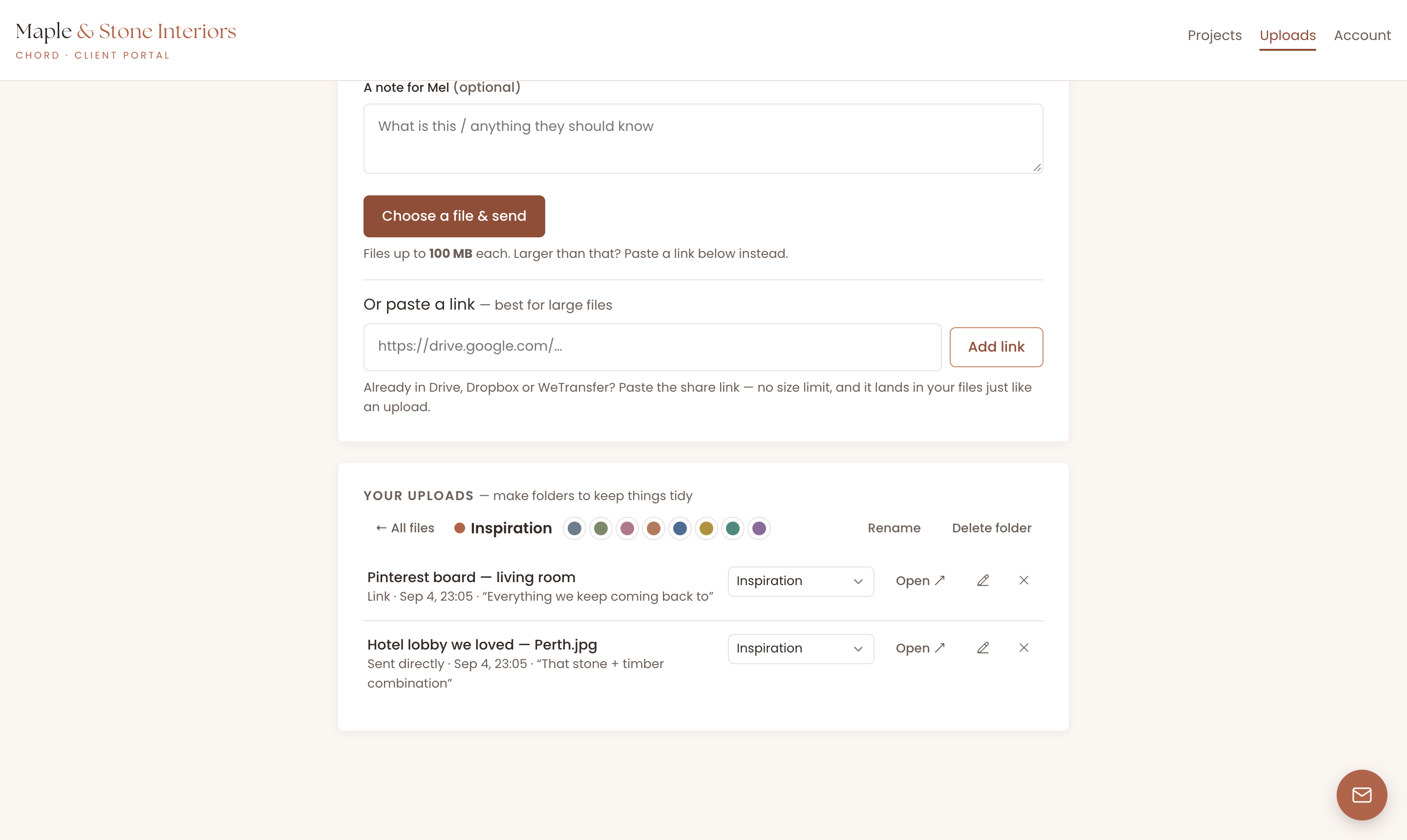
Between the approved boards on one side and the client's own uploads on the other, the project builds its own paper trail. When the tile question comes up, you open the folder and point.
4. Money in stages
Interiors money arrives in phases: a deposit to begin concept, a payment at design development, procurement sums as orders are placed, a balance around install. A CRM that only knows "send invoice, get paid" leaves you rebuilding that structure by hand on every project — and chasing each phase from memory.
Look for milestone invoicing with named phases, automatic reminders so the design development payment never needs an awkward email, and room for added scope: the powder room that joined the project halfway deserves its own line, not a mystery lump sum.
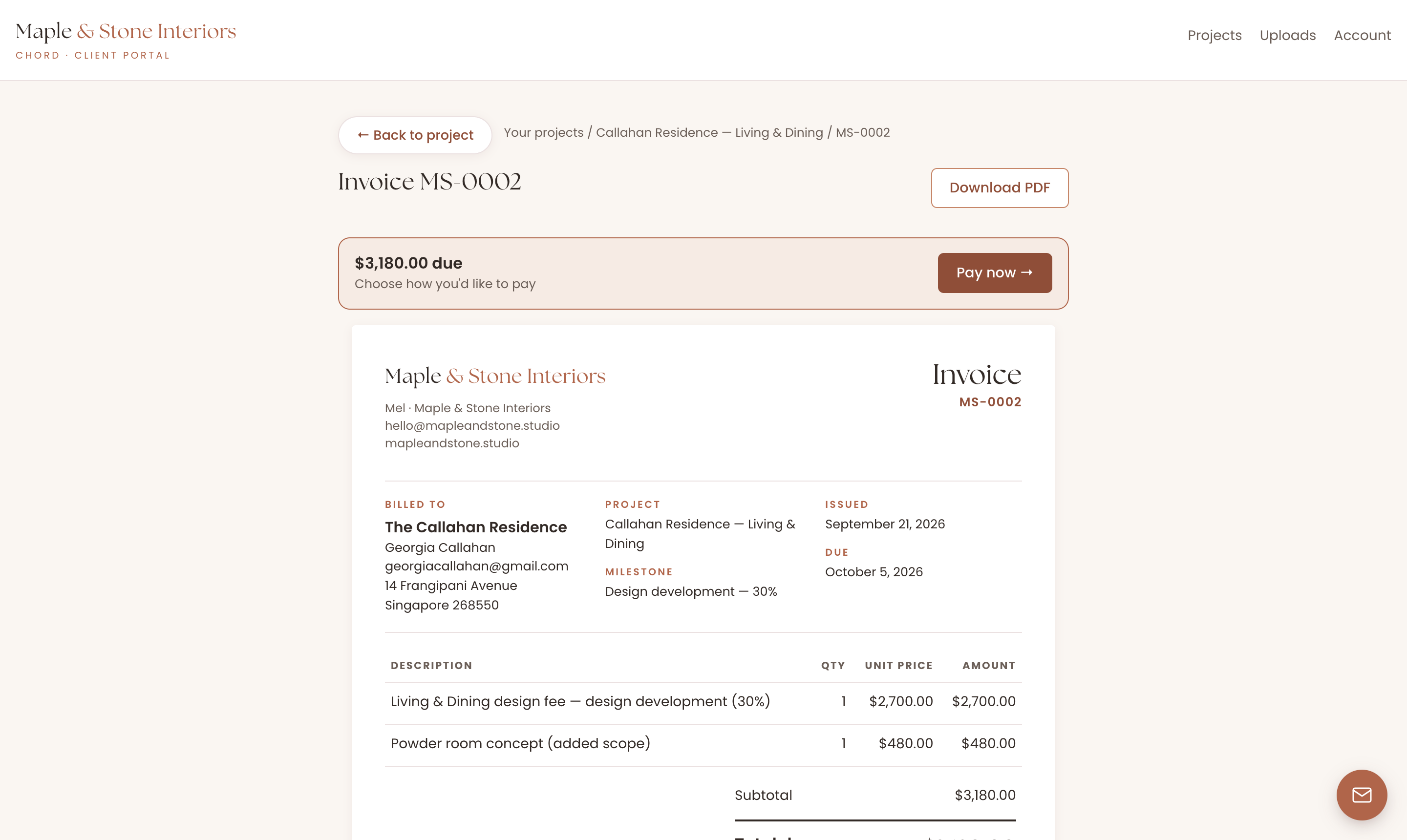
Chord does milestone invoices per phase ("Deposit — 40% to begin concept"), payment plans, automatic reminders, and card payments through your own Stripe alongside bank transfer and QR flows. Added scope goes on as a named line item, so the invoice matches how the project actually went.
5. A portal built for the long haul
A renovation runs for months, and the quietest stretch — procurement, when everything is ordered and nothing visible is happening — is exactly when clients start sending the "just checking in!" emails. They're not being difficult. They've paid a lot of money, and if you don't have a client portal, all they have is a silent inbox.
A good client portal answers the question before it's asked: what's happening now, what's next, what needs me. It should survive being opened once a fortnight on a phone, and it should never ask your client to remember a password.
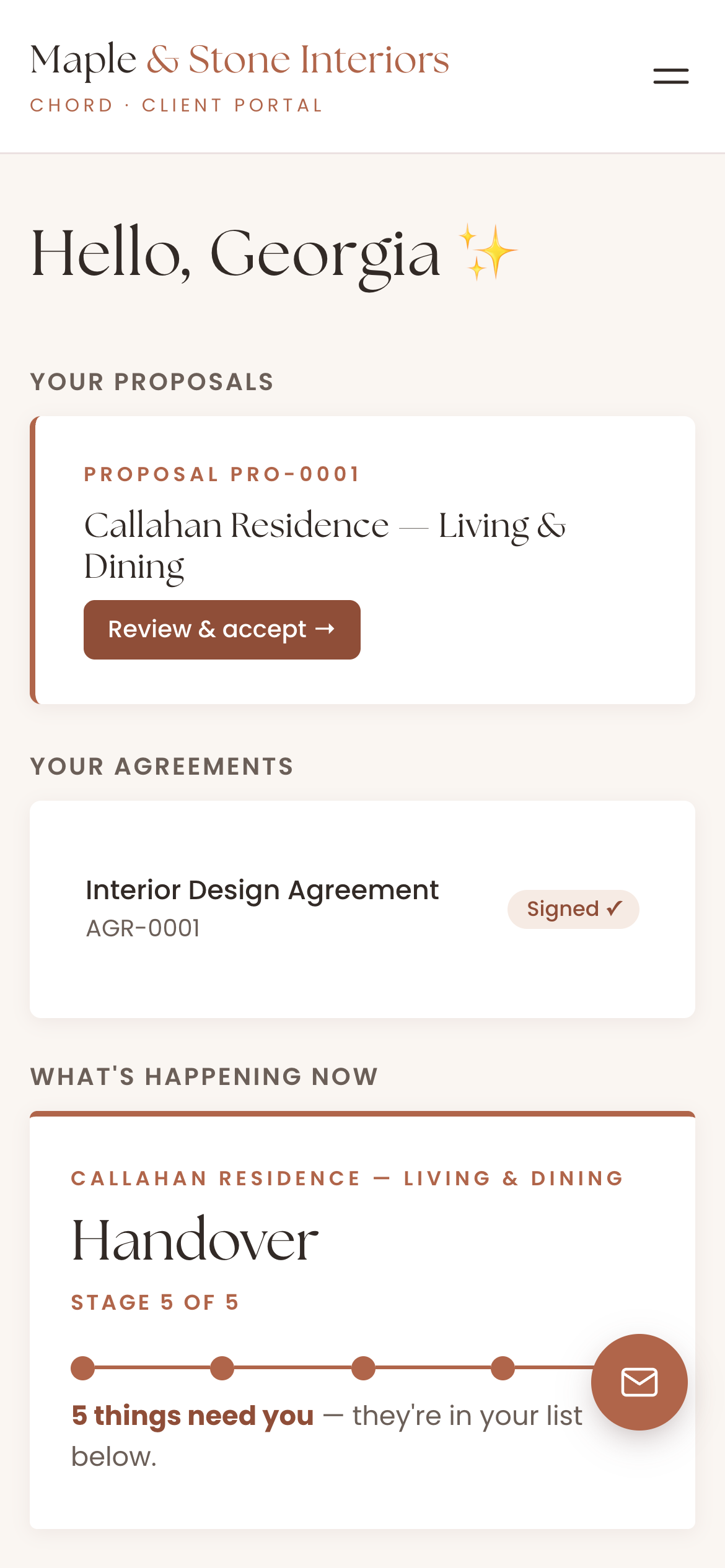
Chord's portal is one calm page per client with one-click sign-in links. They see the phases moving, the tasks that need them, the invoices and the signed agreement — and they message you through a little concierge button that arrives in your inbox as an email. Going away for a week? An away notice tells them, so the silence never looks like neglect.
The honest comparison
The interiors software market splits by how procurement-heavy your practice is. As of writing:
| Tool | Starts at (US$/mo) | Pricing model | Worth knowing |
|---|---|---|---|
| Studio Designer | $69 | Per user | Accounting-grade procurement + ledger |
| Houzz Pro | ~$249 | Volume-tiered, quote-based | Bundles Houzz lead flow; opaque pricing |
| Programa | $59–71 | Per seat (extra seats ~$31) | Procurement-first, modern UI |
| Mydoma Studio | $58 | Per user, single plan | Joined forces with Studio Designer in 2024 |
| DesignFiles | $49 | Flat plans | Budget pick; strong moodboards |
| Chord | $9 Starter / $29 Pro | Flat plans | First month of Pro US$1 with code TRIAL |
Based on published pricing as of September 2026, in US dollars. Check each site for current plans.
Studio Designer is the accounting-grade specialist — full ledger, purchase orders, vendor tracking, time billing — and the established firms running heavy FF&E volume swear by it. Pricing is per user from around US$69 a month. For a solo studio, the trade is real: you're taking on bookkeeping-grade software to get the client-facing parts.
Houzz Pro bundles project management with lead flow from the Houzz marketplace, which is genuinely valuable if Houzz is where your enquiries come from. Pricing is volume-tiered and hard to pin down before a sales call, and reviews consistently mention billing and cancellation friction — go in with eyes open.
Programa is the modern procurement-first pick: schedules, specifications and FF&E in a designer-first interface, priced per seat from around US$59–71 a month. If specification documents are the centre of your practice, it deserves a serious look.
Mydoma Studio is the approachable all-rounder — projects, selections and client portals on a single plan around US$58 per user — and it joined forces with Studio Designer in 2024 while continuing as its own product.
DesignFiles is the budget-friendly option, from about US$49 a month, with strong moodboards and e-design presentation tools. Lighter on the business spine, strongest at the visual front end.
And Chord is ours: built by a working creative for solo studios and small teams, around the five things above — approvals on the record, renovation-shaped projects, selections that accumulate, staged money, and a portal clients open without being asked. An honest line: Chord is not a procurement ledger. If you need purchase orders and vendor accounting, the specialists above win that. What Chord is, is the client-facing spine of the studio: the part your clients actually touch. Setup takes a couple of hours, not a whole week. Pricing flexes with you: start on Starter at US$9, move to Pro at US$29 when you want retainers and the deeper automation, and the code TRIAL makes your first month of Pro US$1.
How to choose
The table above gives you the shortlist, but it can't make the choice. Take your last full renovation — enquiry, concept, the revision that went two rounds too long, procurement, the tile dispute, install, handover — and walk it through any tool you're trialling. The CRM that handles your messiest approval and your money shape is the right one, whatever it's called.
If you'd like that walk-through to take about ten minutes, start it in Chord.