It's 2.45pm. You have fifteen minutes before school pickup, a client email asking for "just a quick call today", and a proposal you promised to send before the weekend.
You answer the email in the car park. You write half the proposal after bedtime. By Friday, you feel stretched thin, and a little guilty on both sides: there wasn't enough time for the work, or for the kids.
I run my own creative studio around a toddler, and I build a client tool called Chord. So I'll be upfront: Chord is mine, and I'll talk about it later in this post. First, I want to share the six things that decide whether a CRM helps you keep work and family in balance, whichever tool you choose.
I wrote this for mums who run a creative business, often in school hours and nap times. The right CRM for you fits around your family, instead of asking your family to fit around it.
1. Capacity that starts from your real hours
Most tools assume you work a full week, every week. You probably don't. Maybe you work Monday to Thursday in school hours, and the school holidays change everything again.
When a tool plans your work against a full-time week, every week looks fine on paper. Then real life happens, and you end up working at 10pm to catch up.
What you need is a tool that starts from the hours you actually have. You tell it how much client work you can take on and which days you work, and it does the maths from there.
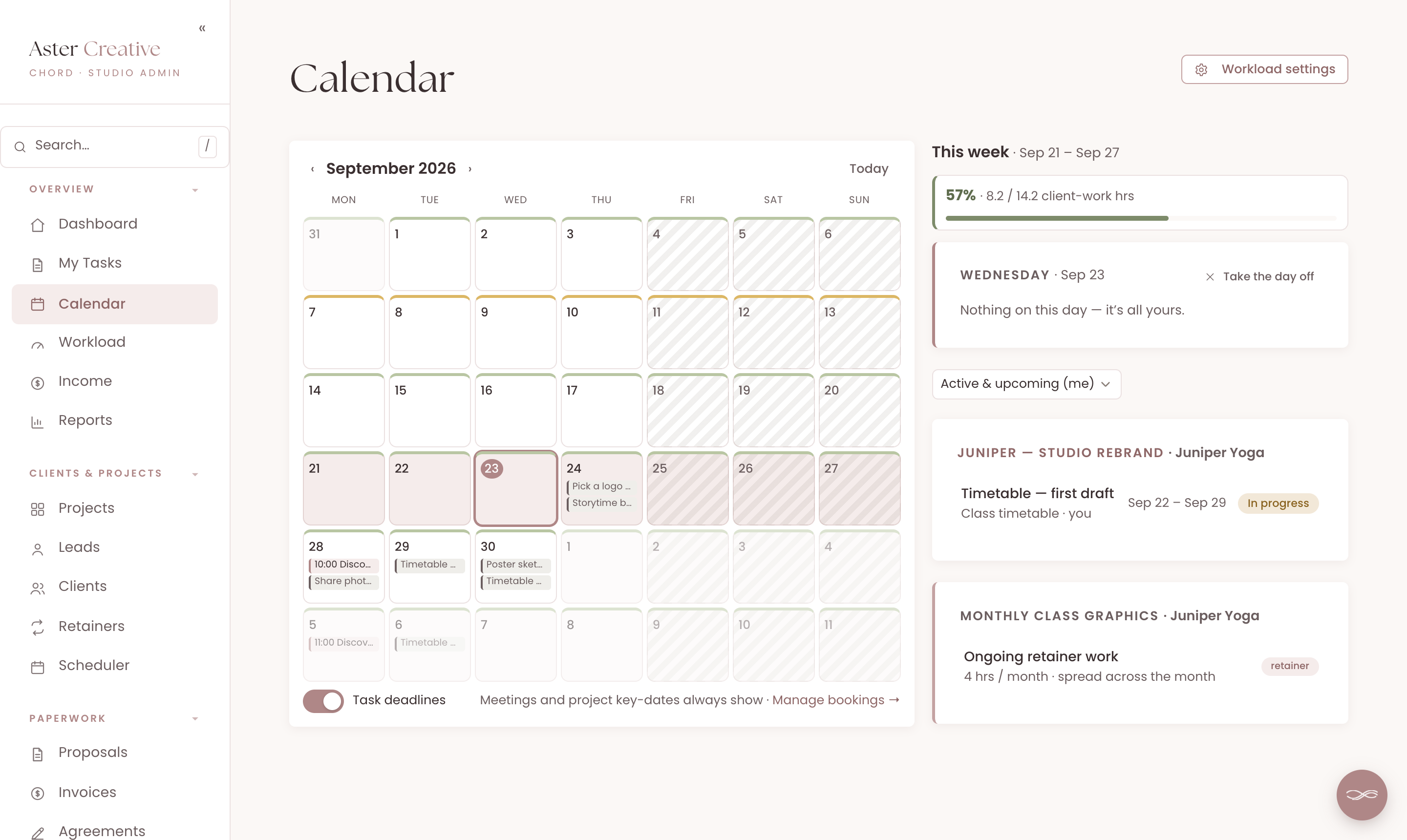
In Chord, you set your client-work hours for the month and pick your working days. Chord divides your hours across the days you actually work. If you set your country, public holidays come off automatically.
Every week on your calendar gets a coloured stripe: green while you have room, amber past 75% and red past 90%. You can also lower your hours for a single month, like the school holidays.
If you'd like to go deeper, I've written a whole post on running your weeks by traffic light.
2. The "parenting comes first today" button
Some mornings, your child wakes up with a fever, and the plan for the day is gone.
The missed day is only the start. Then come the deadlines you have to move by hand, the emails to clients, and the call someone booked for that afternoon.
What you need is one button that takes the day off and moves everything else for you.
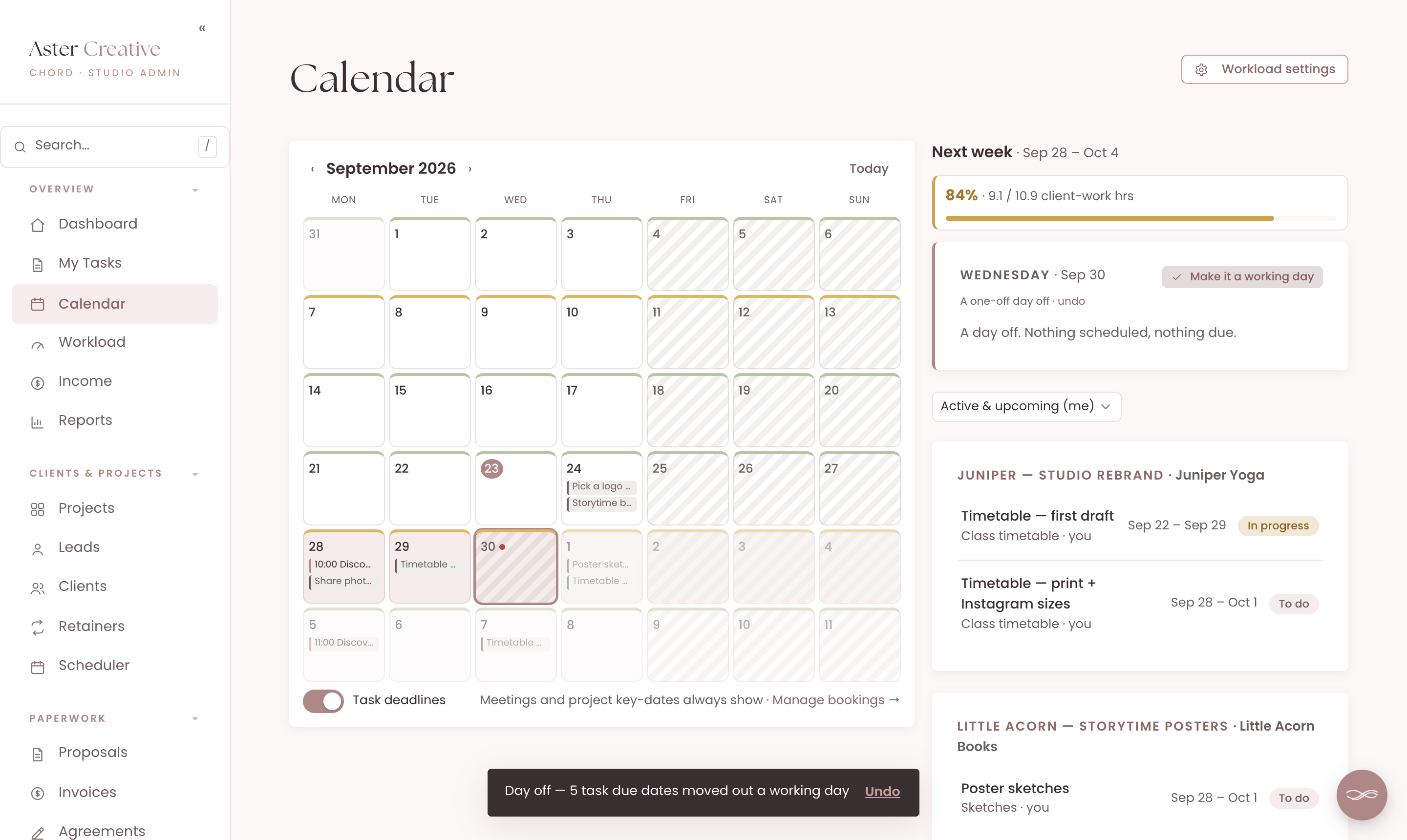
In Chord, you tap "Take the day off" on the calendar. Every open deadline from that day onwards moves one working day later, and a message tells you how many moved, with an Undo button.
If you use Chord's scheduler, clients can't book a call on that day either. Calls that were already booked stay booked, so you'll still need to move those yourself.
For longer breaks, you can set a holiday notice. It shows as a banner in every client's portal, in your own words, so clients know when you'll be back.
3. A studio that answers while you're at pickup
Enquiries don't wait for nap time. When someone gets in touch while you're at pickup, you want them to hear back, even if you can't reply yet.
Your existing clients have questions too. Usually it's the same one: "Where are we up to?"
Look for a CRM that can reply to new enquiries for you, and a client portal that answers the status question without you.
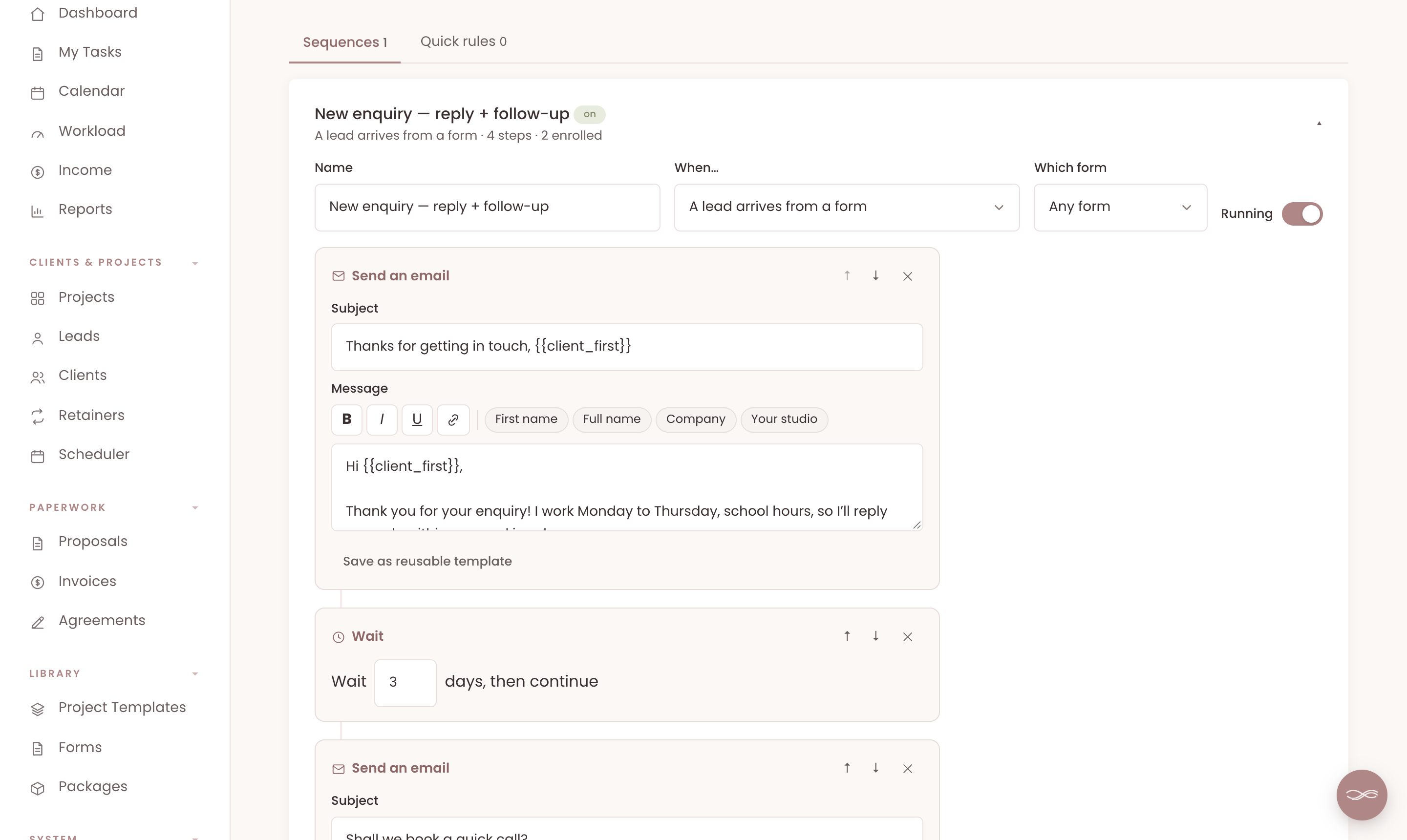
In Chord, you can set up a sequence that starts when an enquiry arrives from your website form. It sends your welcome email within the hour, waits a few days, then follows up. You only write the emails once.
Your clients' portal shows where each project is up to: the current stage, and whether anything needs them. If nothing does, it tells them you're on it.
When a client does want to reach you, they tap the message button in their portal. It arrives in your inbox as an email, and you reply when you're ready.
4. Paperwork in nap-sized pieces
Admin tends to happen in the gaps: twenty minutes during a nap, or half an hour after bedtime.
A proposal, a contract and a deposit invoice can easily take three separate sessions. By the time the last one goes out, your client has lost a little of their excitement.
Look for templates, so you never write from scratch. And look for a way to send the proposal, contract and deposit together, so one short session does the job.
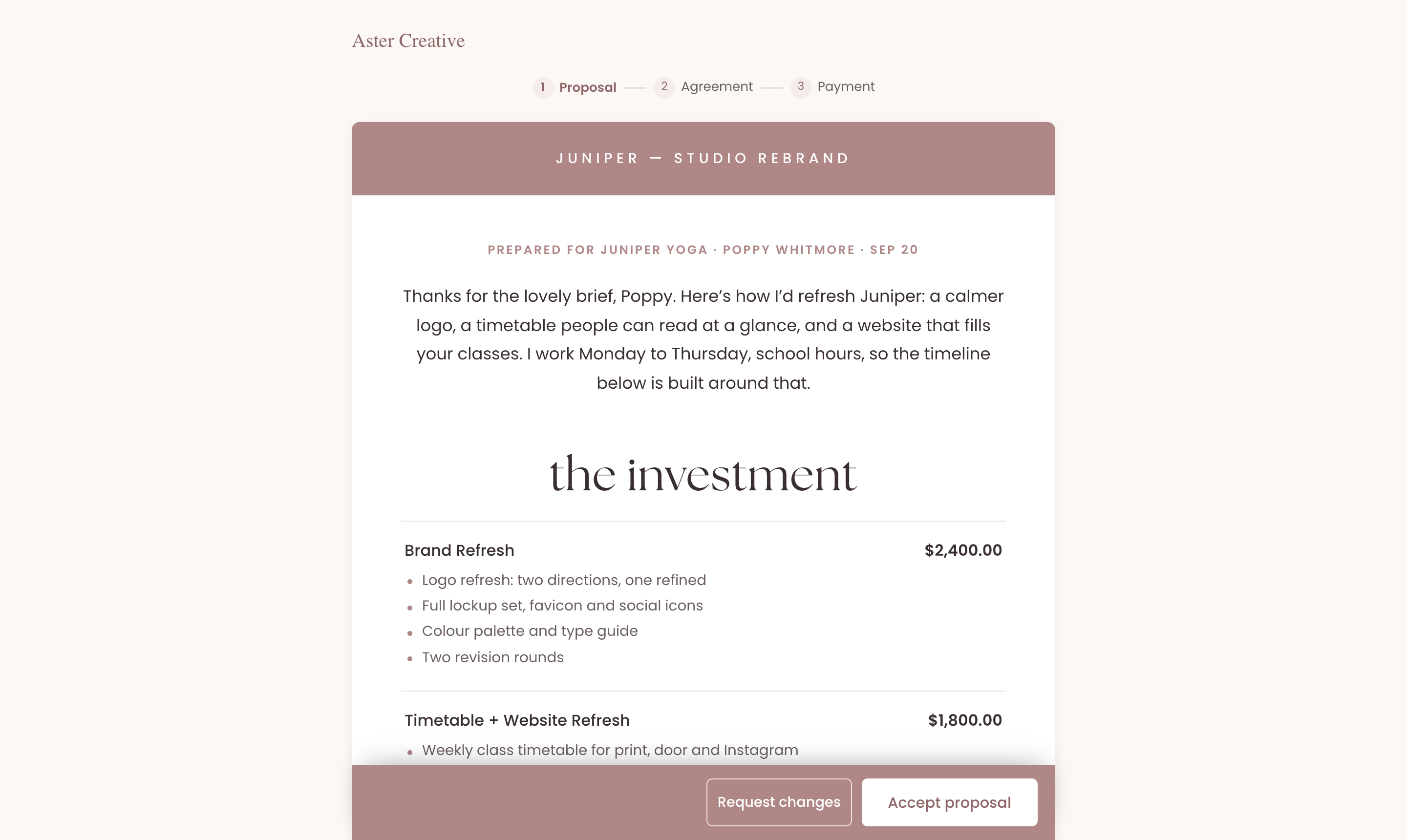
In Chord, you start proposals and contracts from your own templates. A payment plan splits the total into a deposit and milestones for you.
Then you send it all as one link. Your client accepts the proposal, signs the agreement and pays the deposit, one step after the other. They open it with a short access code, so there's no account to create.
5. The office in your pocket, on your terms
Being reachable is useful. Being reachable all the time is exhausting.
You want to know when a client pays or signs, even at the playground. You don't want every small update buzzing your phone at dinner.
Look for a CRM that works well on your phone, and lets you choose what's allowed to notify you.
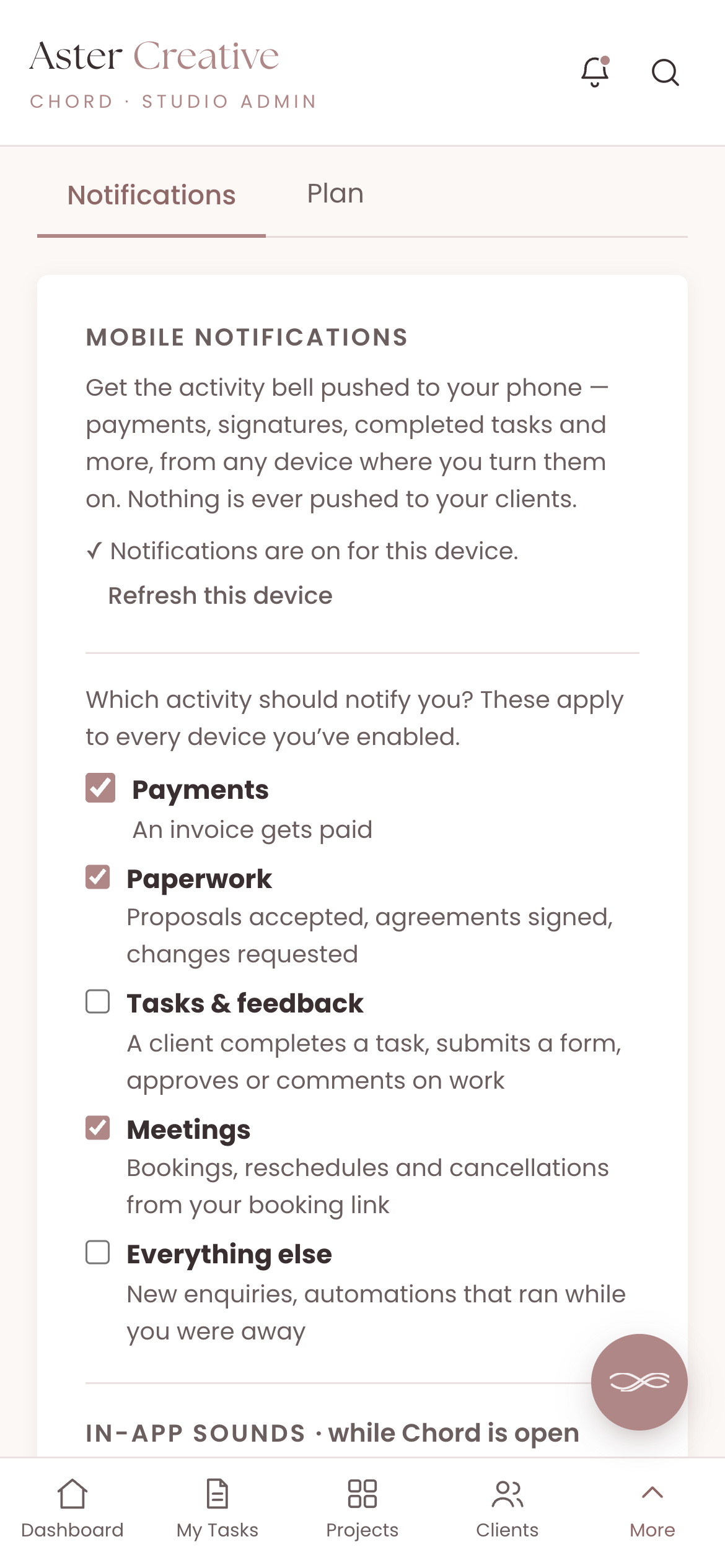
Chord installs on your phone like an app. You can switch on push notifications and choose which kinds reach you: payments, paperwork, tasks and feedback, meetings, or everything else.
So you can keep payments and signed agreements on, and mute the rest until the kids are in bed.
And if you like a little celebration, you can turn on a cha-ching sound for payments while Chord is open on your computer.
6. A plan that flexes with your seasons
One of my pet peeves: when you're at peak season, you pay for tools that expand your capacity. A lot of those tools lock you in, and then you find yourself in low season still paying for them, and now they're very expensive. Most software pricing assumes your business runs the same way every single month, but creative work doesn't.
That's why, when I built Chord, I wanted two plans you can switch between at any time. Starter at US$9 covers one active project at a time and 1 GB of storage. It doesn't include retainers, reports or sending email from your own domain, which makes it right for a one-project-at-a-time pace or a slower season.
When the work stacks up, move to Pro at US$29: unlimited projects and clients, retainers, reports, 10 GB of storage and sending email from your own domain. When things slow down again, drop back to Starter with no penalty. I made it this way deliberately, so Chord flexes with you through every season of your business.
The honest comparison
Most mum-run studios choose between the freelancer all-in-one tools. Here's how the prices compare as I write this, billed monthly:
| Tool | Starts at (US$/mo) | Pricing model | Worth knowing |
|---|---|---|---|
| HoneyBook | $36 | Flat plans | Payments in US, Canada, UK and Australia |
| Dubsado | $35 | Flat plans, 3 users included | Deepest automations, long setup |
| 17hats | $60 | Single all-inclusive plan | Free tier allows 4 invoices a quarter |
| Moxie | $12 | Flat plans | Client portal starts on Pro ($25) |
| Bonsai | $15 | Per user, tiered | Invoices and contracts start at $25 |
| Chord | $9 Starter / $29 Pro | Flat plans | First month of Pro US$1 with code TRIAL |
Based on published pricing as of September 2026, in US dollars, billed monthly (most tools discount annual plans). Check each site for current plans.
HoneyBook is the polished all-rounder, at US$36 a month or US$29 if you pay yearly. It can automate replies and follow-ups. Its online payments only work in the US, Canada, the UK and Australia, so check your country first.
Dubsado can automate almost anything, from US$35 a month or about US$28 if you pay yearly. But setting it up takes a lot of time, and that's time you may not have right now.
17hats puts everything into one plan at US$60 a month, or US$50 if you pay yearly. It also has a free tier that allows four invoices a quarter, which can work while you're starting out.
Moxie is the best value, at US$12 a month for one person, and every plan includes time tracking. You need the Pro plan, at US$25, for the branded client portal.
Bonsai charges per user, starting at US$15 a month. Invoices, contracts, proposals and the client portal start on the Essentials plan at US$25. If you want expense and tax tracking in the same tool, Bonsai is strong there.
And then there's Chord, which I built while running my own studio around family life. I built it around the six things in this post.
I'll be honest about two gaps. Chord doesn't do your accounting or taxes, so Bonsai is better for that. And Chord plans your capacity in whole days, so you can't tell it you work half days yet.
Setting Chord up takes a couple of hours, which you can split across a few nap times.
How to choose
The table gives you a shortlist, but you still have to choose.
So take last week and walk it through each tool you're trying. Include the enquiry you answered in the car park, the proposal you wrote after bedtime and the day you had to cancel.
Then pick the CRM that gives you back the most evenings.
If you'd like to try that in Chord, you can start in about ten minutes.