
It's the 12th. The invoice was due on the 1st. You've opened a new email three times, typed "Just following up…", and closed it again. You did the work and the client loved it. Now you have to ask for your own money, and it feels like begging. If you've ever wondered how to get clients to pay on time without that knot in your stomach, this post is for you.
That feeling is worth naming. Chasing money makes you feel awkward, a little embarrassed and, if rent is due, anxious. None of that means you're bad at business. It means nobody gave you a system.
Here's the good news. Most late payments aren't personal. The client forgot, the invoice sat in someone else's inbox, or paying it was fiddly. Each of those has a fix you can set up once.
This guide walks through six of them, in the order they happen: before the work, on the invoice, before the due date, after it, how to word it, and when to pause.
1. Agree how you'll be paid before you start
Late payment often starts on day one. If the contract says "payment on completion", nobody knows when completion is. If it doesn't mention a due date, your client's accounts team will use their own.
So write the money part down before any work begins. Say how much the deposit is, when each payment is due, and how many days the client has to pay an invoice. Fourteen days is common. Some studios use seven.
Take a deposit, too. A deposit of 30 to 50% is normal for creative work. It tells you the client is serious, and it means you're never owed the whole fee at the end. (I wrote more about turning a yes into a deposit.)
For longer projects, split the rest into stages: a payment at the halfway point and the balance before the final files. Smaller invoices get paid faster, and a missed one is easier to spot.
2. Make the invoice easy to pay
Put yourself in your client's shoes for a moment. They open your invoice on their phone between meetings. If they can't see the amount, the due date and a way to pay in five seconds, they'll "do it later". Later is how invoices go late.
A good invoice has a clear invoice number, one total, a due date written as a real date ("Due 14 October"), and every way you accept payment. Card, bank transfer, and a local option like PayNow in Singapore all help. The fewer steps between "I should pay this" and "done", the better.
Send it the day the work is approved, too. An invoice that arrives two weeks after the final files feels like an afterthought, and clients treat it like one.
3. How to get clients to pay on time: remind them before it's due
This is the step most freelancers skip, and it makes the biggest difference. Send one friendly note two or three days before the due date.
It isn't chasing, because nothing is late yet. It's a reminder, and most people are grateful for it. It also brings the invoice back to the top of their inbox at the moment it matters.
Something like this works:
Hi Sarah, a quick heads-up that invoice 1042 for $2,400 is due this Friday, 14 October. No need to reply if it's already on its way. Thank you!
Often, that one note is all it takes.
4. Follow up on a schedule, not on your mood
When an invoice goes overdue, most of us wait until we feel brave enough to write. That might be two days or three weeks. The client can't tell whether you care, and you spend the whole time feeling uneasy.
Decide your follow-up days once, and stick to them for every client. A simple schedule is:
- 3 days after the due date: a light nudge.
- 7 days after: a clear reminder with the invoice attached again.
- 14 days after: a direct note that names the next step.
A schedule takes the emotion out of it. You're not deciding whether to chase. You're following your process, the same way you would for any other part of the job.
5. Keep the tone warm and clear
You can be kind and still be clear. The trick is to assume good faith in the first two messages, and to be specific in every one.
For the first nudge, assume it slipped through:
Hi Sarah, just a nudge that invoice 1042 for $2,400 was due on 14 October and is still open. If it's already been paid, please ignore this. Here's the link again in case it's handy.
For the last one, be direct and give a date:
Hi Sarah, invoice 1042 is now two weeks overdue. Could you let me know when I can expect payment? I'll need to pause the next stage of work until it's settled, so I'd love to get it sorted by Friday.
Notice what's missing. There's no "sorry to bother you" and no long explanation. You're not bothering anyone. You're asking to be paid for work they agreed to.
6. Know when to pause the work
Every studio needs a line. For most, it's this: no new work starts while an invoice is overdue, and final files go out once the final invoice is paid.
Put that line in your contract, so it's a term you're applying and not a threat you're making. Some studios also add a late fee clause. Even if you never charge it, it signals that the due date is real.
Holding final files is the fairest pause there is. The client still gets everything they paid for. They get it the moment they pay.
I learned this one the hard way. A few years ago, I finished the copy for a client's website and sent the invoice for the final balance. Then I waited, and waited, and waited. A month after I'd handed over the finished copy, the invoice was still open.
I was annoyed, of course. But mostly I was worried, because this client was also a friend. I didn't want to sound desperate for money. I just wanted to be paid fairly. I'm an introvert, so I thought about that one chaser email for far too long before I worked up the courage to send it. Her reply? "Oh, I actually forgot." She paid straight away. Still, I can't help feeling it changed our friendship a little.
That's what I changed afterwards. Now my client portal says, from day one, that final deliverables are released on payment. There's nothing to negotiate and nothing to ask. The client pays, and the files are theirs straight away. It's a business policy, not me personally asking a friend for money.
Let the reminders send themselves
The schedule above works on paper. In real life, you're in the middle of a project on day three, and the nudge never goes out. That's why I built reminders into Chord, the client tool I run my own studio on.
In Chord, Money autopilot sends the heads-up before the due date and the nudges after it, on the days you choose. You can edit the wording, and it fills in the client's first name, the invoice number, the amount and the due date for you.
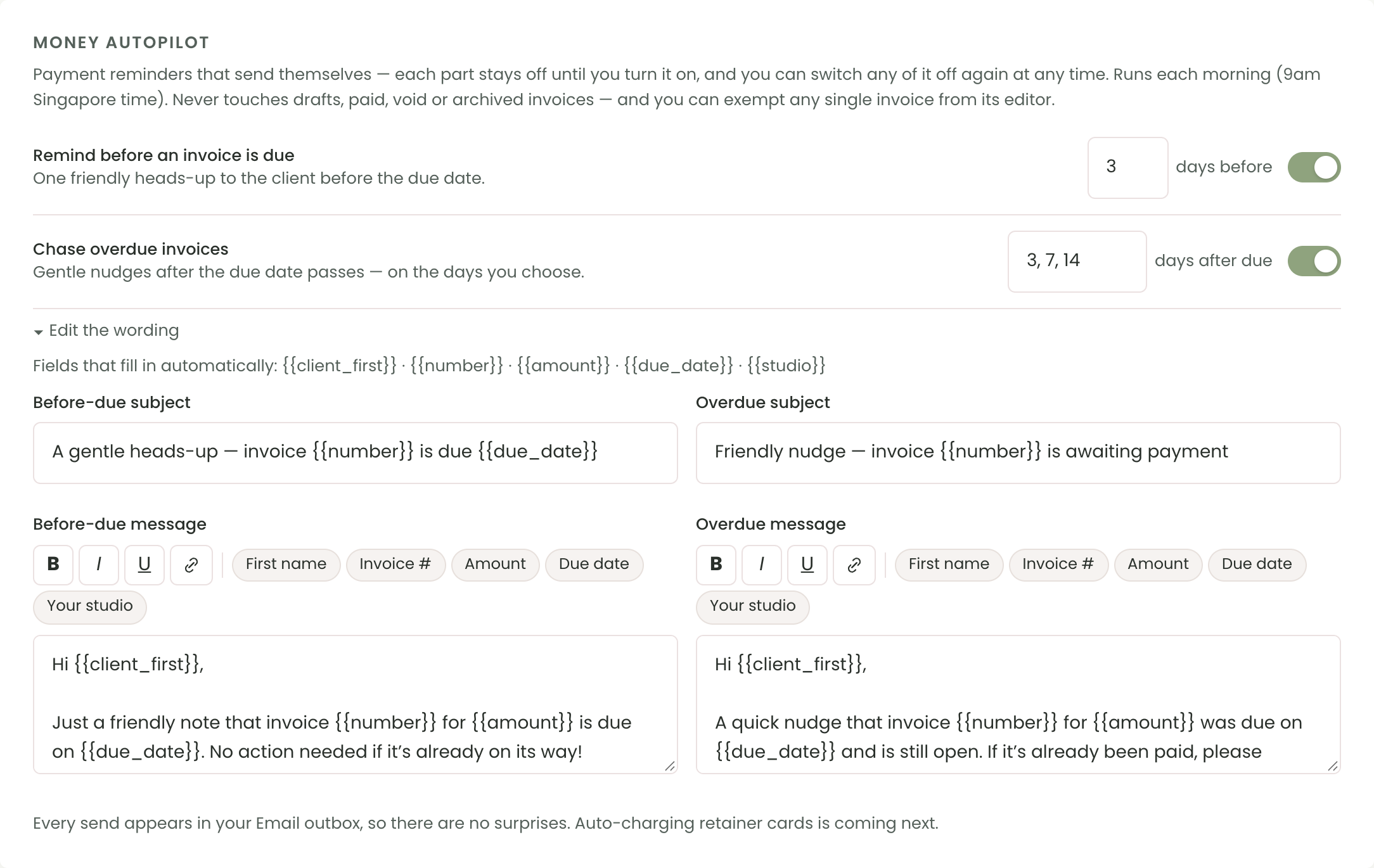
It's all off until you turn it on. It runs every morning on our server, so the reminders go out even when you haven't opened Chord. It never emails about drafts or paid invoices. You can switch it off for one client's invoice if you're handling that one personally.
Every reminder shows up in your Email outbox, so you always know what your client has been sent. You can also see when a client first opened an invoice, which tells you whether "I never got it" is true.
Your client pays from their portal, or from a link with a short code if they don't have a portal login. They can pay by card through Stripe, by bank transfer or by QR code. A card payment marks the invoice paid and sends the receipt automatically. For a transfer, they upload a screenshot and you confirm it.
You can also hold final files until the invoice is paid. Your client sees that they're waiting, and they unlock when the payment comes in.
Chord isn't accounting software. It won't reconcile your bank account or file your tax. It doesn't add late fees for you, and it can't yet charge a saved card each month for a retainer. If you need those, pair it with a tool like Xero or QuickBooks.
The short version
Agree the terms before you start. Make the invoice easy to pay. Remind before the due date. Follow up on a schedule, kindly and clearly. Pause the work when you need to.
None of it is pushy. It's a process, and a process means you never have to write that awkward email from scratch again.