It's ten at night and your phone lights up. It's the bride. "Quick one! Have we booked the florist yet? And how much do we still owe you?"
You know the answers are somewhere. They're split between a spreadsheet, a WhatsApp thread, your inbox and the notes app on your phone. You feel like you're carrying the whole wedding in your head, and that's exhausting when you're planning six of them at once.
That's why choosing the best CRM for wedding planners matters more than it seems. A good one holds the timeline, the payments and the couple's questions, so your head doesn't have to.
I run a creative studio and I build a client tool called Chord, so I'll be upfront: Chord is mine, and I'll talk about it later in this post. First, I want to share the six things that decide whether a CRM works for a wedding or event planner, whichever tool you choose.
I wrote this for independent wedding planners and small event studios who run every event from the first enquiry to the day itself. If you run a large venue or a catering business, you'll want a venue system, and your list will look different.
1. A timeline that counts back from the wedding day
Every wedding works backwards. The venue is booked first, then the photographer, then the florist, then the final numbers and the run sheet. Everything hangs off one date.
Most project tools work forwards from a start date. So when a couple moves their wedding by a month, you end up redoing every deadline by hand.
Look for a tool where each task sits a set distance before the event date, so the whole plan moves when the date does.
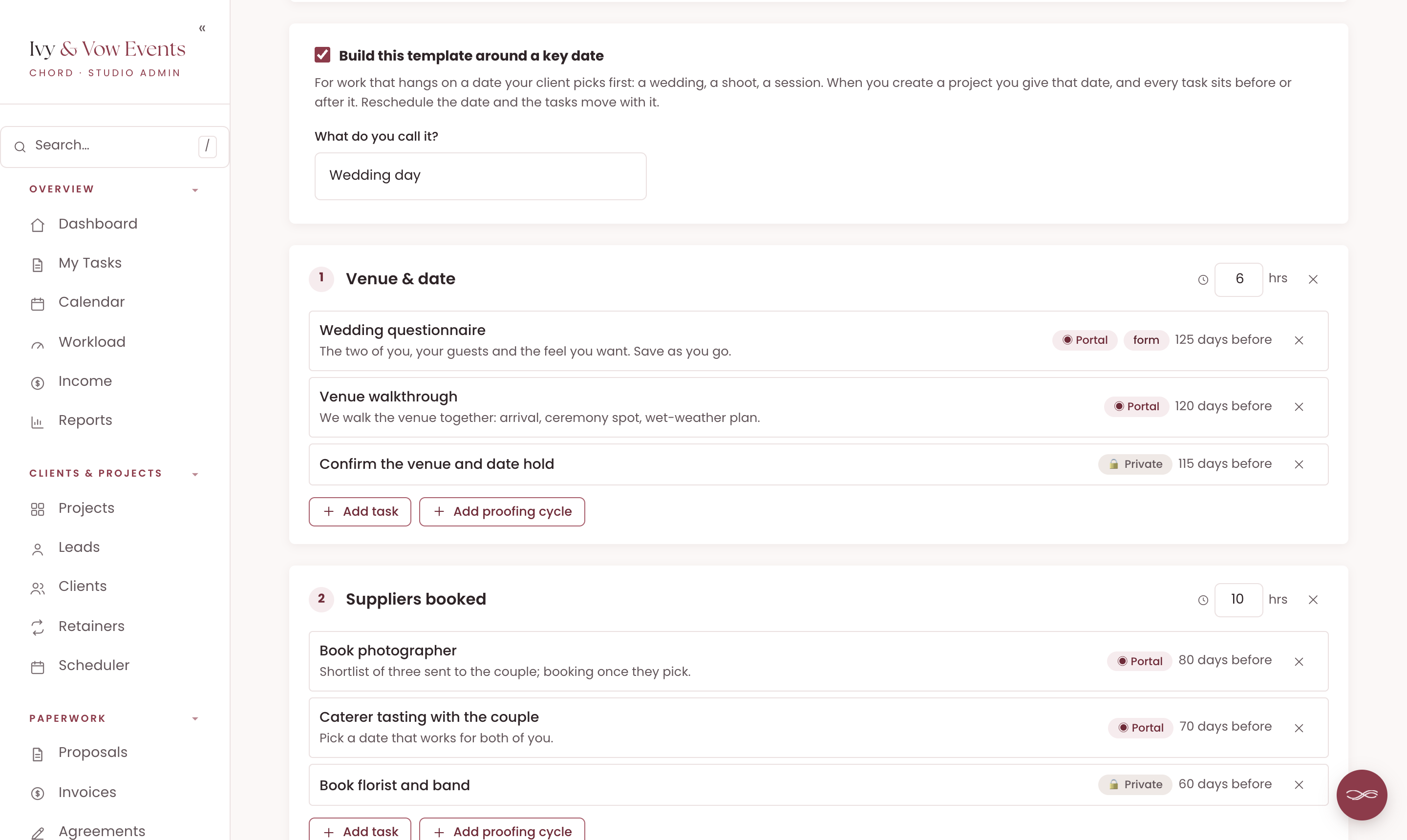
In Chord, you build your planning template around a key date and call it whatever you like, such as "Wedding day" or "Launch night". Each task sits a set number of working days before or after it.
When you start a new wedding, you enter the date, and Chord works out every deadline from it.
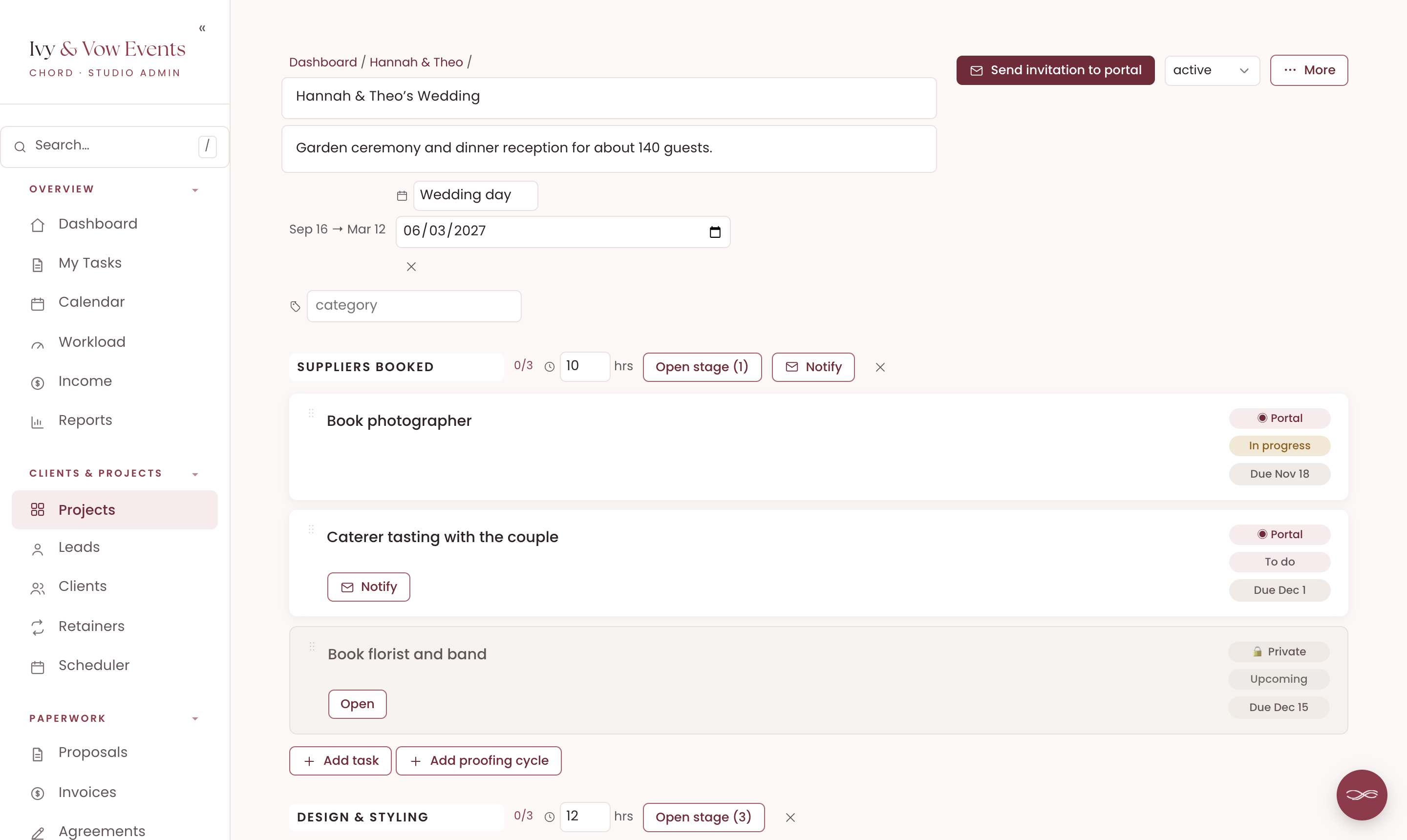
If the couple moves the date, you change it once on the project. Every task moves with it, and Chord tells you how many moved, with an Undo in case you change your mind.
Taking a day off doesn't shift these deadlines, because the wedding doesn't move for your day off.
One tip: Chord counts in working days, so set your working week first. If the wedding is on a Saturday and you don't normally work Saturdays, mark that day as a working day in your calendar, so the tasks on the day itself sit where they should.
2. One calm place for the couple
Couples are planning a wedding on top of full-time jobs. They want to know three things: when it is, what they've paid, and what they need to do next.
When those answers live in your head, they message you. Often late at night. And if there's more than one person involved, like the mother of the bride, you might be getting several texts about the same thing.
What you need is a portal the couple can open any time, which answers those questions without you.
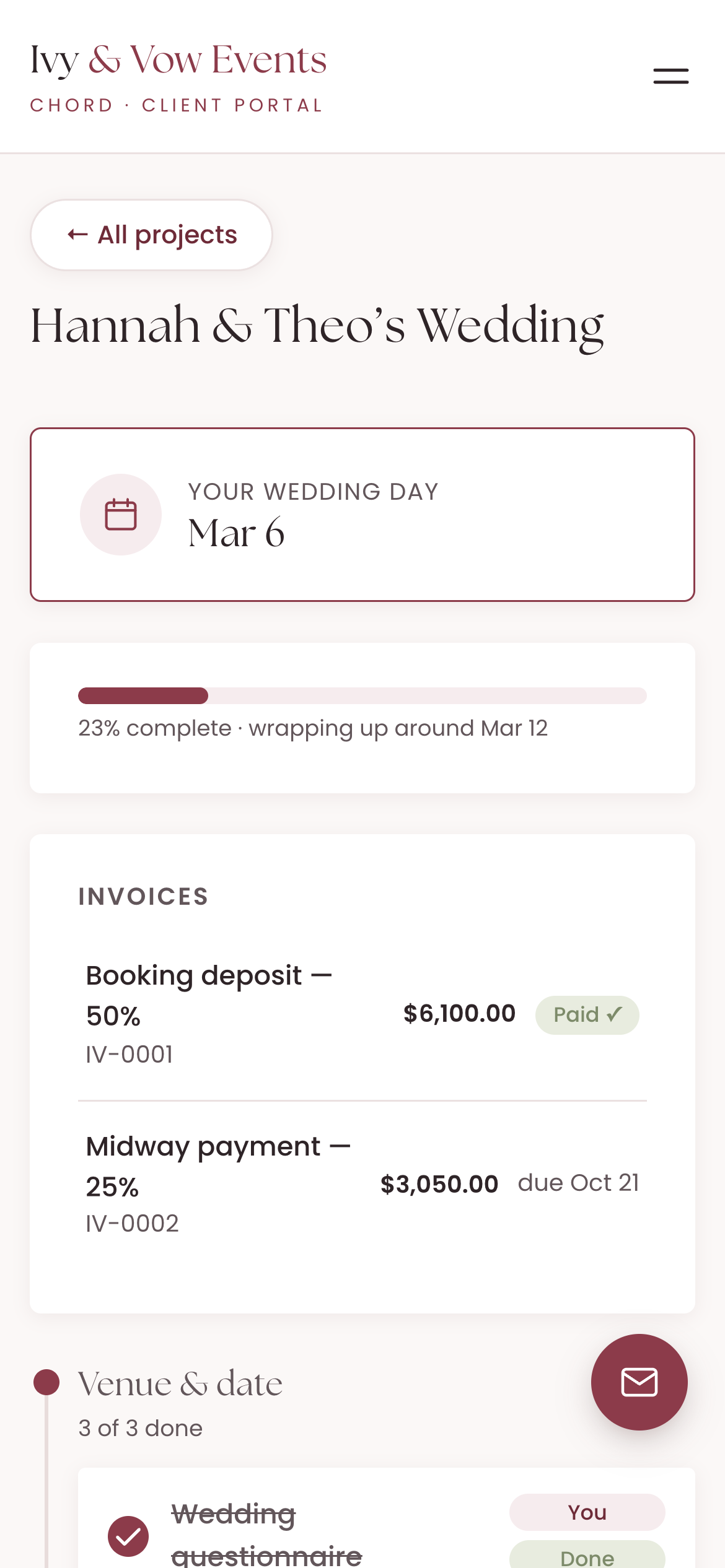
In Chord, each couple has their own portal. Their wedding date sits at the top, with a progress bar underneath, so they can see how far planning has come.
They can see every invoice, what's paid and what's due next. Anything waiting on them, like a form to fill in or an invoice to pay, sits in one section called "Waiting on you".
Both partners can have their own sign-in. You invite each one by email, and they sign in with an email link, so nobody needs a password.
3. Getting the couple's details without the email chain
A wedding runs on details: the guest count, the dietary needs, the song for the first dance, the names of the people giving speeches.
When you collect them over email, they arrive in pieces. Then you copy them into your run sheet and hope you didn't miss one.
Look for questionnaires the couple fills in inside their portal, and one place for them to send files.
In Chord, a questionnaire is a task on the timeline. You build it once, with text, dates, choices and file uploads, and reuse it for every wedding. Chord saves their answers as they type, so they can come back and finish later.
The couple also has an Uploads area for inspiration photos, the guest list or the seating spreadsheet. They can upload files or paste a link, and sort everything into folders.
4. A payment plan the couple agrees to up front
Weddings are big invoices, so they're almost always paid in stages: a booking deposit, a payment in the middle and the final balance before the day.
Chasing the last payment while you're also chasing final numbers is no fun for anyone.
What you need is a proposal that shows the payment plan before the couple says yes, then invoices that follow it.
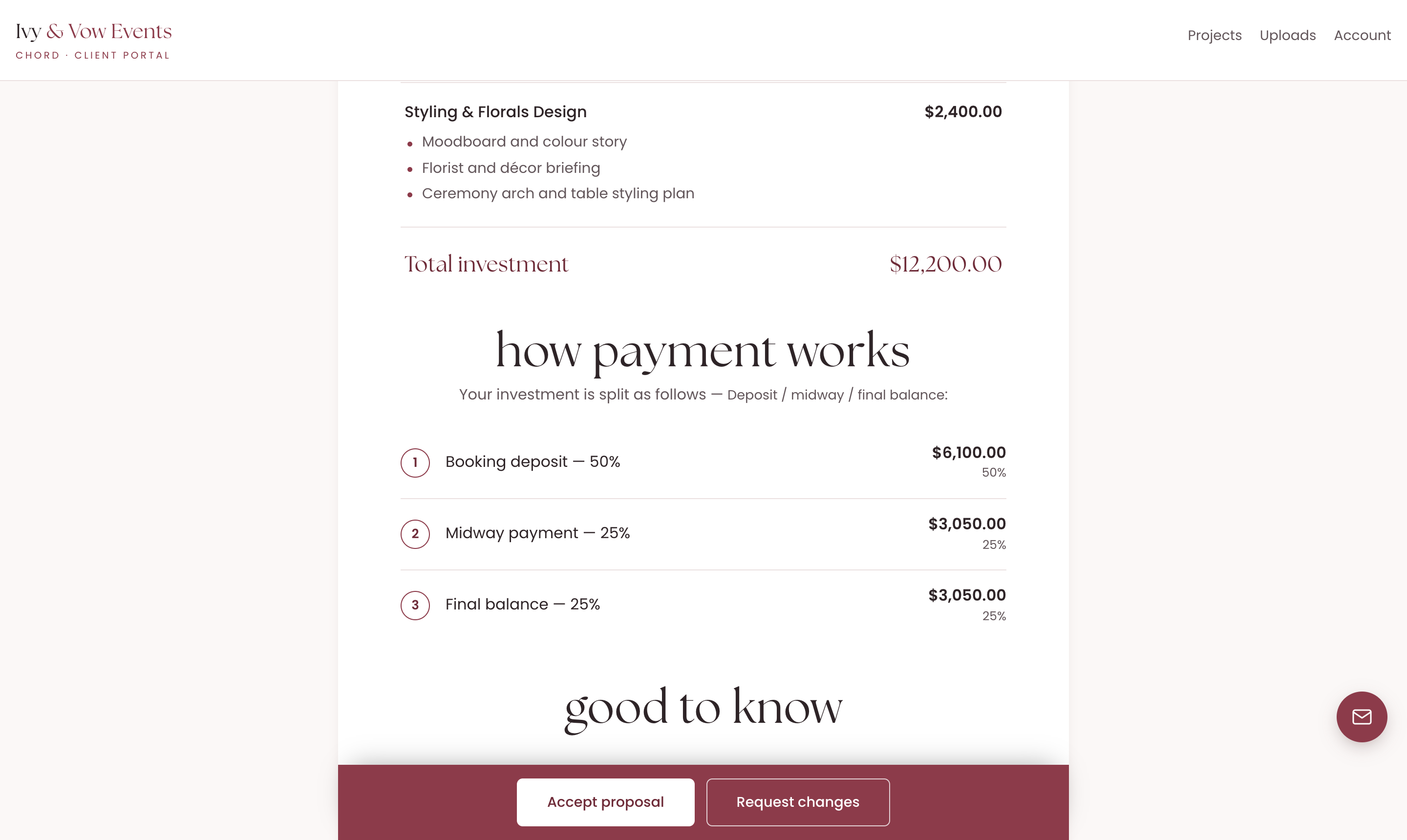
In Chord, you add a payment plan to your proposal, such as 50% to book, 25% midway and 25% before the day. The couple sees each amount in a "How payment works" section.
When you share the proposal by link, the couple can accept it, sign the agreement and pay the deposit in one go.
On the project, one click turns the payment plan into an invoice for each stage. They start as drafts, so you set each due date and send them when it's time.
Couples can pay by card through your own Stripe account, and Chord takes no cut. If you switch on reminders, Chord sends a polite email before an invoice is due and again if it's late, so you don't have to.
5. Seeing your whole season at once
Wedding season stacks up. In a busy month, you might have three weddings in planning, one next Saturday and a corporate launch in between.
When each event lives in its own folder, it's hard to see what's coming and whether you can take on one more.
Look for a view that shows every event date in order, alongside how busy you are.
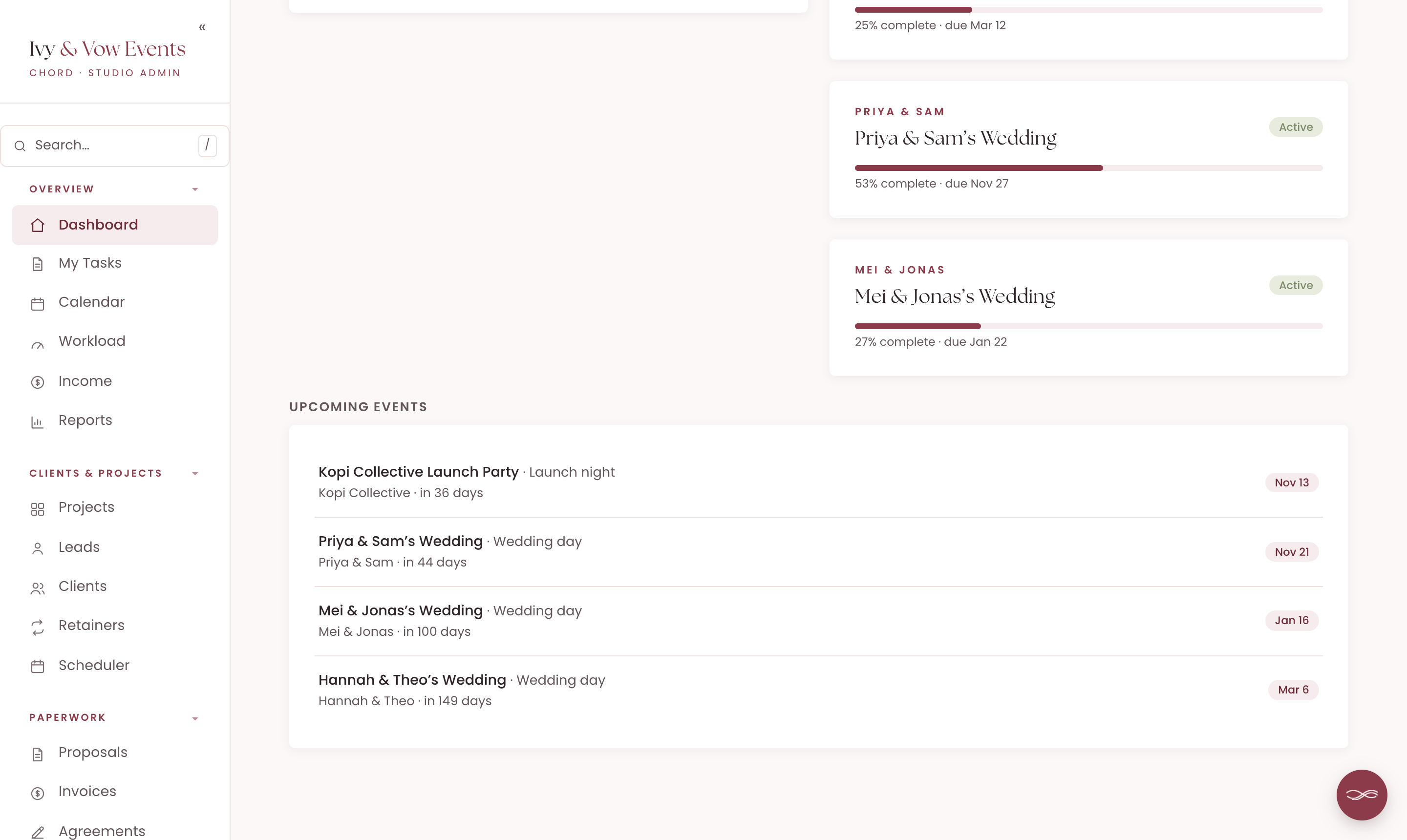
In Chord, your dashboard lists your upcoming events, soonest first, with how many days away each one is. Event dates also show on your calendar, next to your meetings and deadlines.
Chord also tracks your workload from the hours you plan for each stage. So before you say yes to another June wedding, you can see whether June has room.
6. A plan that flexes with your seasons
One of my pet peeves: when you're at peak season, you pay for tools that expand your capacity. A lot of those tools lock you in, and then you find yourself in low season still paying for them, and now they're very expensive. Most software pricing assumes your business runs the same way every single month, but creative work doesn't.
That's why, when I built Chord, I wanted two plans you can switch between at any time. Starter at US$9 covers one active project at a time and 1 GB of storage. It doesn't include retainers, reports or sending email from your own domain, which makes it right for a one-project-at-a-time pace or a slower season.
When the work stacks up, move to Pro at US$29: unlimited projects and clients, retainers, reports, 10 GB of storage and sending email from your own domain. When things slow down again, drop back to Starter with no penalty. I made it this way deliberately, so Chord flexes with you through every season of your business.
The honest comparison
Wedding planners usually choose between tools built for weddings and the all-in-one tools for creative businesses. Here's how the prices compare as I write this, billed monthly:
| Tool | Starts at (US$/mo) | Pricing model | Worth knowing |
|---|---|---|---|
| Aisle Planner | $49.99 | Tiered by active projects, unlimited users | Planning tools start at $69.99 for 15 projects |
| Planning Pod | About $74 | Tiered by active events, unlimited users | Prices not published on its own site |
| Dubsado | $35 | Flat plans, 3 users included | Scheduler and workflows start on Premier ($55) |
| HoneyBook | $36 | Flat plans | Available in the US, Canada, UK and Australia |
| Chord | $9 Starter / $29 Pro | Flat plans | First month of Pro US$1 with code TRIAL |
Based on published pricing as of October 2026, in US dollars, billed monthly (most tools discount annual plans). Planning Pod's figure comes from third-party listings. Card payment fees are extra with every tool. Check each site for current plans.
Aisle Planner is built for wedding planners, and it shows. It has checklists, timelines, budgets, vendor management, guest lists, seating layouts and even an event website with RSVPs. Its sales plan is US$49.99 a month, and the planning tools and client portal start at US$69.99 for up to 15 projects. Every plan includes unlimited users.
Planning Pod is a big toolkit for events, with floor plans, event orders and vendor tools. It now focuses mainly on venues. Its prices aren't on its own website, but listings put the event plans at about US$74 a month for 10 active events.
Dubsado is strong on forms and workflows, and its workflows can send emails and tasks timed around a project date. It costs US$35 a month with three users included. The scheduler and workflows start on Premier, at US$55. Setting it all up takes time.
HoneyBook is the polished all-rounder, from the first enquiry to the final payment. It costs US$36 a month, or US$29 if you pay yearly. Check your country first: it's only open to businesses in the US, Canada, the UK and Australia.
And then there's Chord, which I built as a working creative, for solo studios. I built it around the six things in this post.
I'll be honest about the gaps. Chord has no supplier list, guest list, seating plan or event website, so if you want all of that in one place, Aisle Planner does it better. Chord is also built for one person, with no team seats. And it doesn't automatically remind the couple about their tasks yet.
How to choose
The table gives you a shortlist, but you still have to choose.
So take your last wedding and walk it through each tool you're trying. Include the enquiry, the proposal, the deposit, the date change, the questionnaire and the final payment.
Then pick the CRM that handles the part of planning you find hardest.
If you'd like to try that in Chord, you can start in about ten minutes.