You send the homepage draft on Monday. On Wednesday, the reply comes back: "Love it! It just doesn't feel very us yet. Can it be a bit more... elevated?"
There's no sentence to fix and no word to change. You feel stuck, because you can't edit a feeling. So you guess, rewrite the whole page, and send round three.
I run a creative studio and I build a client tool called Chord, so I'll be upfront: Chord is mine, and I'll talk about it later in this post. First, I want to share the six things that decide whether a CRM works for a copywriter, whichever tool you choose.
I wrote this for freelance copywriters and small copy studios who write websites, launches, emails and content for clients. If you write in-house for one company, your list will look different.
1. Draft rounds with a counter
Every copywriter knows the email that starts with "Sorry, one more tweak!"
One tweak is fine. But the fourth small change in a week turns a two-round project into a five-round project, and nobody is paying for rounds three, four and five. You feel taken for granted, but you don't want to sound petty.
What you need is a tool that counts each round of changes, and shows your client the count too.
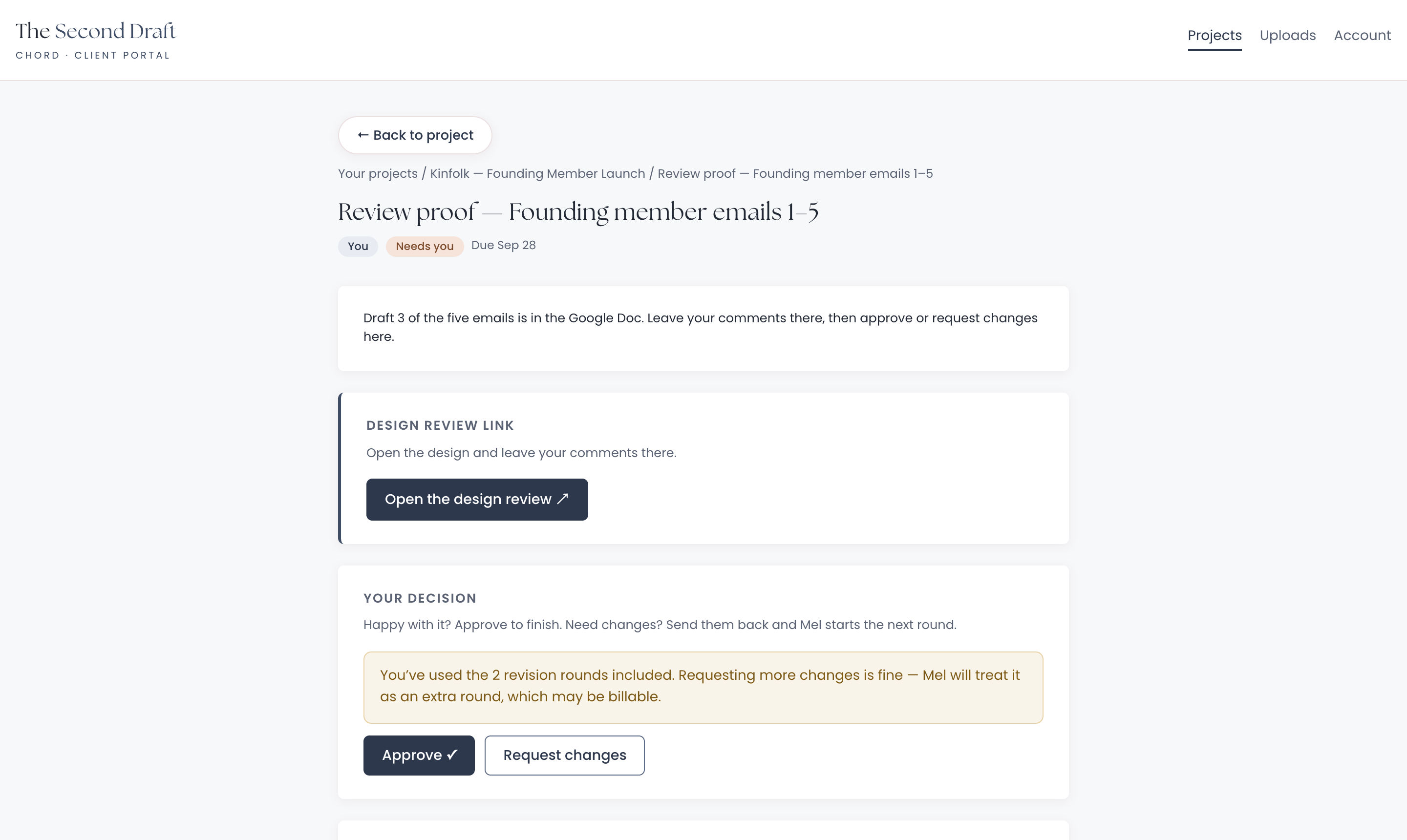
In Chord, each draft runs as a proofing cycle with a set number of included rounds. Every time your client clicks "Request changes", Chord counts a round.
Once they've used the rounds you included, the portal tells them that more changes are fine, but they count as an extra round, which may be billable. You see the extra round flagged on your side too.
Chord doesn't add the charge for you. You decide what to bill, but the conversation has already started, in writing, before any extra work begins.
2. Feedback on the exact words
Copy feedback is usually about one word in one sentence. But it arrives as a paragraph in an email: "In the bit about swimming, can it sound less salesy?"
You spend the first ten minutes of every round working out which line they mean.
Look for a tool that lets your client point at the exact line, or that works with the doc you already share, while still counting the rounds.
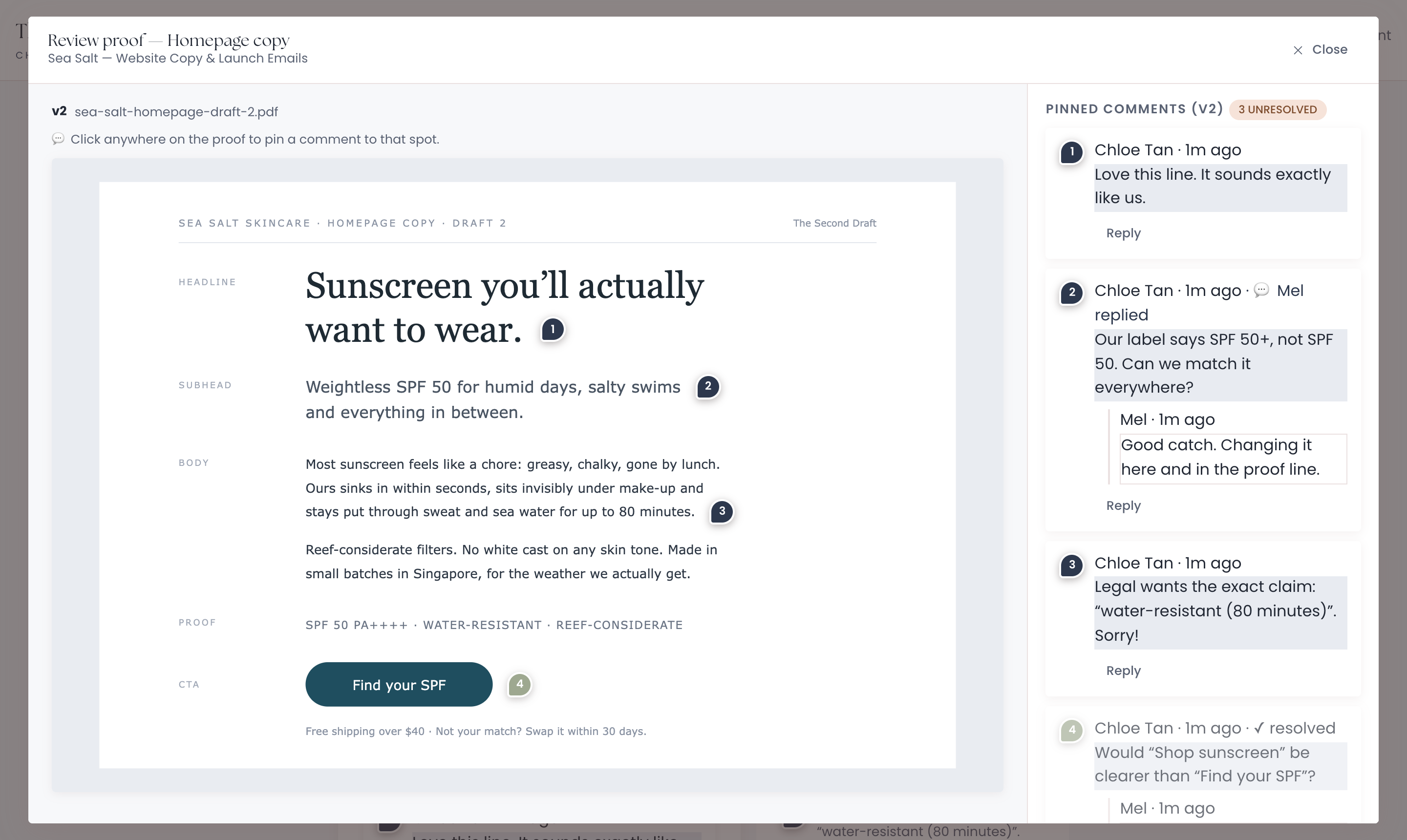
In Chord, you upload your draft as a PDF, and your client clicks anywhere on the page to pin a comment. You reply in the thread, and mark each comment done once it's in the next draft.
Prefer to work in Google Docs? Add the doc link to the review instead. Your client leaves comments in the doc, then comes back to Chord to approve or request changes, so every round is still counted.
3. Content retainers with monthly checklists
Many copywriters have a client or two on a monthly content retainer: blog posts, a newsletter, social captions.
It's steady income, but the work is easy to lose track of. By the end of the month, you're not sure whether you delivered four blog posts or three, or how many hours they really took.
Look for a tool that lists each month's content with its hours, so you can tick things off and see whether the month is on track.
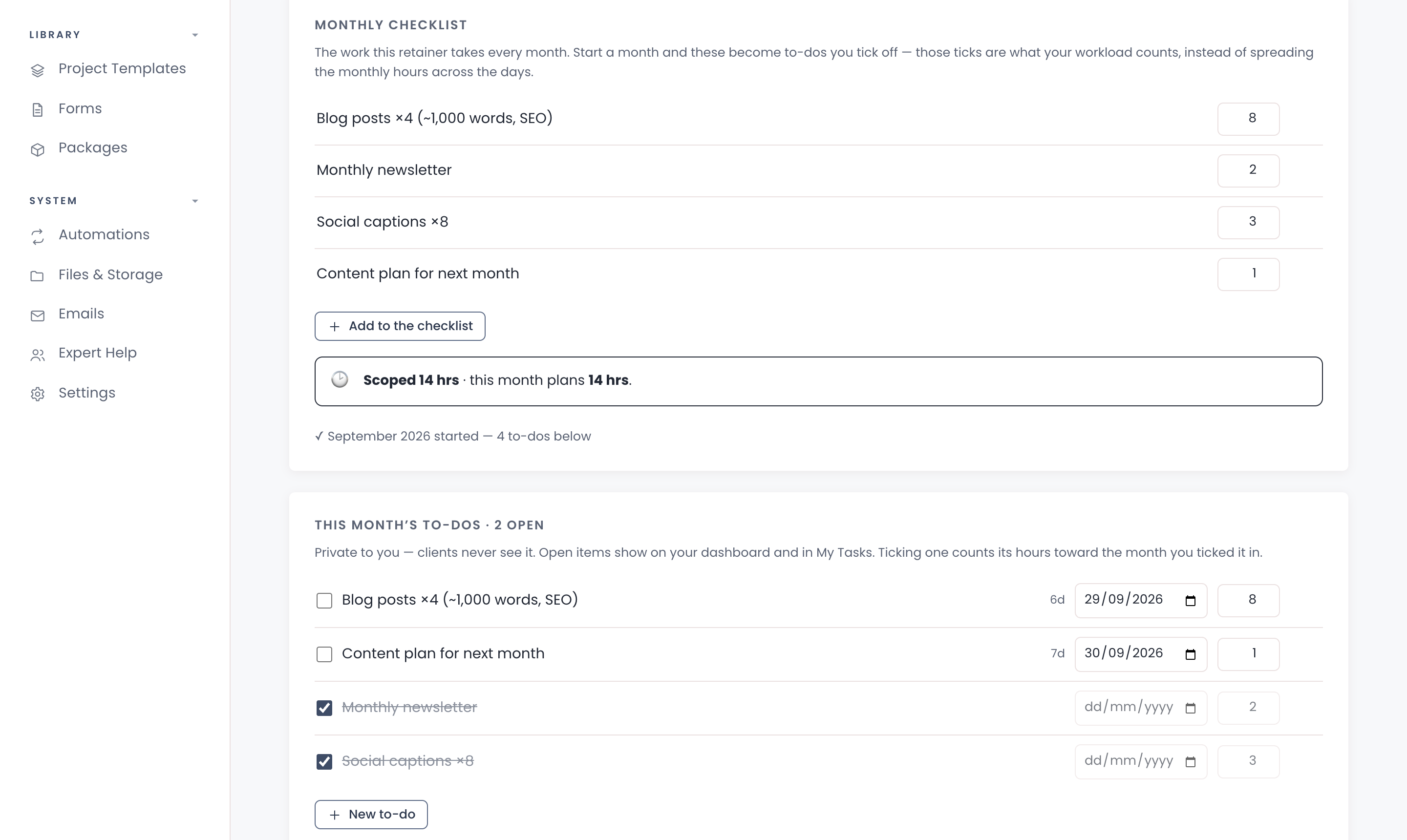
In Chord, you give a content retainer a monthly checklist, such as four blog posts, a newsletter and eight captions, each with its hours. When you start a new month, the checklist becomes that month's to-dos.
As you tick them off, the hours count toward your workload. Chord also shows the hours you sold next to the hours the month plans, so you notice early when a client starts getting more than they pay for. Retainers come with the Pro plan.
4. The questionnaire that writes half the brief
Good copy starts with your client's own words: how they talk about their customers, what they love and what makes them cringe.
If you gather that on a discovery call, you spend the call typing notes. If you send a Google Form, the answers end up in a spreadsheet you'll never open again.
Look for a brand voice questionnaire that lives in your client portal, saves as your client types, and keeps the answers with the project.
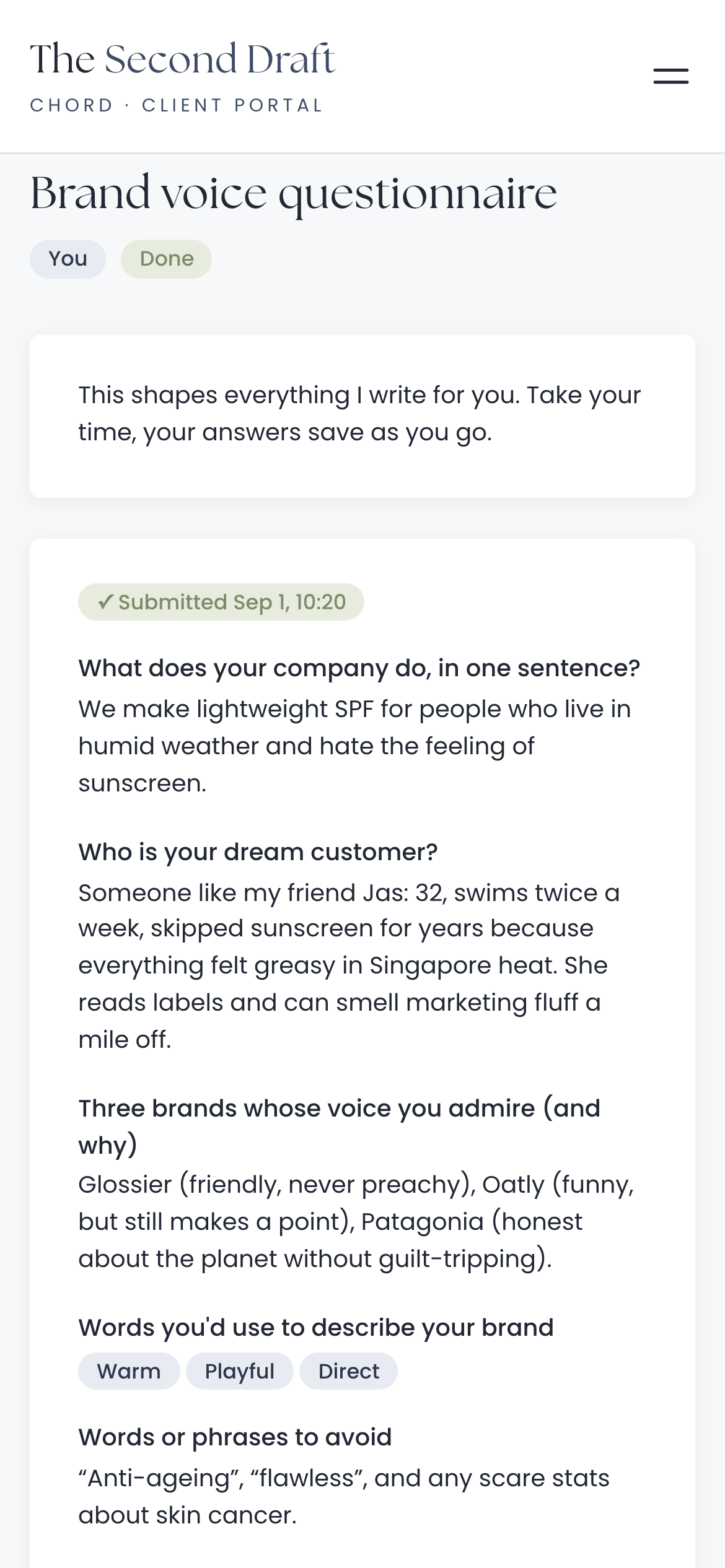
In Chord, you send the questionnaire as a task in your client's portal. They can fill it in on their phone, and their answers save as they type.
When they submit it, Chord emails you. The answers stay on the project and on the client's record, so you can find their own words whenever you need them.
It won't write the brief for you. But when your client describes their dream customer as "someone like my friend Jas", half the work is done.
5. Deadlines that respect thinking time
Writing isn't a straight line. Some days the headline comes in five minutes. Other days it takes the whole afternoon.
So your deadlines need a little room, and they need to follow the days you actually work.
Look for a tool that plans in working days, and moves your deadlines when you need a day to think, rest or catch up.
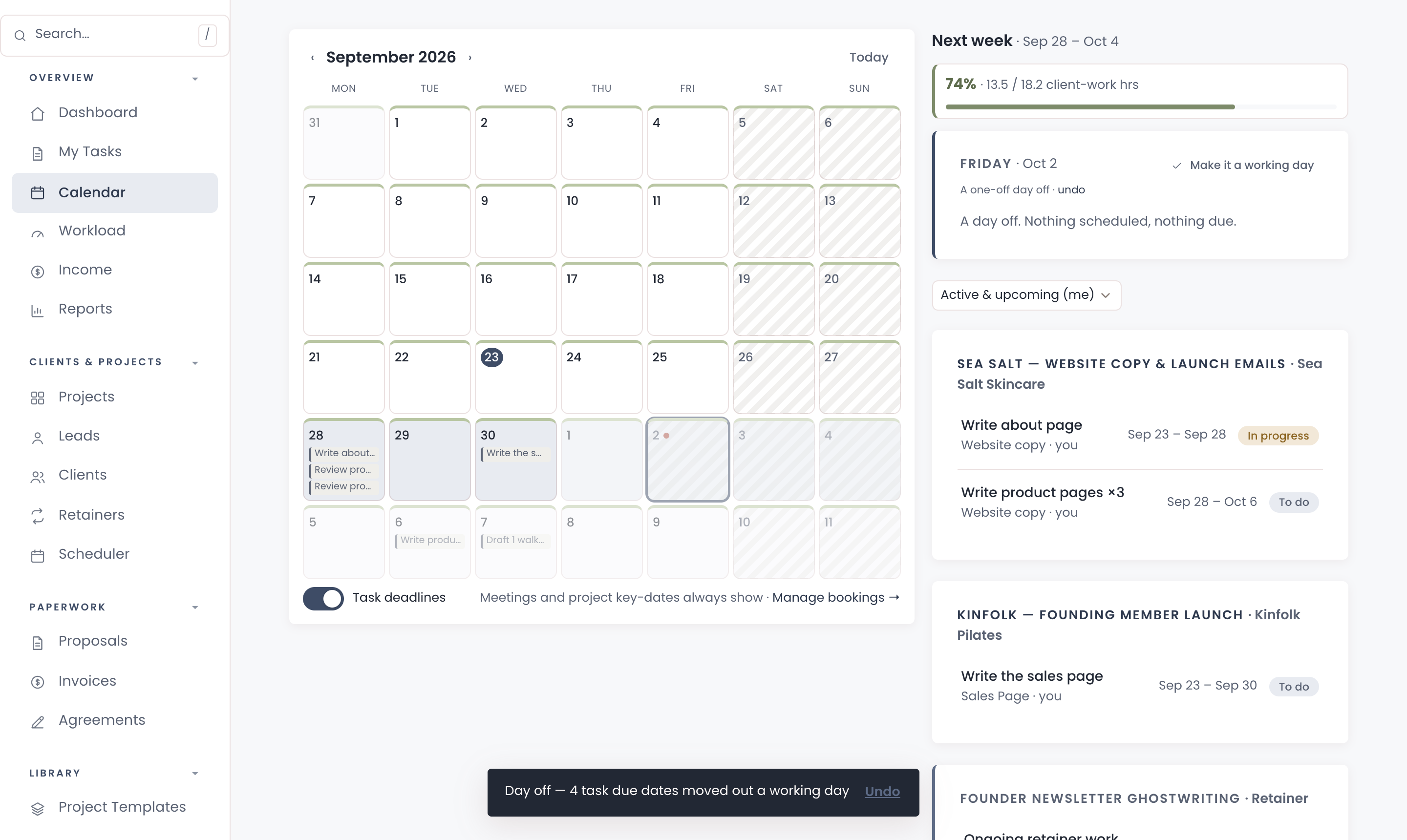
In Chord, you give each task a length in working days. Chord works out the dates for you, skipping weekends, public holidays and your days off.
If you need a day away from the desk, tap "Take the day off" on the calendar. Every open deadline from that day moves one working day later, and you can undo it if you change your mind.
6. A plan that flexes with your seasons
One of my pet peeves: when you're at peak season, you pay for tools that expand your capacity. A lot of those tools lock you in, and then you find yourself in low season still paying for them, and now they're very expensive. Most software pricing assumes your business runs the same way every single month, but creative work doesn't.
That's why, when I built Chord, I wanted two plans you can switch between at any time. Starter at US$9 covers one active project at a time and 1 GB of storage. It doesn't include retainers, reports or sending email from your own domain, which makes it right for a one-project-at-a-time pace or a slower season.
When the work stacks up, move to Pro at US$29: unlimited projects and clients, retainers, reports, 10 GB of storage and sending email from your own domain. When things slow down again, drop back to Starter with no penalty. I made it this way deliberately, so Chord flexes with you through every season of your business.
The honest comparison
Most copywriters choose between the freelancer all-in-one tools. Here's how the prices compare as I write this, billed monthly:
| Tool | Starts at (US$/mo) | Pricing model | Worth knowing |
|---|---|---|---|
| Bonsai | $15 | Per user, tiered | Invoices and contracts start at $25 |
| Dubsado | $35 | Flat plans, 3 users included | Deepest automations, long setup |
| HoneyBook | $36 | Flat plans | Payments in US, Canada, UK and Australia |
| Moxie | $12 | Flat plans | Client portal starts on Pro ($25) |
| Plutio | $19 | Flat plans, capped by active clients | Core allows 9 active clients |
| Chord | $9 Starter / $29 Pro | Flat plans | First month of Pro US$1 with code TRIAL |
Based on published pricing as of September 2026, in US dollars, billed monthly (most tools discount annual plans). Check each site for current plans.
Bonsai charges per user, starting at US$15 a month. That entry plan doesn't include invoices, contracts, proposals or the client portal; you get those on the Essentials plan at US$25. If you want expense and tax tracking in the same tool, Bonsai is strong there.
Dubsado is the automation powerhouse. It starts at US$35 a month, or about US$28 if you pay yearly, and it includes three users. Its forms and workflows go deep, but setting them up takes a lot of time.
HoneyBook is the polished all-rounder, at US$36 a month or US$29 if you pay yearly. Its online payments only work in the US, Canada, the UK and Australia, so check your country first.
Moxie is the best value, at US$12 a month for one person, and every plan includes time tracking. You need the Pro plan, at US$25, for the branded client portal.
Plutio starts at US$19 a month and includes proposals, contracts, invoices and a client portal. Its Core plan allows nine active clients, which is fine for a small roster and tight for a busy one.
And then there's Chord, which I built as a working creative, for solo studios and small teams. I built it around the six things in this post.
I'll be honest about two gaps. Chord doesn't edit or import Word files or Google Docs, so your writing stays in the tool you already love. And it doesn't do your accounting or taxes, so Bonsai is better for that.
Setting Chord up takes a couple of hours.
How to choose
The table gives you a shortlist, but you still have to choose.
So take your last website project and walk it through each tool you're trying. Include the brief, the first draft, the "more elevated" email, the extra round and the final invoice.
Then pick the CRM that makes your feedback rounds clear, for you and for your client.
If you'd like to try that in Chord, you can start in about ten minutes.