The logo was approved on Tuesday. By Friday, there's an email in your inbox titled "tiny tweaks!", with eleven of them.
You quoted three weeks for this identity, and now it's heading into week six. You aren't billing for any of the extra time, and you're starting to feel frustrated.
The problem is your process. Nothing in it turns a round of changes into something real that you and your client both count, so the rounds never end.
I run a creative studio and I build a client tool called Chord, so I'll be upfront: Chord is mine, and I'll talk about it later in this post. First, I want to share the six things that decide whether a CRM works for brand design, whichever tool you choose.
I wrote this for designers who create brand identities and websites, working solo or with a small team. If you're an agency with account managers who run the client relationship, your list will look different.
1. Revision rounds that count themselves
Scope creep in branding rarely arrives as a demand. It arrives as enthusiasm: one more direction, one more lockup, a colour swap after sign-off.
Saying no can feel like punishing your client for caring. So most designers absorb the extra work and finish the project feeling resentful.
What helps is a system where rounds are visible, numbered and limited from the start.
Look for a tool that treats each revision round as a real thing. It should show that this is round two of two and keep the counter on screen. When the client asks for more, the tool should tell them what happens next, so you don't have to.
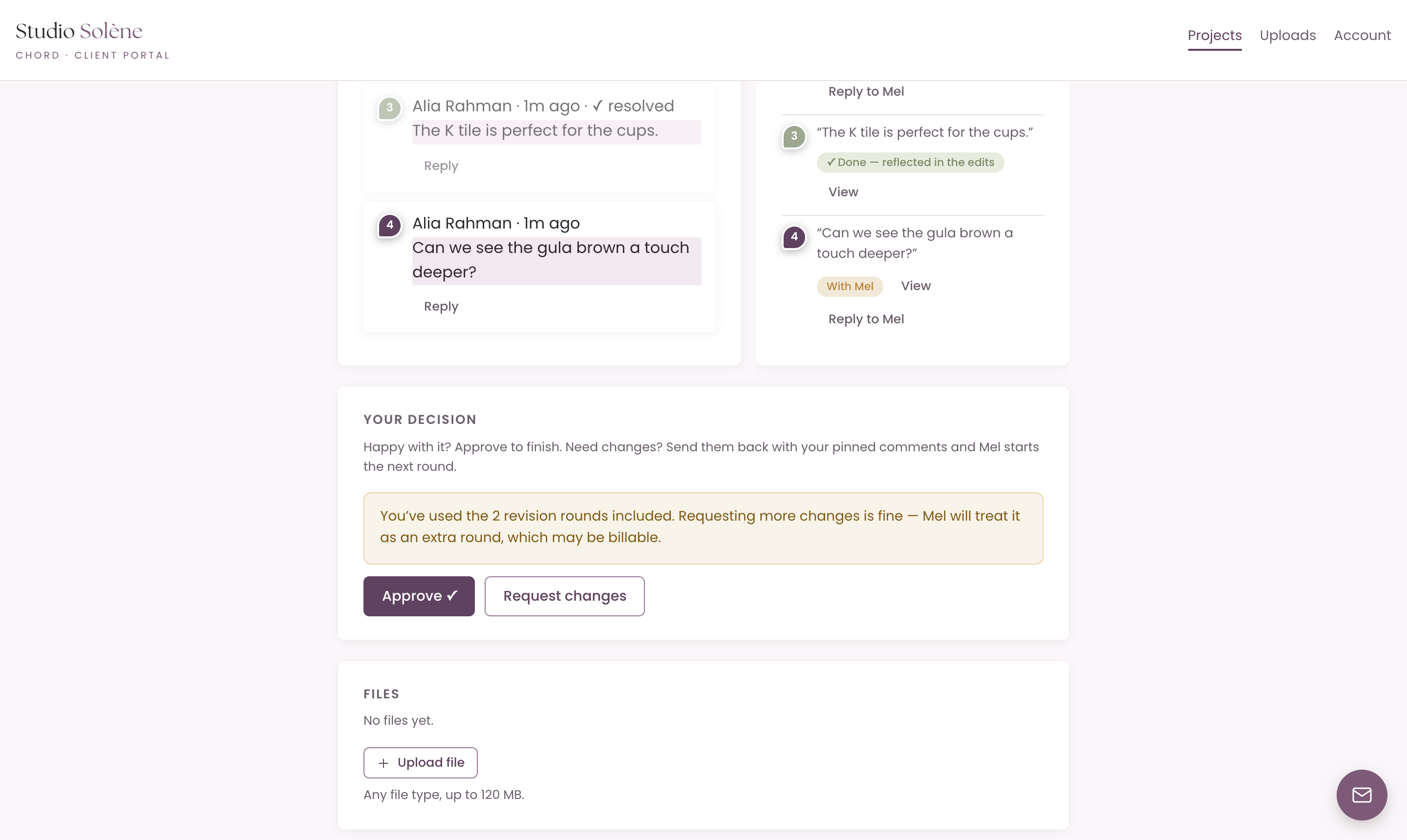
In Chord, every deliverable runs as a proofing cycle with a set number of included rounds. Your client can see the counter.
When they reach the limit, the portal tells them that more changes are welcome but may be billable. They see it in writing before any work happens, and you don't have to send an awkward email.
Your client can then choose to approve, or to keep requesting changes knowing that they will be billable.
2. A beautifully branded intake form without having to leave the portal
Most designers run their intake through a form that lives somewhere else, like a Google Form, a Typeform or a PDF attached to an email.
Your client gets a bare link that looks nothing like your studio. When their answers come back, they sit in a spreadsheet in another tab, far away from the contracts, files and invoices they belong with.
Three months later, finding what your client actually said takes a lot of digging.
Look for intake that never asks your client to leave the portal. The questionnaire should open as a task, in your colours and under your logo, with no extra link, login or app in the way.
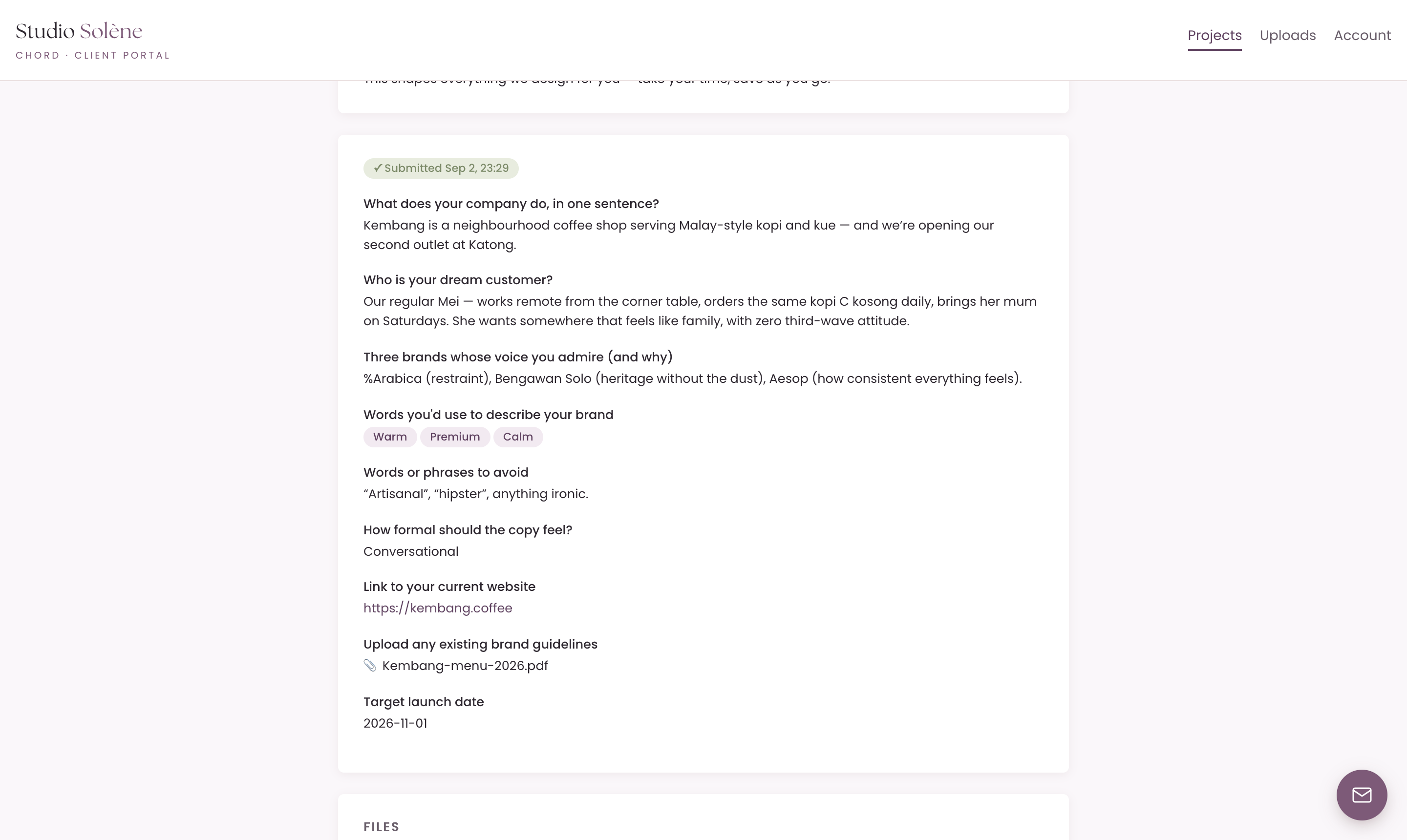
In Chord, the questionnaire opens right in the portal, with your colours and logo. It saves your client's draft as they go.
Their answers live on the project, in the same place as the invoices, files and agreements, so you never have to dig through another tool.
And when your client says "that's not us" in round two, you can find their own words in one click.
3. Presenting like a designer
You know the email. Your client comes back with twelve revisions, and you have to match every sentence to a spot on the design. "The one on the left, but warmer" doesn't help much when you're looking at a PDF.
What you really need is pinned comments: feedback that points at the letterform, the badge or the exact colour chip. Your CRM should let clients point at what they mean.
The catch is where those pins live. Most pin-comment tools are design software, like Figma, Adobe or a separate proofing app.
So you send your client out of the portal to yet another place. They need another login, and nothing keeps count of how many rounds of changes they've asked for.
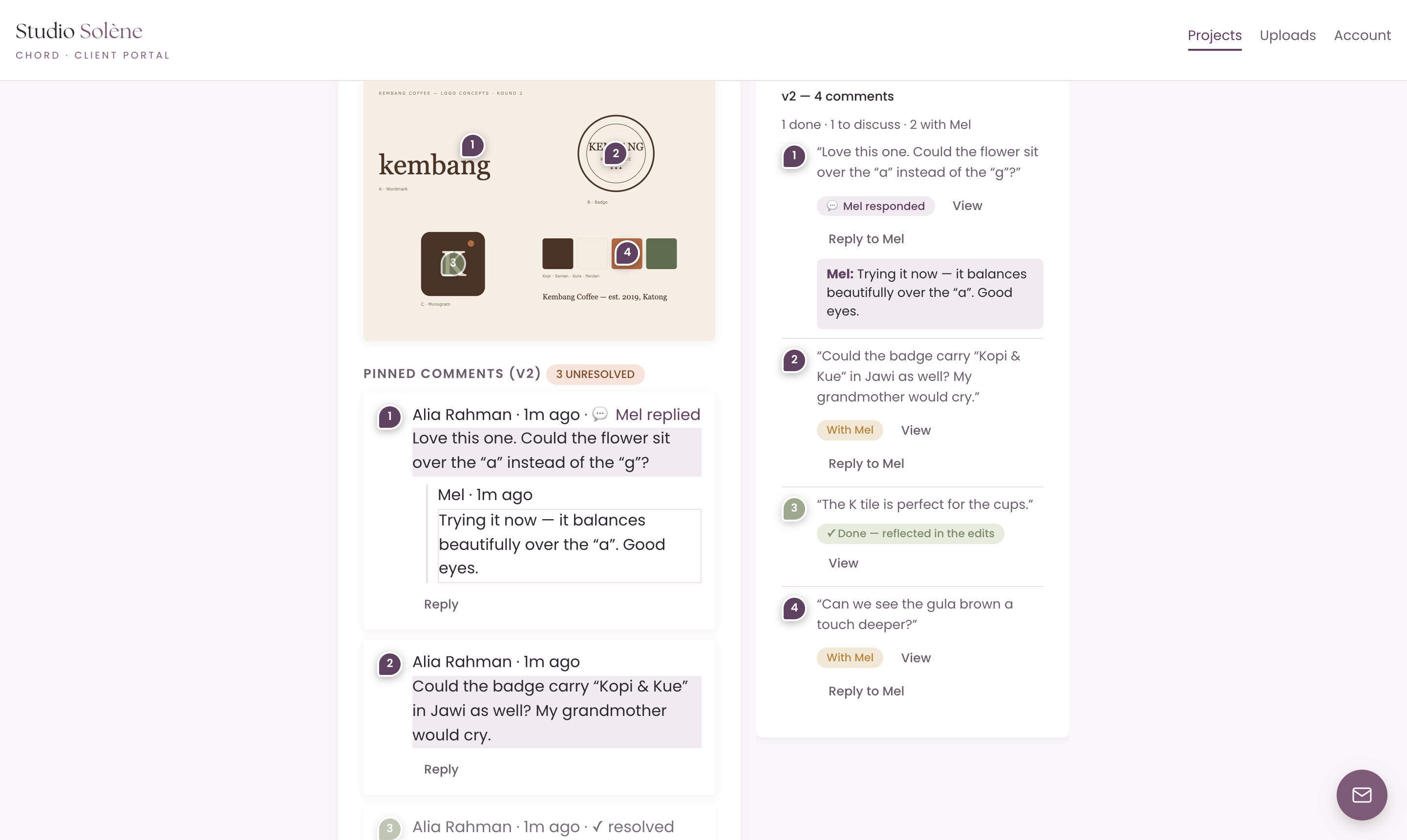
Chord has pin-comment proofing built in, so you don't pay for another subscription and your client never leaves the portal.
Your client clicks anywhere on the artwork to leave a numbered pin with their comment. You reply in the thread, and Chord counts every request against the rounds from section one.
Prefer to work in Figma, Framer or Adobe? Add the review link to the same task. Your client explores the design there, then comes back to tell you their feedback is in.
4. Proposal, contract and deposit in one chain
Between "yes, let's do it" and the start of the work, a brand project has to get through three documents: the proposal, the agreement and the deposit invoice.
Every gap between them is a chance to lose momentum. The proposal is accepted, but the contract never goes out. Or the contract is signed, but you forget the invoice for a week.
Look for a tool that links them together. Your packages sit in the proposal, accepting it leads to the agreement, and signing the agreement brings up the deposit invoice.
Your client should be able to reach all of it through one link, without creating an account or inventing a password.
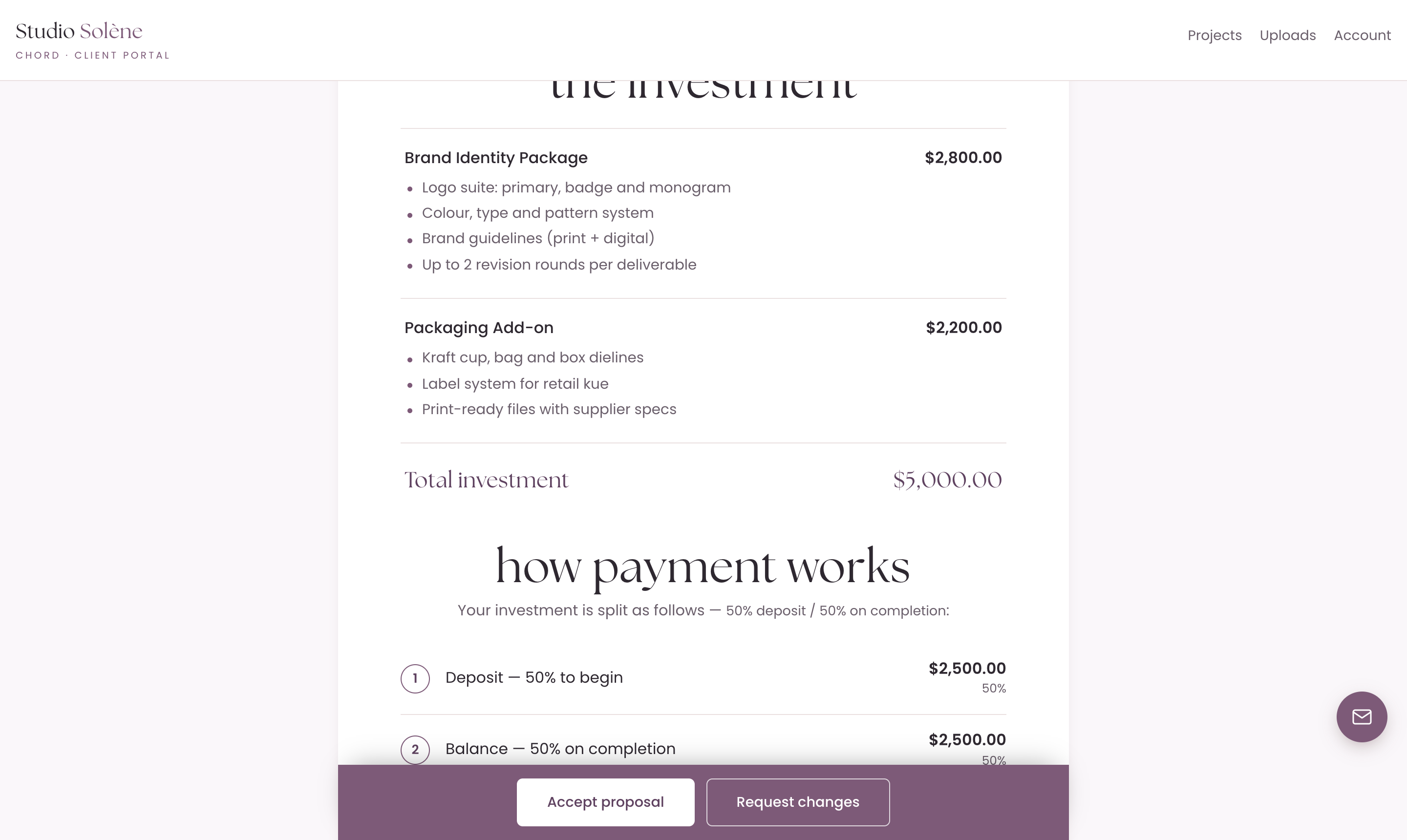
In Chord, your proposal shows your packages and the payment split on one branded page. Accepting it leads to the agreement, and the agreement leads to the deposit invoice.
Your client signs in with a one-click link the whole way through. So the project kicks off while they're still excited about saying yes.
5. The golden handover
Brand identity projects deserve a grand finale, but most of them fizzle out instead.
The final files go out in a WeTransfer link that expires. You chase the last invoice for a month. And you rush to gather everything they approved just to close the project properly.
Your client remembers how the project ends. When everything is in one place, they leave with a good final impression.
I designed Chord for exactly this grand finale. Approved proofs are highlighted in gold, so months later you can still see which version your client approved for each deliverable.
You can also hold the final files until the last invoice is paid. They release automatically as soon as your client pays.
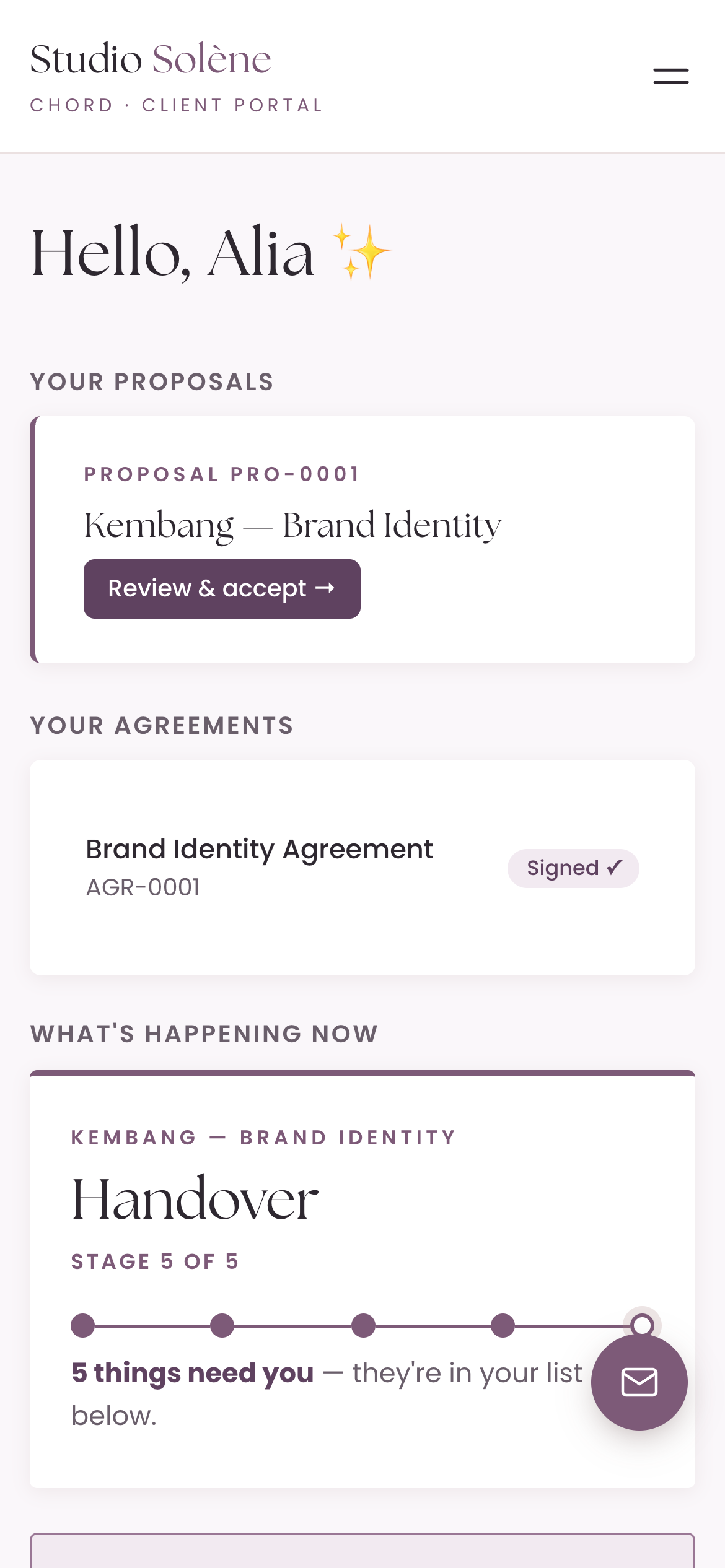
You add the final files or a link to them, and the portal shows your client that they're ready and waiting on the last invoice.
As soon as it's paid, everything releases on its own. You never chase the balance, and your client never waits for you to hit send.
6. A plan that flexes with your seasons
One of my pet peeves: when you're at peak season, you pay for tools that expand your capacity. A lot of those tools lock you in, and then you find yourself in low season still paying for them, and now they're very expensive. Most software pricing assumes your business runs the same way every single month, but creative work doesn't.
That's why, when I built Chord, I wanted two plans you can switch between at any time. Starter at US$9 covers one active project at a time and 1 GB of storage. It doesn't include retainers, reports or sending email from your own domain, which makes it right for a one-project-at-a-time pace or a slower season.
When the work stacks up, move to Pro at US$29: unlimited projects and clients, retainers, reports, 10 GB of storage and sending email from your own domain. When things slow down again, drop back to Starter with no penalty. I made it this way deliberately, so Chord flexes with you through every season of your business.
The honest comparison
Brand designers mostly choose between the freelancer all-in-one tools. Here's how the prices compare as I write this:
| Tool | Starts at (US$/mo) | Pricing model | Worth knowing |
|---|---|---|---|
| Bonsai | $12 | Per user, tiered | Accounting and tax built in |
| Dubsado | $28 | Flat plans (annual rate) | Deepest automations, famously long setup |
| HoneyBook | $36 | Flat plans | The polished generalist; US-centric |
| Moxie | $12 | Flat plans (up to 5 seats) | Strong value; white-label portal on Pro |
| 17hats | $60 | Single all-inclusive plan | Everything in one tier |
| Chord | $9 Starter / $29 Pro | Flat plans | First month of Pro US$1 with code TRIAL |
Based on published pricing as of September 2026, in US dollars. Check each site for current plans.
Bonsai is the one with accounting built in. You get invoices, expenses and tax tracking in the same tool, with per-user pricing from around US$12 a month. If you're a US or UK freelancer who wants the money side handled end to end, it's the practical choice.
Dubsado is the automation powerhouse, from about US$28 a month if you pay yearly. It has conditional forms, multi-step workflows and endless customisation. It's also well known for taking a long time to set up.
HoneyBook is the polished all-rounder at US$36 a month. Its proposals look good enough that designers are happy to send them. It's built mainly for the US, and it serves every kind of service business rather than design in particular.
Moxie is the value pick, at around US$12 a month, with a flat rate for small teams and a white-label client portal on its Pro plan. You get a lot of tool for the money.
17hats puts everything into one all-inclusive plan, at about US$60 a month. It's simple to understand if you'll use most of what it offers.
And then there's Chord, which I built as a working creative, for design studios. I built it around the six things in this post.
I'll be honest about one gap: Chord doesn't do your accounting or taxes, so Bonsai is the better choice for that.
What Chord does well is the client-facing side of your studio, and no tool on this list has a proof viewer like it. Setting it up takes a couple of hours.
How to choose
The table gives you a shortlist, but you still have to choose.
So take your last identity project and walk it through each tool you're trying, from start to finish. Include the enquiry, the proposal, discovery, the concepts, the round that went on too long and the handover.
Then pick the CRM that handles your worst feedback loop.
If you'd like to try that in Chord, you can start in about ten minutes.