
You signed up for Dubsado because everyone said it would run your whole business for you. You watched the setup videos. You gave up evenings and weekends to build your forms, your emails and your workflows. And in the end, it's beautiful. Your proposals look polished, your contracts get signed, and your invoices go out on time.
Then the actual work starts. Your client emails you a link to their photos. Their feedback arrives in a long reply thread, or in a message on your phone. You track your tasks on a separate board, and your files live in yet another folder. Dubsado handles the paperwork well, but the work in between happens somewhere else.
So now you're paying for Dubsado and juggling a few more tools to do the job itself. If you're searching for a Dubsado alternative, you're far from the only one.
This post is for you if Dubsado runs your paperwork but not your projects. I'll cover why people leave, what to check before you move, and six tools worth a look, with their monthly prices.
I know this search well. When I started my own studio, I used Dubsado too. I used it mostly for paperwork, like proposals, invoices and contracts, and it does that beautifully. But I realised I needed something else to manage the files and the tasks.
So I added Trello and Airtable to manage the tasks. They weren't branded enough for me.
I moved to Asana, but Asana had a learning curve for my clients. Then I moved to Notion. It was easy for me to see all my clients in one database. But it was limited on privacy, and it was hard for my clients to action their tasks. For them, it was little more than a dashboard to look at.
Next came Launchbay. It had less of a learning curve than Asana, but it wasn't brandable, and it still felt a bit clunky to me.
First, what Dubsado does well
Its forms and workflows go deeper than almost anything else in this price range. Once they're built, they can send the right email at the right step of every project, for years.
Every plan includes unlimited clients and projects, a client portal, and three users. You can also run more than one brand from one account, for US$10 a month per extra brand. If you have a small team or a second business, that's a real strength.
Why designers look for a Dubsado alternative
Three reasons come up again and again.
The setup never ended. Dubsado gives you building blocks rather than a finished studio. You design every form, email and workflow yourself. If you never found the free weekends to do it, you're paying for the potential and using a fraction of it.
The price went up. In December 2025, Dubsado raised its prices for new subscribers. Starter went from US$20 to US$35 a month, and Premier went from US$40 to US$55. Existing subscribers kept their old price. So if you cancel and come back later, you'll pay the new one.
The features you want sit on the bigger plan. On Starter, you get one lead form and no scheduler or automated workflows. Those start on Premier. Many designers join Dubsado for the automation, then find it costs US$55 a month.
What to check before you switch
Switching tools takes time, so it's worth knowing what you're switching for. Before you start any free trials, answer these four questions.
First, what's the one thing you most want the new tool to fix? Maybe it's setup time, price, feedback or getting paid. Write it down. Every tool you try has to pass this test first.
Second, who else uses your system? If you have an assistant or a second designer, you need a tool with more than one seat.
Third, where do you live, and where are your clients? Some tools only take payments in certain countries. Check this first, before you fall for a tool you can't use.
Fourth, what do you need to take with you? Dubsado lets you export your clients and projects as a CSV file. Do that before you cancel. Download your signed contracts and paid invoices too, so you have them for your records.
Six Dubsado alternatives worth a look
Here are the monthly prices as I write this. Most tools are cheaper if you pay for a year up front.
| Tool | Starts at (US$/mo) | Pricing model | Worth knowing |
|---|---|---|---|
| Dubsado (for reference) | $35 | Flat plans, 3 users included | Scheduler and workflows start on Premier ($55) |
| HoneyBook | $36 | Flat plans | Available in the US, Canada, UK and Australia |
| Bonsai | $15 | Per user, tiered | Invoices and contracts start at $25 |
| 17hats | $60 | One plan, plus add-ons | Scheduling and recurring billing cost extra |
| Moxie | $12 | Flat plans | Client portal starts on Pro ($25) |
| Notion + Stripe | $0 to $12 | Notion plan, plus Stripe fees | You build and maintain everything |
| Chord | $9 Starter / $29 Pro | Flat plans | First month of Pro US$1 with code TRIAL |
Based on published pricing as of September 2026, in US dollars, billed monthly. Card payment fees are extra with every tool. Check each site for current plans.
HoneyBook
HoneyBook is the one you've probably heard about on a podcast. It's a polished all-rounder, from the first enquiry to the final payment, and most people find it quicker to set up than Dubsado. It costs US$36 a month, or US$29 if you pay yearly. The scheduler and automations start on Essentials, at US$59.
Check your country first. HoneyBook is only open to businesses in the US, Canada, the UK and Australia. If you're anywhere else, you can't sign up. (I'm in Singapore, so I know this one well.)
Bonsai
Bonsai is strong on the money side. Proposals, contracts, invoices and expense tracking all sit in one tidy place. It charges per user. The entry plan is US$15 a month, but you need Essentials, at US$25, for invoices, contracts and the client portal.
If what you really want is clean paperwork and help at tax time, Bonsai is a very good fit.
17hats
17hats now sells one plan, at US$60 a month or US$600 a year. That plan includes workflows, a client portal and questionnaires with if/then logic. Some things still cost extra, like online scheduling and recurring billing, at US$5 to US$10 a month each.
It suits a studio that sells the same package again and again, where one workflow can run every job.
Moxie
Moxie is good value, at US$12 a month for one person. Every plan includes time tracking, which helps if you bill by the hour. You need the Pro plan, at US$25, for the branded client portal.
Notion and Stripe, built yourself
Some designers skip the all-in-one tools altogether. They run their studio from a Notion workspace and send Stripe payment links. It costs very little, and you control every detail your client sees.
The catch is that you become the software company. You build every template, every reminder and every client page yourself, and you fix them when they break. If you loved building Dubsado workflows, you might love this. If you didn't, it's the same problem in a new tool.
Chord
And then there's Chord, which I built. After Launchbay, I decided to build the tool I'd been looking for: a combination of everything I'd been piecing together. I run a creative studio myself, so please weigh this part with that in mind.
I built Chord for the designer who never finished setting up Dubsado. When you sign up, you pick your field, and your studio starts with a sample project template and a starter agreement for that kind of work. (Have a lawyer check the agreement before you use it with clients.) You can bring your client list over with a CSV import, and Chord skips any duplicates.
The biggest difference is what your client sees. In Chord, your client's portal shows the project itself: the timeline, what's waiting on them, and your designs with their feedback pinned to the exact spot. Chord counts each round of changes for you. Your clients sign in with an email link, so they never need a password.
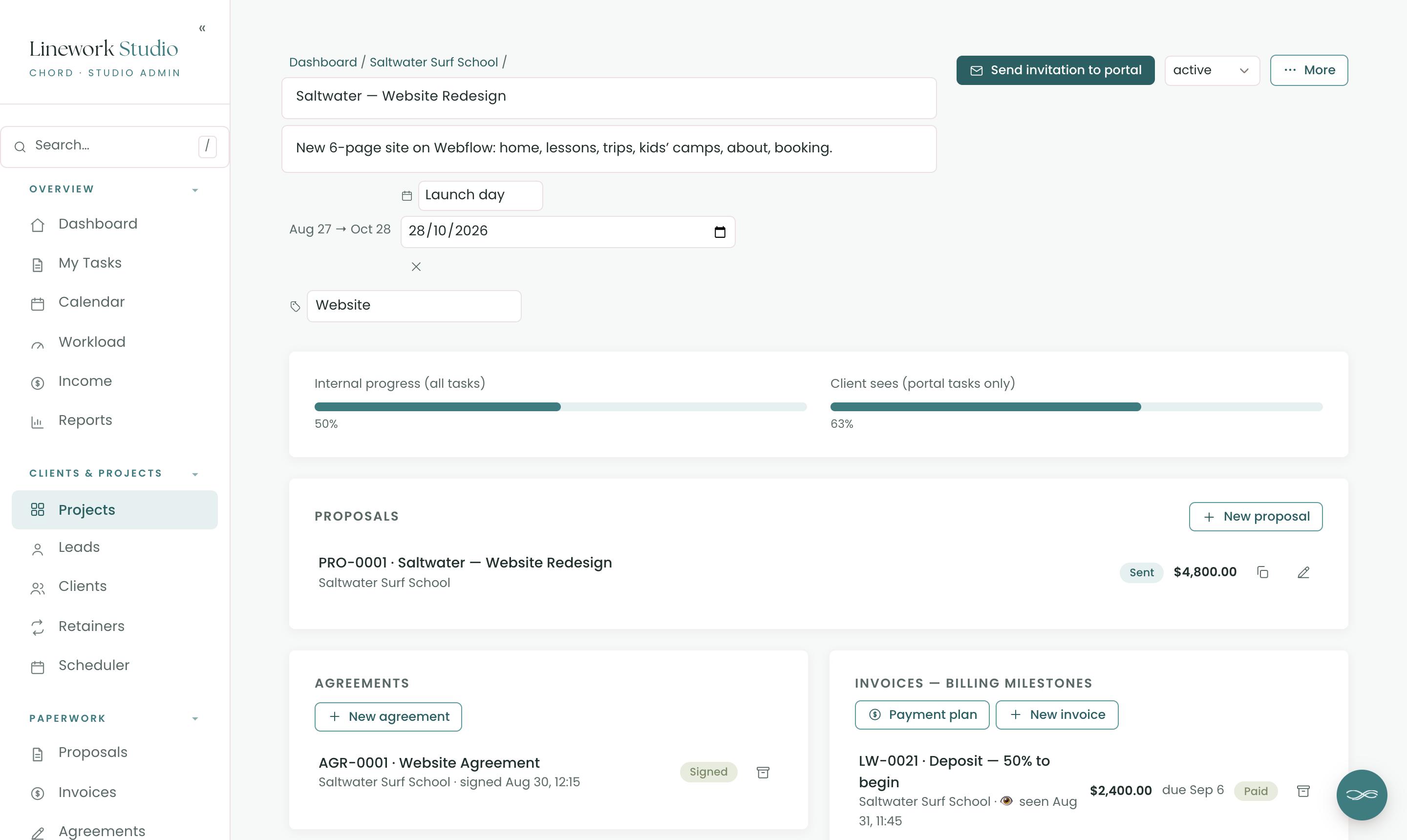
The paperwork is there too. When you share a proposal by link, your client can accept it, sign the agreement and pay the deposit in one go. Payments go through your own Stripe account, and Chord takes no cut of your invoices. You pay Stripe's usual card fees and nothing more.
Chord can also send simple sequences, such as a welcome email two days after a client accepts your proposal. And it can send polite reminders about invoices that are due or overdue. Both are optional, and you turn them on when you're ready.
Starter is US$9 a month for one active project at a time. It includes the scheduler and the sequences. Pro is US$29 a month for unlimited projects, plus retainers and reports. You can move between the two whenever your workload changes.
Now the honest gaps. Chord is built for one person, so there are no team seats, and each account runs one brand. If you have a team or a second business, Dubsado's three included users and extra brands suit you better. Chord's sequences are also simpler than Dubsado's workflows, with no branching. And Chord doesn't do accounting or tax, so if you need that, Bonsai is the better fit.
How to decide
The table gives you a shortlist, but it can't choose for you.
So pick two tools and try each one with a real project. Use your most recent client, with the real proposal, the real feedback and the real invoice. A week of that will tell you more than any comparison.
When I moved my own projects into Chord, the first thing I noticed was how much easier it was, because everything now shares context.
One client used to email me link after link. I had to keep track of every one and worry that something would fall through the gaps. Now she sends everything in Chord. It's all kept in her own folder, and whatever she uploads stays there. When she needs to reach me, there's a booking tab right there. Her comments and feedback now sit on the task they're about, so the context is always beside them.
It's easier for her too. When she opens her client portal, the tasks I need her to complete sit in one neat section called "Waiting on you."
She's also the kind of client who needs a lot of reassurance. She wants to know what's coming down the road. I built Chord partly because no other tool let me control what a client can see like this. In Chord, I can show her the whole timeline in stages, along with the tasks I choose to make visible. She can see them, but she can't open or action them until I say so. I keep control, and she gets her reassurance.
That week showed me what I'd been missing all along. My tools had handled the paperwork well, but not the work in between. Your week with a real project will show you the same kind of thing.
So when your trial week is over, go back to the note you wrote at the start: the one thing you most wanted fixed. Pick the tool that fixed it. Then stop deciding, and let the tool fade into the background while you get back to the work.
If you'd like to try that in Chord, you can set up your studio in an afternoon.