
Your client's post goes out at 8am tomorrow. It's 9pm, and they still haven't approved it.
Then a WhatsApp arrives: "Love it! Can we swap the photo?" You feel like you're on call for every client, every night of the week.
I run a creative studio and I build a client tool called Chord, so I'll be upfront: Chord is mine, and I'll talk about it later in this post. First, here are the six things I'd look for in the best CRM for social media managers, whichever tool you choose.
I wrote this for freelance social media managers and small content studios who look after a handful of clients on monthly retainers. You probably already use a scheduler like Later or Buffer. This post is about everything around it: approvals, scope, assets, billing and your evenings.
1. Approvals that don't hold up your posting date
Social media runs on dates. A launch post can't go out late because a client didn't get round to looking at it.
But feedback arrives everywhere. One comment comes by email, another by voice note, and a third as a screenshot with a red circle on it. You spend the morning piecing it together.
Look for a tool where your client sees the post, comments right on it, and presses one button to approve. It should also count the rounds, so "one more tweak" doesn't turn into five.
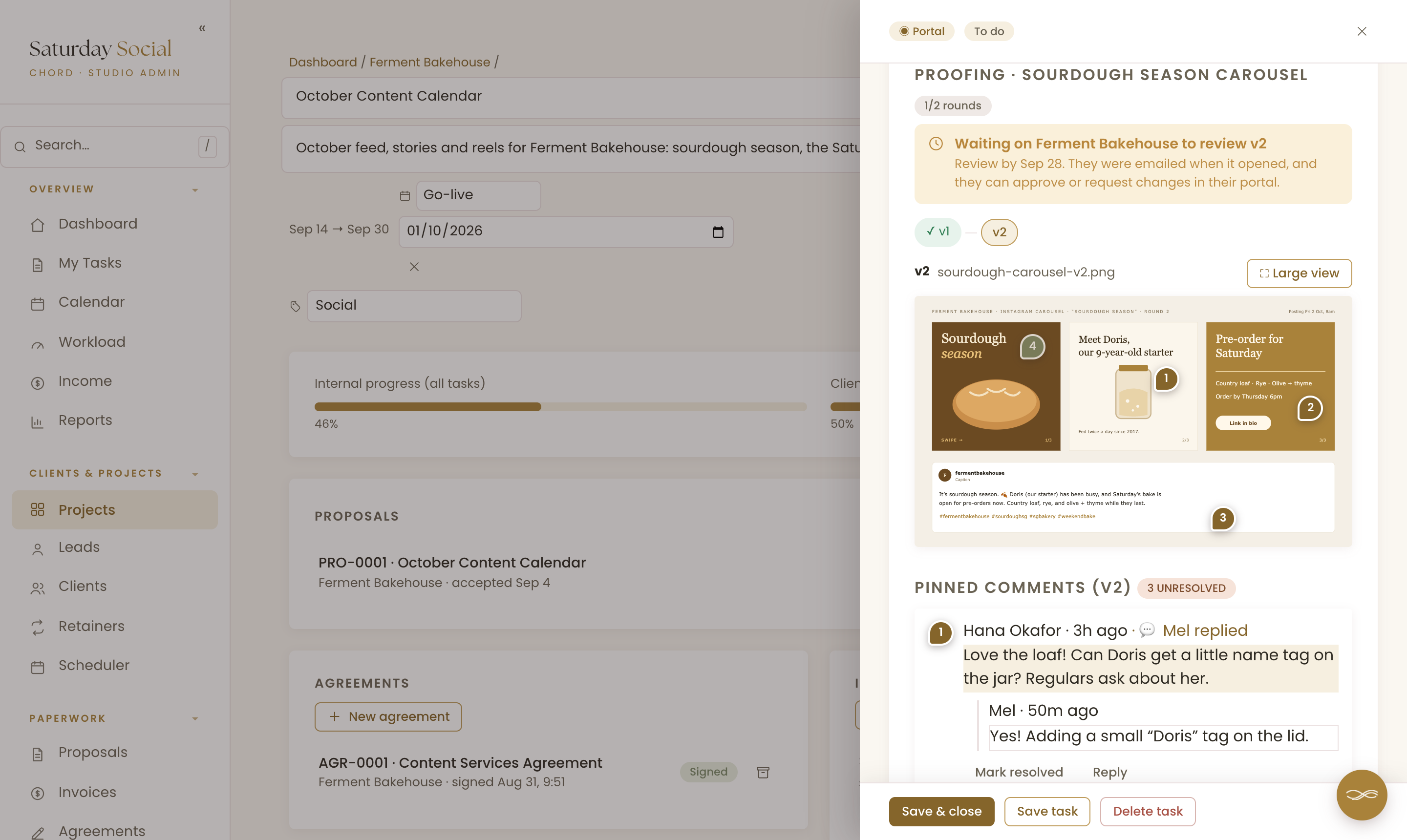
In Chord, you upload the post as a proof and give your client a date to review it by. They get an email, open it in their portal, and click on the image to pin a comment.
A carousel stays together. You can add each slide and the caption to the same round, and your client reviews them as one post.
When they're happy, they press Approve. If they want changes, they press Request changes, and that uses one of the rounds you agreed. You see "1/2 rounds" on your side. If they go over, Chord lets them, and tells them extra rounds may be billable.
If you design in Canva or plan in a Google Sheet, you can share that link instead. Your client still approves or asks for changes in Chord, and the rounds still count. Chord can't see comments they leave inside Canva, though.
2. A retainer that doesn't creep
Your client pays for 12 posts a month. Then they ask for a quick story about the new menu, and a reel for the weekend market.
Each request feels too small to say no to. By the end of the month you've worked four extra hours, and you feel a little resentful about it.
What you need is a written list of what the retainer covers each month, with the hours, and a warning when the month grows past it.
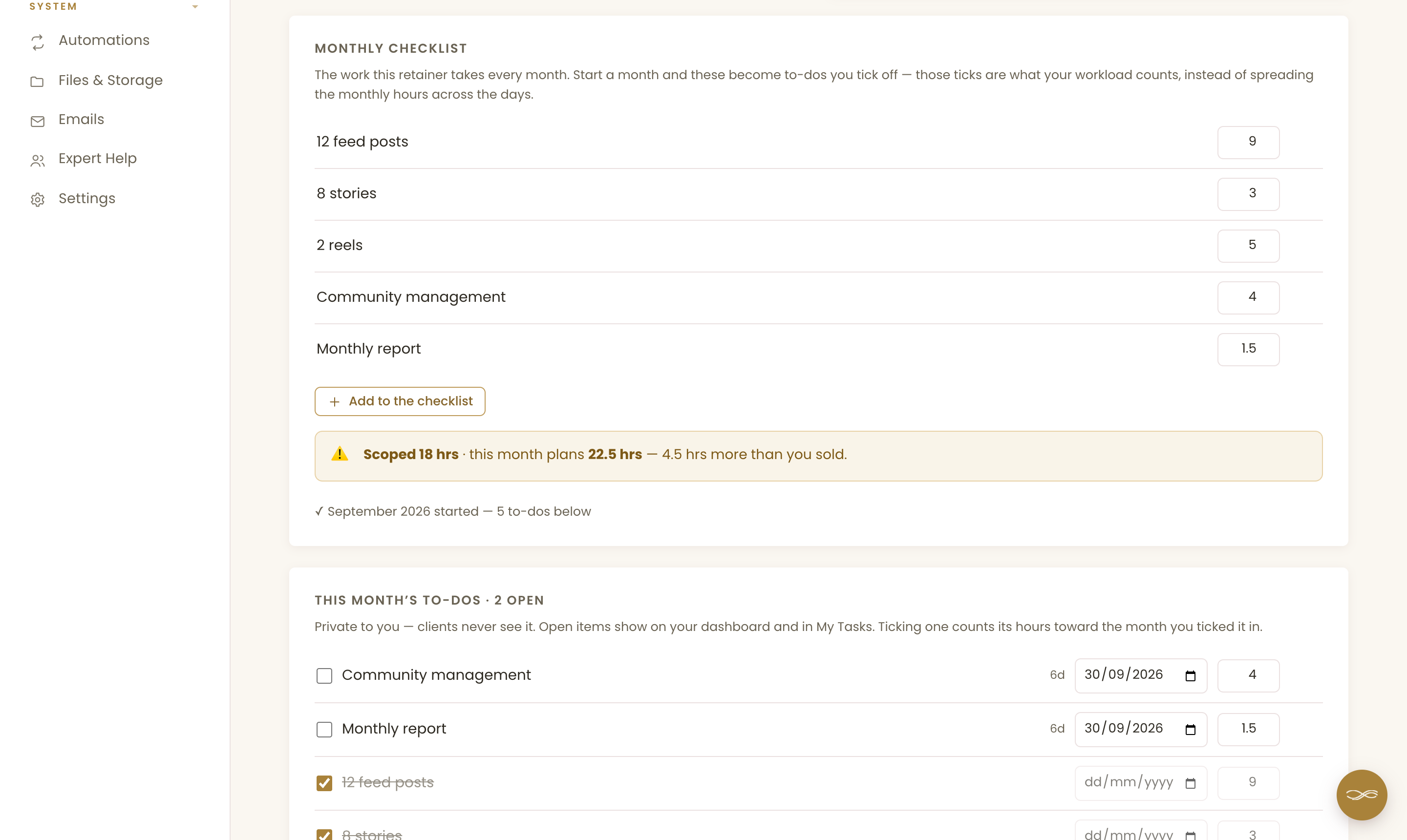
In Chord, each retainer has a monthly checklist: 12 feed posts, 8 stories, 2 reels, community management and the report, each with its hours. When you start a month, the list becomes that month's to-dos.
If you add an extra, Chord compares the hours you sold with the hours you've planned. It tells you plainly: "4.5 hrs more than you sold". Now you can raise it with your client before it becomes a habit.
If a client takes a month off, you can pause that month. It isn't billed and it drops out of your forecast. Retainers come with the Pro plan.
3. Getting the photos out of your client on time
You can't make a month of posts without the month's photos. And the photos are almost always late.
When they do arrive, they're spread across a WhatsApp chat, an email and a Google Drive folder with a vague name. You feel stuck, because your deadline hasn't moved.
Look for a way to ask for exactly what you need, with a due date, and one place for your client to send it.
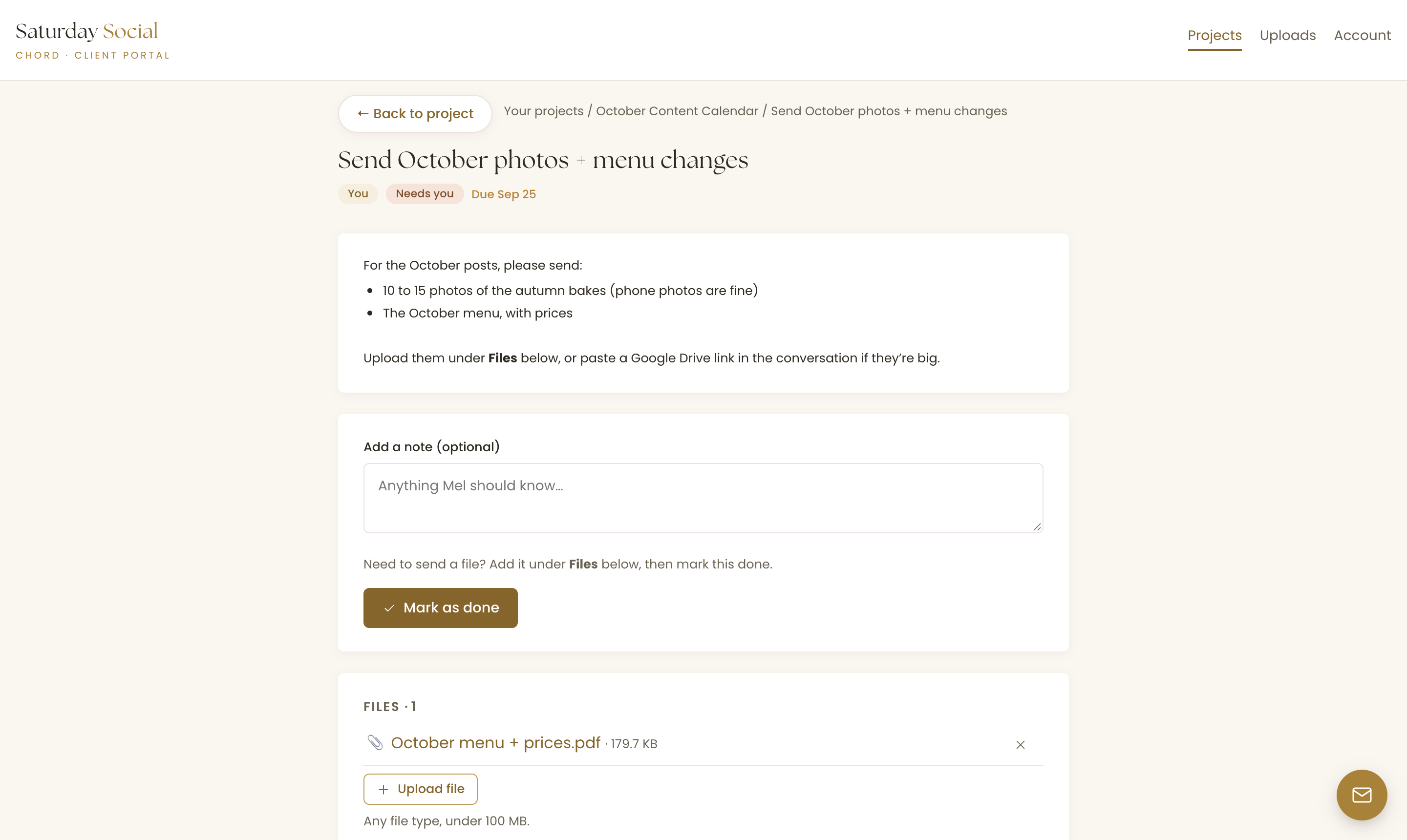
In Chord, you give your client a task, like "Send October photos and menu changes", with a due date and a short brief. They get an email when you assign it.
Your client uploads the files straight into the task, adds a note and marks it done. Files up to 100 MB are fine, or they can share a Drive link in the task's conversation.
Clients can also send files any time from the Uploads page in their portal. Everything they send shows on their client page, so you're never searching your inbox for it.
One thing to know: Chord doesn't chase an overdue task for you yet. If the photos are late, you still send the nudge yourself.
4. Clients who can see what they paid for
Good social media work looks effortless. Your client scrolls past their own feed and sees twelve nice posts.
They don't see the planning, the caption rewrites or the hour you spent replying to comments. So at renewal time, they start to wonder what the fee is for.
Look for a client portal that shows what the retainer includes, and what you delivered each month.
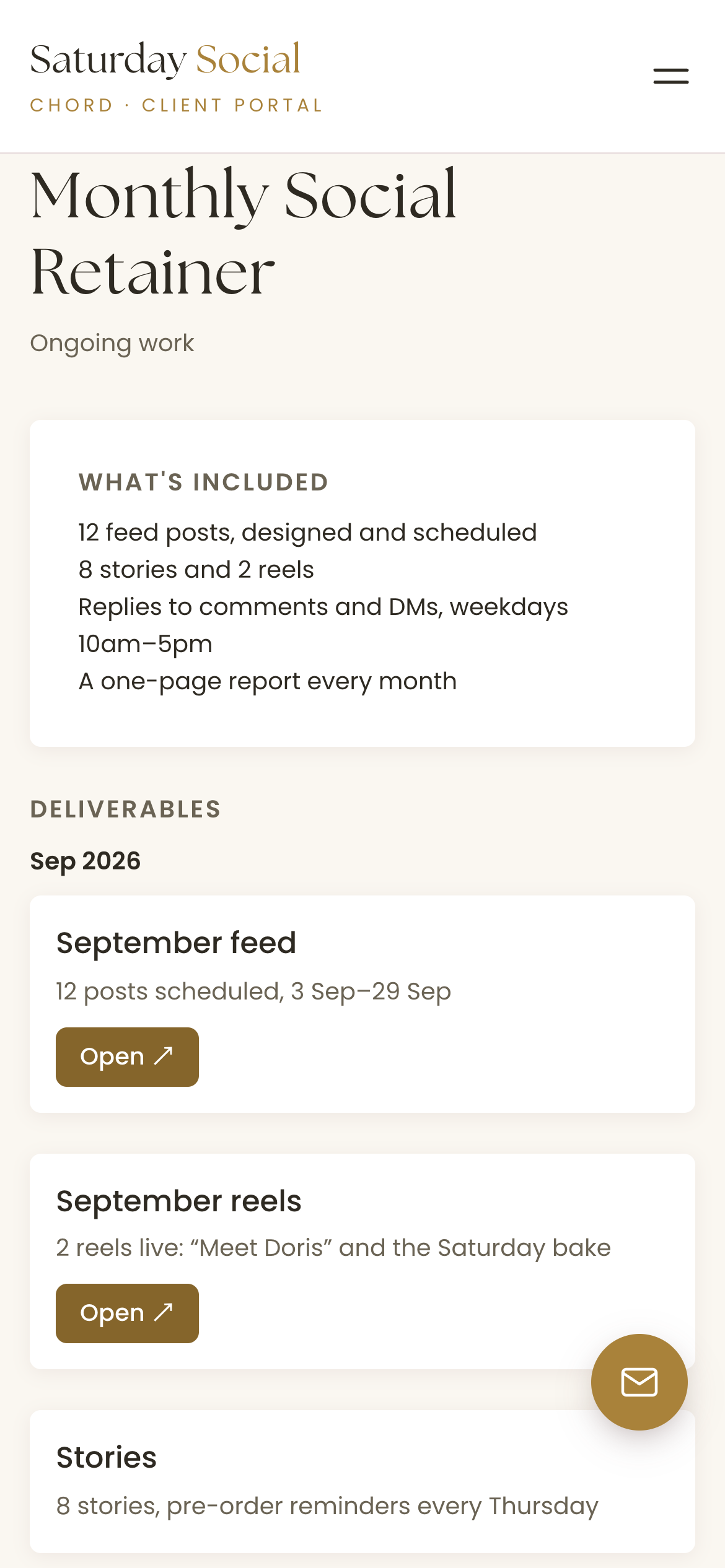
In Chord, you can share a retainer to your client's portal. They see what's included, the deliverables you add each month, and their invoices.
Each deliverable has a short note and a link, like "12 posts scheduled, 3 Sep to 29 Sep". Your client can open it on their phone, whenever they like.
Your own checklist and to-dos stay private. Your client sees the finished work, not your working list.
5. Boundaries for a job that never switches off
Social media never closes. Comments come in at midnight, and clients know you're online because they can see you posting.
So the messages come at all hours, too. If you answer every one, you never really stop working, and you start to feel burnt out.
Look for a tool that keeps client conversations out of your personal apps, and lets you tell every client when you're away.
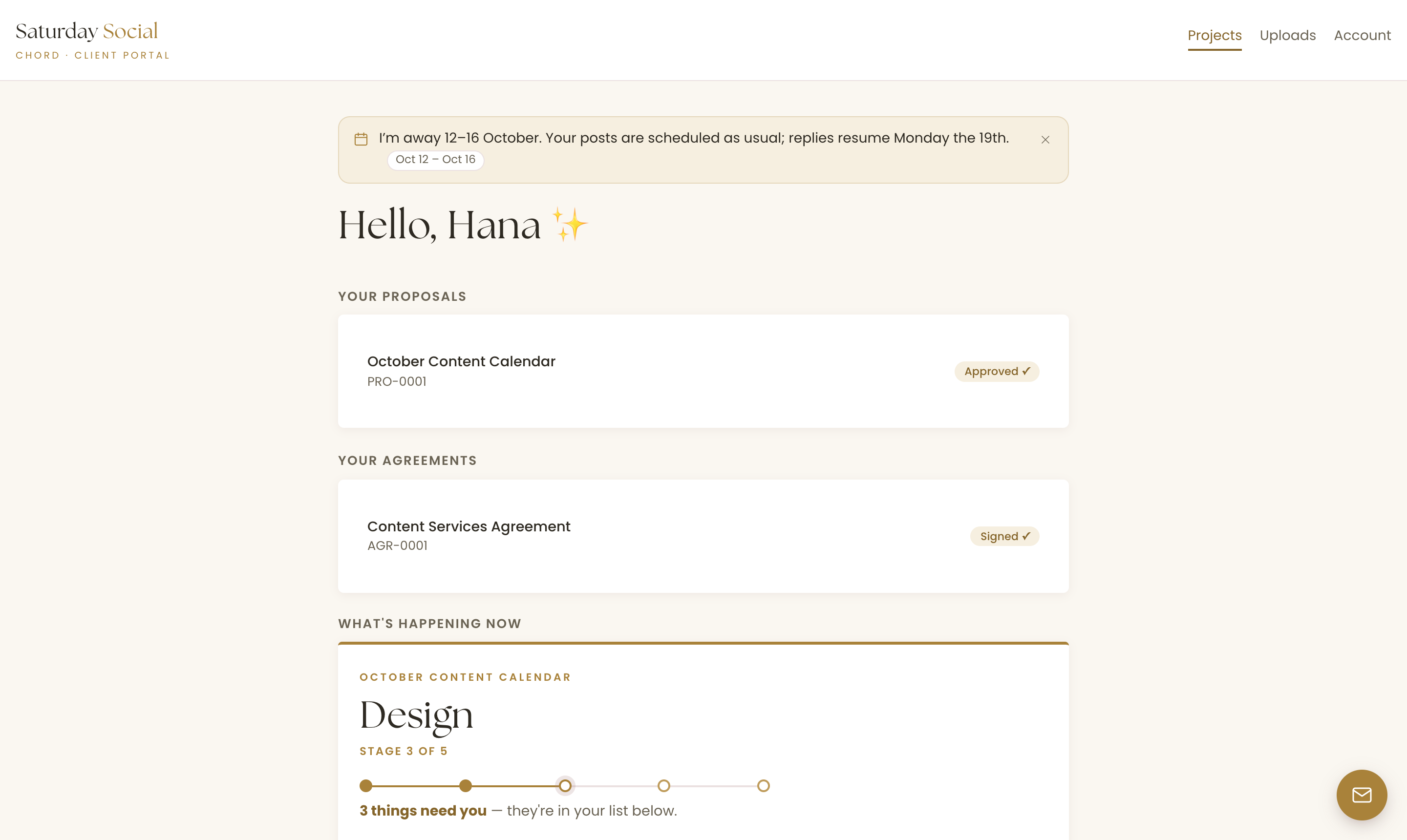
In Chord, feedback lives with the work. Each task has its own conversation, and proof comments stay pinned to the post. So the WhatsApp chat can go back to being for friends.
When you take time off, you write one holiday notice in your own words. It shows as a banner on every client's portal three weeks before you go, and disappears when you're back.
Chord also sends push notifications to your phone if you want them. You can switch off any category, such as tasks and feedback, and keep the ones you care about, like payments.
6. A plan that flexes with your seasons
One of my pet peeves: when you're at peak season, you pay for tools that expand your capacity. A lot of those tools lock you in, and then you find yourself in low season still paying for them, and now they're very expensive. Most software pricing assumes your business runs the same way every single month, but creative work doesn't.
That's why, when I built Chord, I wanted two plans you can switch between at any time. Starter at US$9 covers one active project at a time and 1 GB of storage. It doesn't include retainers, reports or sending email from your own domain, which makes it right for a one-project-at-a-time pace or a slower season.
When the work stacks up, move to Pro at US$29: unlimited projects and clients, retainers, reports, 10 GB of storage and sending email from your own domain. When things slow down again, drop back to Starter with no penalty. I made it this way deliberately, so Chord flexes with you through every season of your business.
The honest comparison
Most social media managers choose between a content approval tool and a freelancer all-in-one. Here's how the prices compare as I write this, billed monthly:
| Tool | Starts at (US$/mo) | Pricing model | Worth knowing |
|---|---|---|---|
| Planable | $33 | Per workspace (one per client) | Required approvals start on Pro ($49) |
| Bonsai | $15 | Per user, tiered | Invoices and client portal start at $25 |
| Moxie | $12 | Flat plans | Client portal starts on Pro ($25) |
| HoneyBook | $36 | Flat plans | Payments in US, Canada, UK and Australia |
| Dubsado | $35 | Flat plans, 3 users included | Automated workflows start on Premier ($55) |
| Chord | $9 Starter / $29 Pro | Flat plans | First month of Pro US$1 with code TRIAL |
Based on published pricing as of September 2026, in US dollars, billed monthly (most tools discount annual plans). Check each site for current plans.
Planable is built for social media approvals, and it does them best. Clients see posts as they'll look on each platform, and it can publish them for you. It charges per workspace, and a workspace is usually one client, so the cost grows with every client you add. It doesn't do invoices or contracts.
Bonsai charges per user, starting at US$15 a month. Invoices, proposals, contracts and the client portal come with the Essentials plan at US$25. If you want expense and tax tracking in the same tool, Bonsai is strong there.
Moxie is the best value, at US$12 a month for one person, and every plan includes time tracking. You need the Pro plan, at US$25, for the branded client portal.
HoneyBook is the polished all-rounder, at US$36 a month or US$29 if you pay yearly. Its online payments only work in the US, Canada, the UK and Australia, so check your country first.
Dubsado starts at US$35 a month and includes three users. Its forms go deep, but the automated workflows and scheduler need the Premier plan, at US$55 a month. Setting it up takes a lot of time.
And then there's Chord, which I built as a working creative, for solo studios and small teams. I built it around the six things in this post.
I'll be honest about the gaps. Chord doesn't schedule or publish posts, and it has no social analytics, so you'll keep your scheduler. It plans your hours instead of timing them, so if you bill by tracked time, Moxie will suit you better. And your client approves a carousel as a whole post, not slide by slide.
Setting Chord up takes a couple of hours.
How to choose the best CRM for social media managers
The table gives you a shortlist, but you still have to choose.
So take last month with your busiest client and walk it through each tool you're trying. Include the photos you waited for, the approvals, the extra requests, the invoice and the late-night messages.
Then pick the CRM that makes your worst week calmer.
If you'd like to try that in Chord, you can start in about ten minutes.